
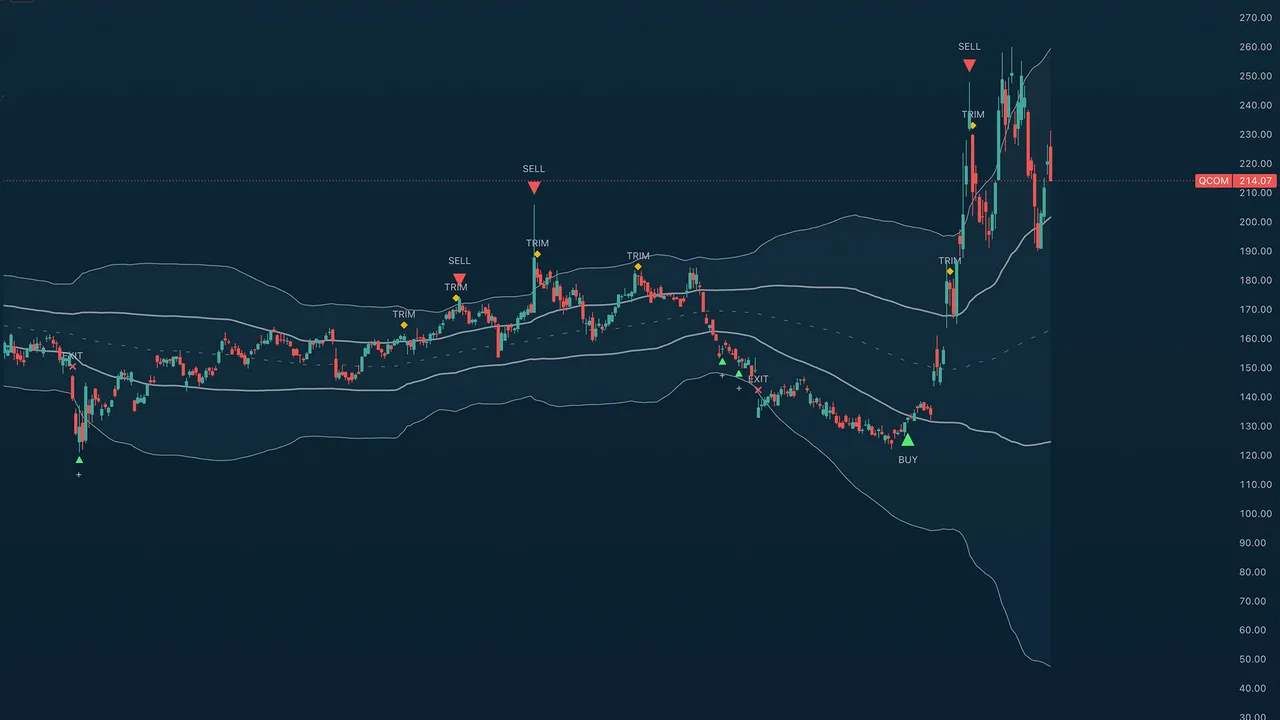
Purpose
TA (Miles) Deviation Bands shows you where price sits relative to its own normal behaviour, and then prints staged buy and sell markers when enough independent evidence lines up at that location.
Use it for location, timing, and scaling knowing whether price is cheap, balanced, or stretched, and being told when a stretch has actually started to turn. It measures location and follow-through; it does not predict tops and bottoms.
Best used for:
- Accumulating into declines in stages rather than in one guess, with a suggested size per stage.
- Scaling out of rallies in stages, and taking a full profit at a genuine swing top.
- Reading the repeating rotation of price through the lower band, the centre, and the upper band and noticing when that rotation breaks.
- Buying back after an exit only when trend continuation actually confirms (optional).
- Selling rips into resistance during downtrends and choppy regimes (optional, Aggressive sell mode).
- Keeping you out of falling knives most of the buy-side logic exists to make you wait for a lift off the low instead of catching one.
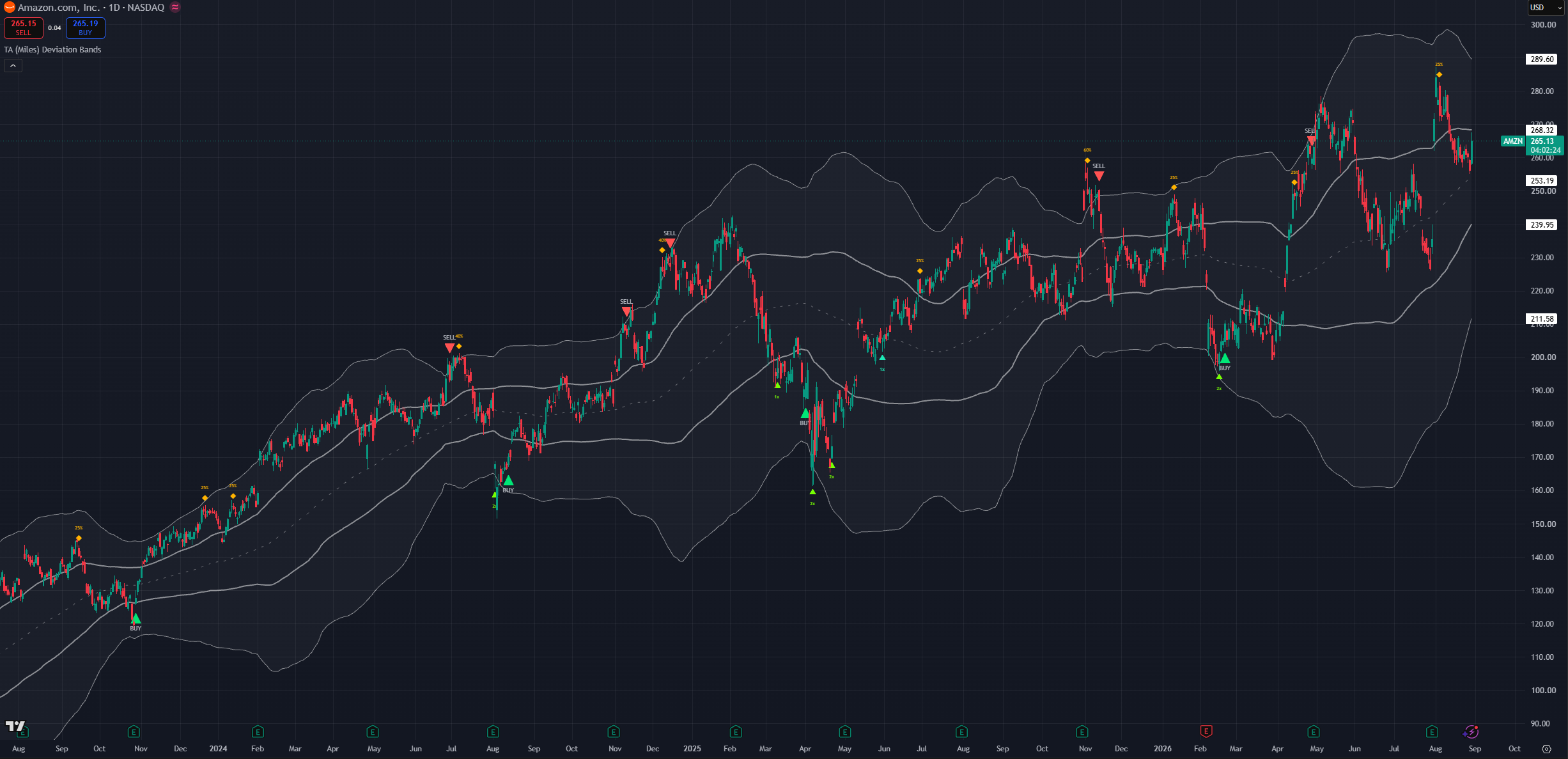
(AMZN 1D chart, default settings)
NOTE: Times and settings throughout this guide are provided as default samples. Different assets may benefit from different settings that may go counter to their standard intended usage.
Candle close & no repaint
Every solid marker is confirmed on the bar's close. Nothing is ever stamped backwards onto a candle that has already closed. The signals are designed to be actionable by humans and work by candle close when information is complete.
Optional dim "forming" previews can appear while the live bar is still building, so you can prepare before the close. A forming preview only ever appears on the same bar that would confirm the signal if the setup fails before the candle closes, the preview simply disappears. A signal that confirms on one bar can never have previewed on an earlier one. This is a helpful guide to set yourself up during the candle formation
How to read Deviation Bands
Deviation Bands is a price-chart overlay. There is no lower pane. Everything is drawn on price: a midpoint, two pairs of bands, three shaded clouds, and the markers.
What you see
- An upper cloud: the zone marked by the upper two lines indicating asset has gained momentum.
- A middle span the optional shading between the two inner bands. This is the balanced middle of the range and usually acts as a transition point.
- A lower cloud: marked by the lower two lines indicating the asset lacks momentum.
- A dashed midpoint line the central reference. Price near here is behaving normally. On equities it coincides with the 100 moving average
- Coloured triangles below price the buy family: ADD, BUY (core), BUY (aggressive), RE (continuation re-entries).
- An amber diamond above price TRIM signals accompanied with a suggested magnitude.
- Coloured triangles above price the sell family: SELL and POP (aggressive SELL).
- Size text on the scaling markers a suggested position multiplier on ADD, a suggested take-profit slice on TRIM.
- A dotted aqua guide the live breakout level while a post-exit continuation pattern is forming (only when the re-entry engine is enabled).
- Optional score dashboard and a signal legend colour key.
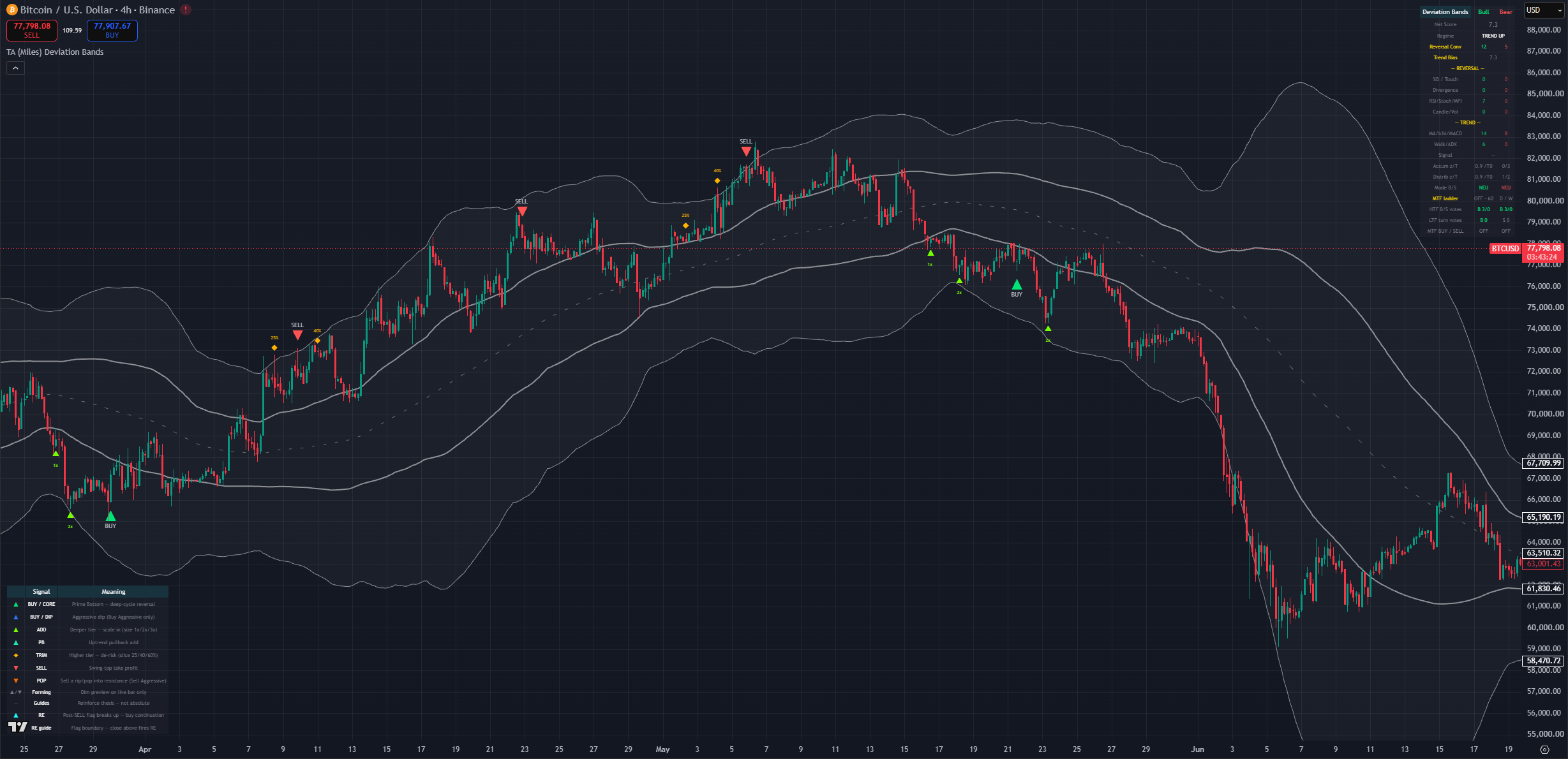
(BTC 1D chart, default settings with the legend and dashboard on)
The band geometry
There is one shared midpoint and two band pairs drawn around it. Together they produce four levels: an inner and an outer band above, and an inner and an outer band below.
The geometry is deliberately asymmetric. The floor beneath the midpoint sits further away than the ceiling above it, because downside stretch runs further and faster than upside stretch. A market grinding higher pokes the upper shoulder constantly; a market selling off punches through the lower shoulder and keeps going. If the two sides were symmetric, sell signals would trigger easily and buy signals would almost never activate.
That asymmetry is why the two sides of this indicator feel different in use, and it is intentional:
- Upper cloud: entered often, even in healthy uptrends. Being here is not a reason to sell it needs a rejection.
- Middle span: the working range. Most price action lives here.
- Lower cloud: entered less often and usually with force. Reaching it means weakness in the asset.
The inner bands are the shoulder edges the point where a stretch becomes worth watching. The outer bands are the extremes the deep floor and the far ceiling. Crossing an inner band arms attention; reaching an outer band is where the strongest reversal signals live.
The band-rotation narrative
This is the most useful habit to build, and it has nothing to do with markers. Price tends to rotate through the bands in a repeating pattern, and the value comes from noticing when it fails to complete the pattern.
The normal rotation
Price moves through the lower band, back into the centre, chops around, pushes through the upper band, comes back through the centre, into the lower band, and back to the centre again. Each band visit typically produces two or three swings before the rotation moves on a first push, a retest, sometimes a third.
Learn what the normal rotation looks like on your asset and timeframe. Then the deviations tell you the story.
Failure to reach the next band
- Price leaves the lower band, gets halfway through the centre, and cannot reach the upper band before rolling over. That is weakness. Expect another trip to the lower band, and expect a lower low to be possible.
- Price leaves the upper band, dips into the centre, and never reaches the lower band before turning back up. That is strength. The trend is intact and another trip through the upper band is likely.
- Price rejects from the midpoint itself without even getting through the centre span that is pronounced weakness, and usually precedes a bigger leg down.
The rotation also gives you a rough count. If you are on the second swing in the lower band and it is making a slightly higher low, that is a small constructive sign. If it rejects, expect a third and often deeper swing.
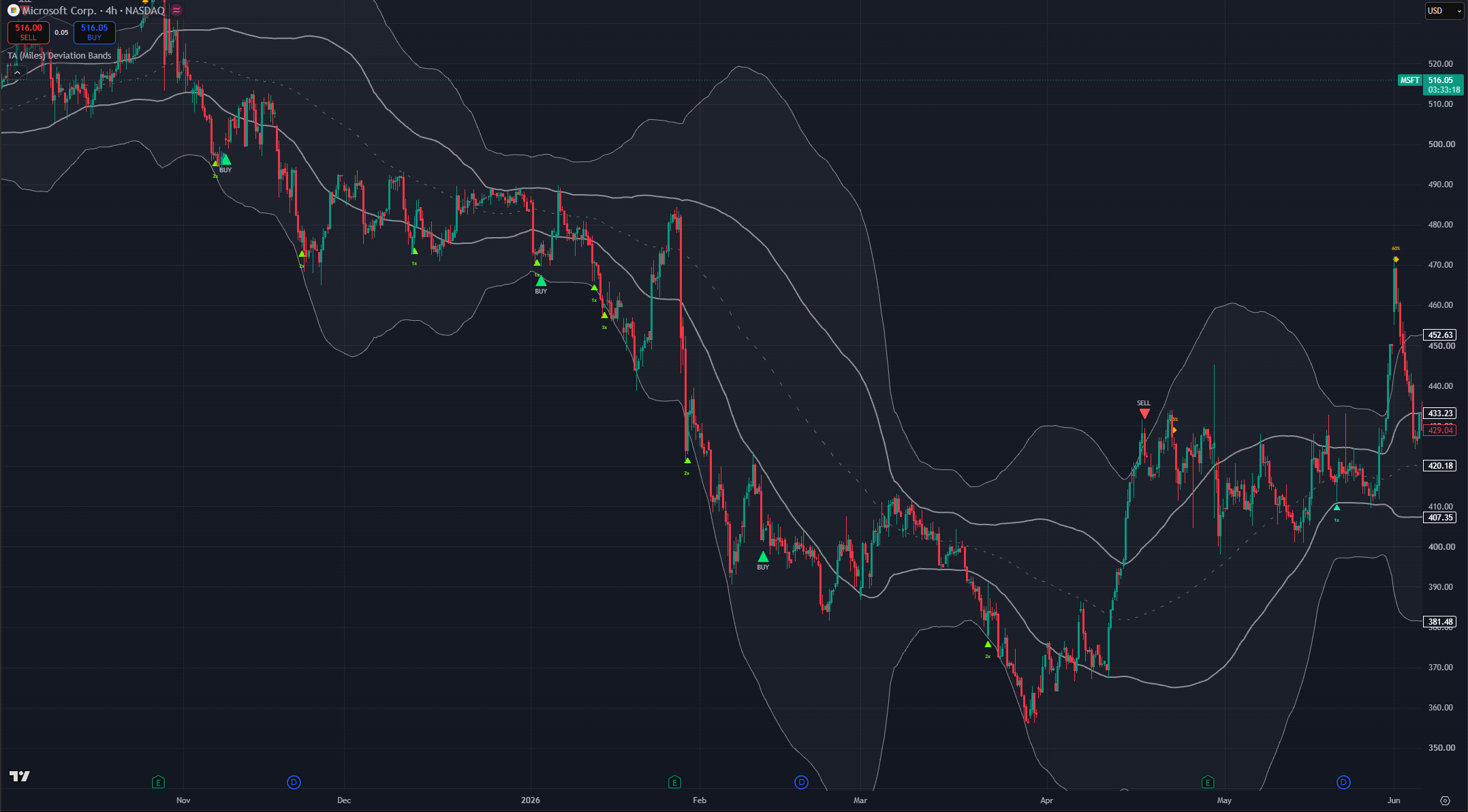
(MSFT 4h chart, default settings lower-band swings and a failed push toward the upper band)
Centre-band backtests
When price breaks into the centre span from either side, it frequently comes back and backtests the boundary it just crossed. A hold there is constructive. A failure there says the break was not real, and often marks the point where the rotation reverses.
When the bands squeeze
When the bands narrow and travel horizontally, volatility is compressing and an expansion is coming. The squeeze does not tell you direction. It tells you that a decision is near.
Direction has to come from context: the prevailing trend, where price sits in the rotation, and whether it is stretched. A squeeze after a stretched rally in a persisting downtrend most likely resolves down. The same squeeze in an established uptrend after a shallow pullback most likely resolves up.
Timeframes nest
Band rotations nest inside each other exactly as days nest inside months. One weekly rotation contains several daily rotations; one daily rotation contains several 4H rotations.
This matters for risk more than for entries:
- A weekly lower-band condition supports a position you might hold for months or years.
- A daily lower-band condition supports a swing lasting weeks to months.
- A 4H lower-band condition supports a trade lasting days to a couple of weeks.
The best risk-reward is a higher timeframe leaving its lower band and working toward its upper band, and you playing the lower-timeframe stretches inside that. The worst is a lower-timeframe buy signal while the higher timeframe is stretched into its upper band that trade can work, but you are fighting the regime and it deserves a smaller size.
Marker reference
Eight markers, in the order you would meet them across a full cycle. Each carries a distinct colour, so the colour identifies the signal type even with marker text turned off.
ADD lime triangle below the bar
Price has reached a new deeper tier of discount and turned up with enough agreement behind it. Adds are graduated: the deeper the tier reached, the larger the suggested size, shown as the marker's own text (1x / 2x / 3x).
An ADD is a scale-in. The whole design assumes you do not know where the bottom is, so it buys progressively worse prices in progressively larger size instead of committing to one guess.
A tier normally adds once. It can add a second time if price genuinely left that tier and later came back to retest it a bounce, then a return. A straight uninterrupted slide never re-adds at the same tier, which is what stops the engine from feeding a waterfall.
Adds are capped per decline cycle, and the counter resets once price has recovered back toward the midpoint.
Pullback teal triangle below the bar
A Pullback add. The trend is intact, price has pulled back toward the midpoint without ever reaching the discount tiers, and it has turned back up.
This exists so trends that never get cheap still produce entries. In a strong uptrend, price may never reach the lower cloud for months. PB is how you participate anyway. It is the lightest of the buy markers, and it carries a 1x size hint.
BUY green triangle
The Prime Bottom: a confirmed reversal of a deep decline. This is the highest-conviction buy the indicator produces, and it fires once per decline cycle.
It requires the decline to have actually reached deep-cycle territory, price to have lifted clear of the cycle low, a real location anchor (a reclaimed level, a rejection candle, or historically respected support), and agreement from independent evidence families momentum turning, divergence, price action, support memory.
Because it is once per cycle and exempt from the per-cycle buy cap, an earlier ADD can never suppress it.
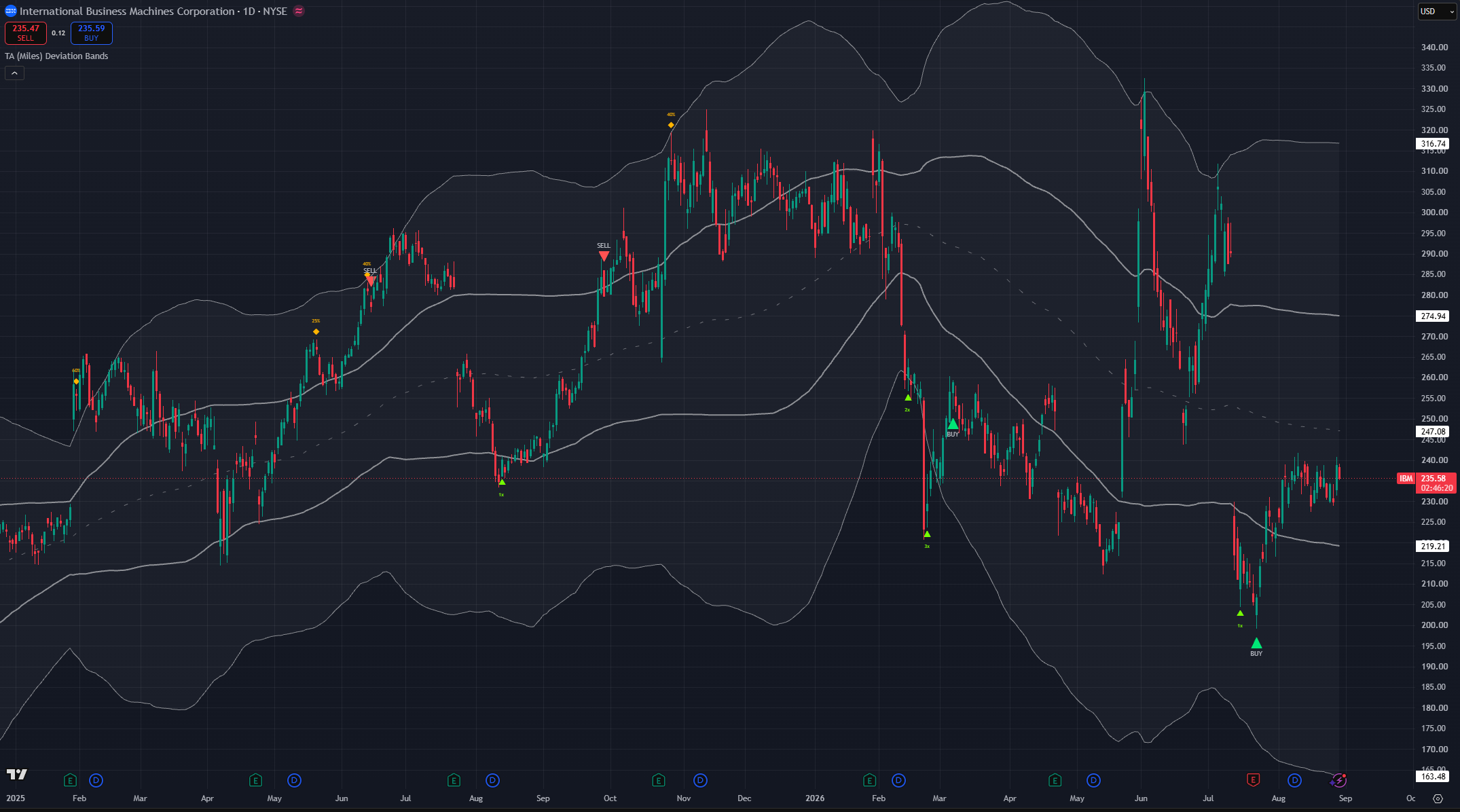
(IBM 1D chart, default settings)
Aggressive buy blue triangle
The Aggressive Dip. This marker only exists when Buy Sensitivity is set to Aggressive. If you never see a blue triangle, that is why.
It is the opportunist: a real-time bounce finder that fires on shallower discounts than the core BUY, at support, when momentum turns up. It resolves on the current bar rather than waiting for a swing to complete, so it is earlier and, being earlier, less reliable.
The two bottom-finders are kept in separate depth territory on purpose. Once a decline is deep enough to belong to the core BUY, the dip finder goes quiet for the rest of that cycle, so you never get a blue and a green marker a few candles apart calling the same bottom.
Dips count toward the per-cycle buy cap and carry their own minimum spacing.
An important note: the aggressive engine will also modify the behaviour of the BUY green triangles to make them more aggressive.
Reentry aqua triangle
Continuation re-entry. Off by default, and marked experimental.
This addresses one situation: you exited on a SELL, price never really corrected, and you want a disciplined way back in without chasing. After a confirmed exit the engine watches for a continuation pattern a shallow, flat-or-drifting-lower consolidation beneath the exit peak that dries up in volume and buys the breakout of that consolidation. A dotted aqua guide draws the live breakout level while the pattern forms; a confirmed close above it is what fires the marker.
A second, stricter path catches a failed top: price reclaims the exit peak outright while the trend stack is fully aligned.
Either path demands, on the firing bar itself, a decisive breakout candle, expanding participation, and agreement from independent context families. A fresh bearish divergence blocks it outright. The watch is cancelled by capitulation, a structural breakdown, a too-deep retracement, or simply expiry.
One RE per exit, maximum. If it does not confirm, nothing prints that is the intended behaviour, not a miss.
TRIM amber diamond
Price has reached a new higher tier of extension and turned down with agreement. Similar to ADD in mirror image, trims are graduated, and the marker's text is the suggested take-profit slice (25% / 40% / 60%) higher tier, bigger slice.
A TRIM is partial de-risking on the way up. Same retest logic applies: a tier trims once, unless price genuinely dropped away and came back to retest it. Trims are capped per rally and the counter resets once price falls back toward the midpoint.
A TRIM is suppressed whenever the same bar qualifies as a full SELL, so you never get a trim immediately followed by a sell marker at the same top.
SELL red triangle
The high confidence take-profit at a swing top. This is the sell-side counterpart to the core BUY, and it is deliberately sparse.
It works in two stages. First, exhaustion has to build while price is stretched overbought oscillators, participation anomalies, price-action exhaustion, divergence. That arms a short window. Then, inside that window, a real-time rejection at a significant swing peak fires the marker. Significance is genuine: the peak has to dominate the bars before it and the rally has to have risen a meaningful distance from its base, so ordinary wiggles are dropped.
Two extra behaviours shape the timing:
- The parabolic guard holds the SELL back while a steep run still closes above and rides its fastest trend line. In blow-offs the first rejection wick almost never marks the top. The signal releases the moment that line cracks, so the marker lands on the real top instead of selling into strength.
- Rounded-top detection catches distribution tops that roll over slowly instead of spiking down. A grinding, curling top never makes the sharp one-bar failure the main path looks for, so this path watches for the roll itself a fast trend line tipping over, a run of lower highs, or a loss of the medium moving average, with momentum fading inside a wider "still near the top" window.
In a strong uptrend, being overbought is normal rather than sufficient. Every mode waits for a genuine crack in trend before selling into strength.
POP orange triangle
Sell a rip into resistance. This marker only exists when Sell Sensitivity is set to Aggressive.
POP is the exact mirror of the Aggressive Dip on the sell side: a real-time fade finder that fires on a premium at resistance, or overbought at resistance with agreement, once price gives back some of its move off the running high.
An important note, Aggressive sell mode does not produce more red SELLs. It runs the same take-profit engine as Neutral and adds the orange POP on top. Moving from Neutral to Aggressive gives you more pop signals, not more sells. POP is suppressed when a full SELL fires on the same bar. This is different than the aggressive buy behaviour which does change the BUY behaviour.
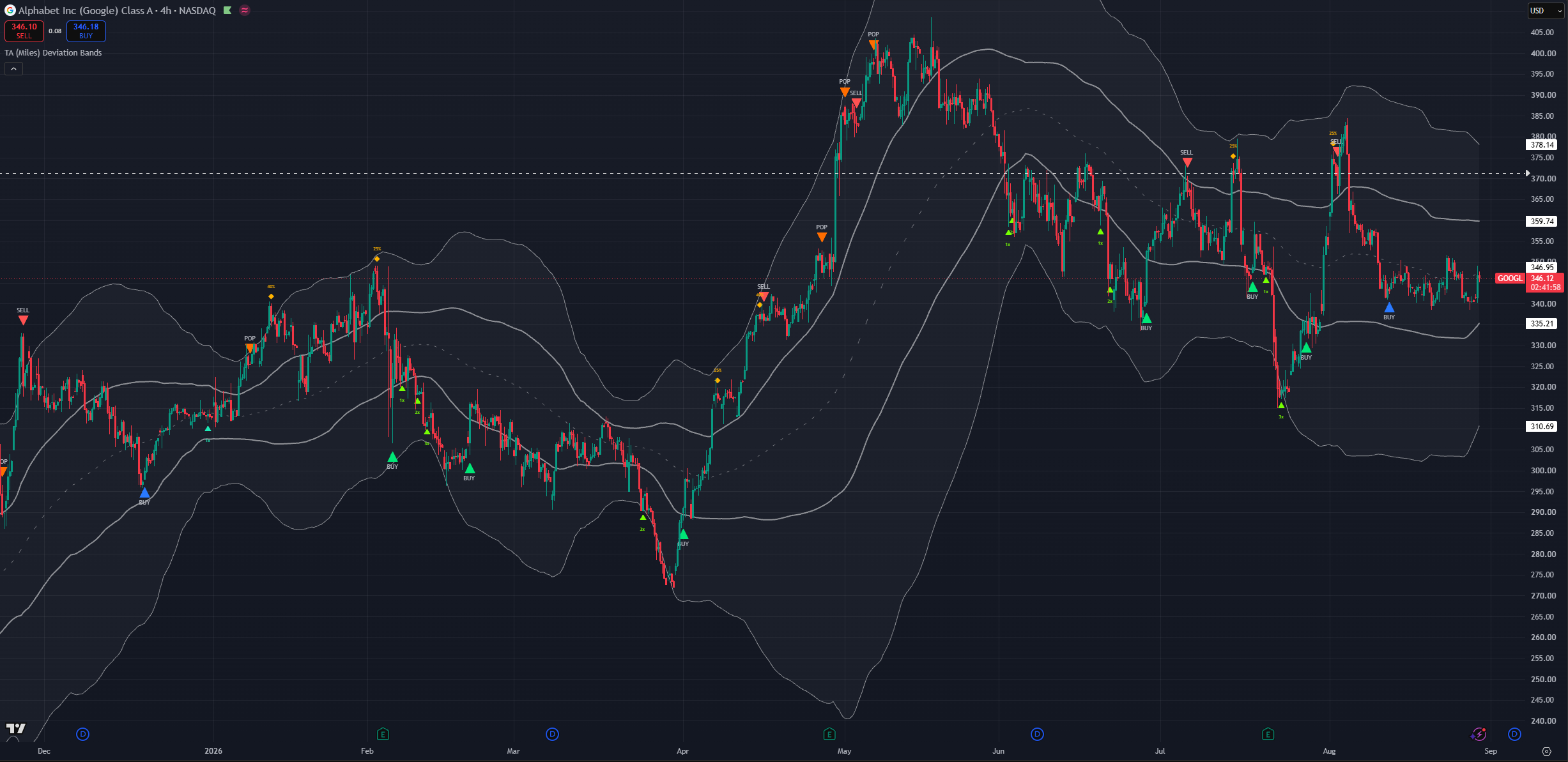
(GOOGL 4h chart, Aggressive buy and sell sensitivity)
Same-bar priority
When two signals qualify on one candle, only one prints, and the more consequential one wins:
- A full SELL or POP owns the bar over everything else, buys included. Risk-side events come first.
- Among the buys: BUY outranks Aggressive BUY, which outranks Re-entry BUY, which outranks ADD and Pullback.
Counters and latches only advance when a marker actually prints, so a signal that lost the bar to a higher-priority one has not silently consumed your cap.
Forming previews follow exactly the same hierarchy, so the live-bar preview matches what would confirm.
What the engines are actually asking for
You do not need this section to use the indicator, but it explains why signals arrive when they do and why they sometimes do not arrive at all.
Importantly the engine modes are not tied to a timeframe but to a style. Meaning that there is no need to use the conservative mode in the weekly chart nor the aggressive only in the lowest timeframes.
Engines are designed to provide different logic applied to all timeframes.
The lift off the low
The indicator is not trying to guess the exact bottom, it will wait for proof of reversal. This can come in multiple forms including historical data, multi-frame analysis and reversal or exhaustion signals firing behind the scenes. This is a key component for the indicator avoiding noisy buy signals and avoiding catching falling knives without proof.
The trade-off is direct, the actual exact bottom will not usually be the candle that is marked, the signals more commonly coming earlier or later than said bottom the majority of the time.
Scaling has to be structural
A green candle is not a turn. The scaling engines require a real momentum or structure reversal momentum curling up off a low reading, reclaiming an inner band, a rejection candle that closes well off its low, or a genuine divergence.
The same discipline applies in mirror on the trim side.
Agreement, not a single trigger
Alongside the turn, each side counts agreement from separate families: participation, candle structure, divergence, oscillator condition, and reclaimed or historically respected levels. A signal needs a minimum amount of that agreement, and how much depends on the situation:
- When the current decline is statistically extreme for this symbol, the requirement eases slightly the drop has already earned the benefit of the doubt.
- When the decline is shallow, when recent bounces have been shrinking, or when price is in a structural downtrend, the requirement tightens.
This is how the same setting produces different behaviour on a quiet mega-cap and on a name in freefall.
The momentum factor
An optional confluence family (on by default) that measures how far momentum has displaced from its own mean, normalised so it reads comparably across assets. When that reading is deep in its stretch tail and crosses back through its own basis, that counts as one more turn read behind the BUY and SELL signals.
It is another component in the neutral modes that counts towards the agreement. However it gains a higher level of importance in the more aggressive mode unique signals. Other systems can always gate against them and act as extra filters.
Historical memory
The buy side learns this symbol's own history rather than applying fixed thresholds. It records how large past declines became before they bounced, how long they lasted, what oscillator level they bottomed at, and at what prices. Then it reads the current decline against that record:
- A drop deeper or longer than most past drops makes buys more eager and earlier.
- Remembered trough prices are scored by how price actually behaves at them a level that has held before scores up, a level that breaks cleanly scores down. Buying at a well-respected shelf is treated as evidence in itself.
- The typical bottoming oscillator level is learned per symbol, because some assets bottom near 35 and others near 20.
- When recent bounces are shrinking, a falling-knife regime is assumed and more confirmation is demanded.
Everything reads completed history plus the current bar, so none of it repaints.
Chart timeframe profiles
There is no single "trading style" dropdown. The chart timeframe you work on, plus the two sensitivity dials and a handful of toggles, define how the indicator expresses itself. The profiles below map common workflows onto settings.
With that said in the lower time-frames the aggressive engines can provide a more reactive and fast-paced signal engine that better suits day trading and scalping trading styles.
NOTE: these are starting points. Different assets particularly options-heavy names may want something different.
Position / cycle investor (Weekly)
For positions you intend to hold for a year or more. Set Buy Sensitivity → Conservative and Sell Sensitivity → Conservative: fewer, deeper adds and a SELL that targets genuine cycle peaks rather than swing highs. Leave Detect rounded / rolling tops → On cycle tops are usually rounded, not sharp. Keep Continuation re-entry off. Turning the size hints on is useful here, because the whole point is graduated accumulation over a long decline.
The conservative BUY engine focuses more on the ADD signals in favour of BUY signals as way to build positions rather than looking for the more swing-oriented BUY signals. Signals on both engines are significantly sparser sometimes signals may not fire for years.
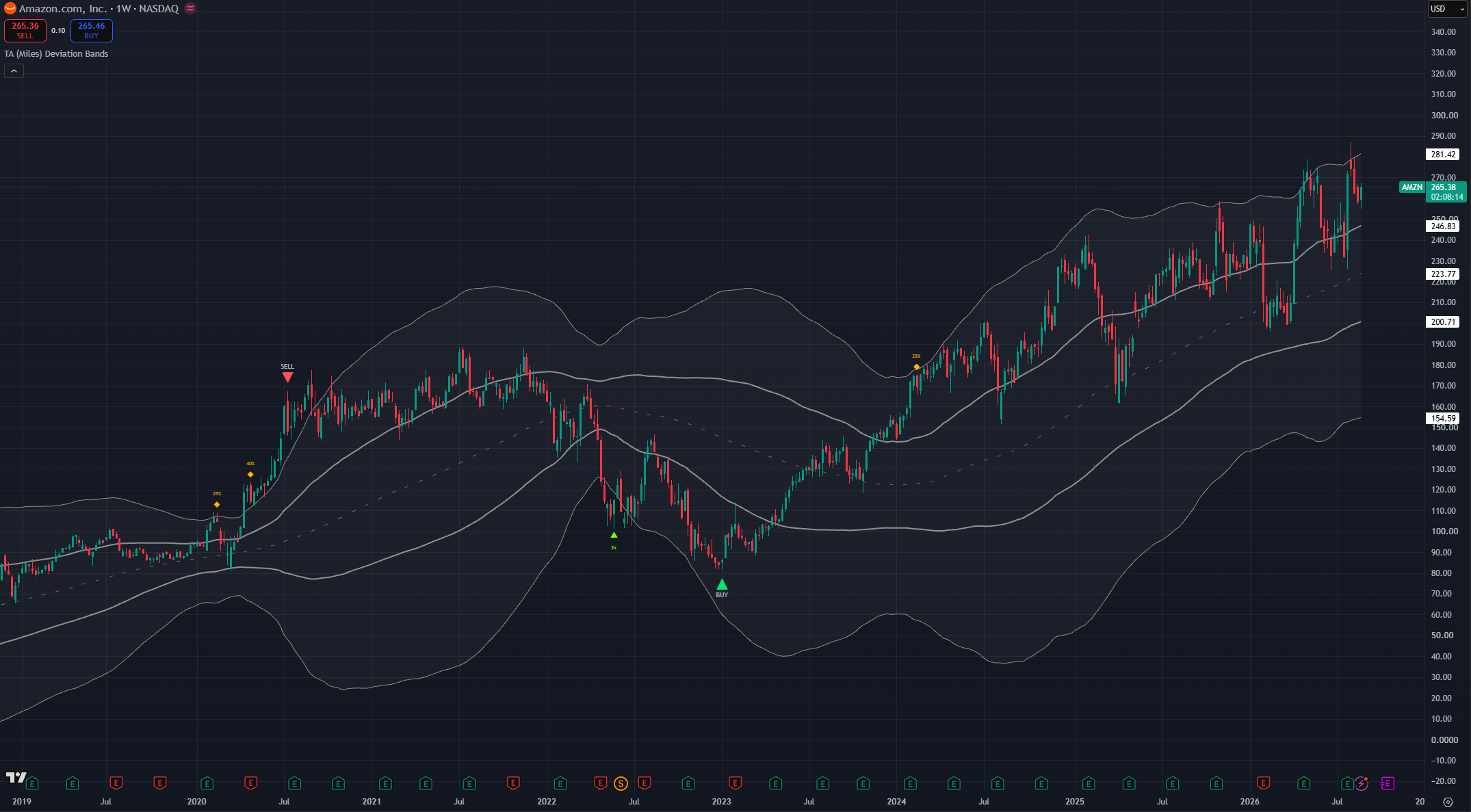
(AMZN 1W chart, Conservative buy and sell engines)
Daily swing trading (default)
The all-rounder, and the settings the indicator ships with. Buy Sensitivity → Neutral, Sell Sensitivity → Neutral, momentum stretch on, historical memory on. Entries you expect to develop over weeks to a few months. Leave everything at default; add the score dashboard while you are learning it and turn it off afterwards.
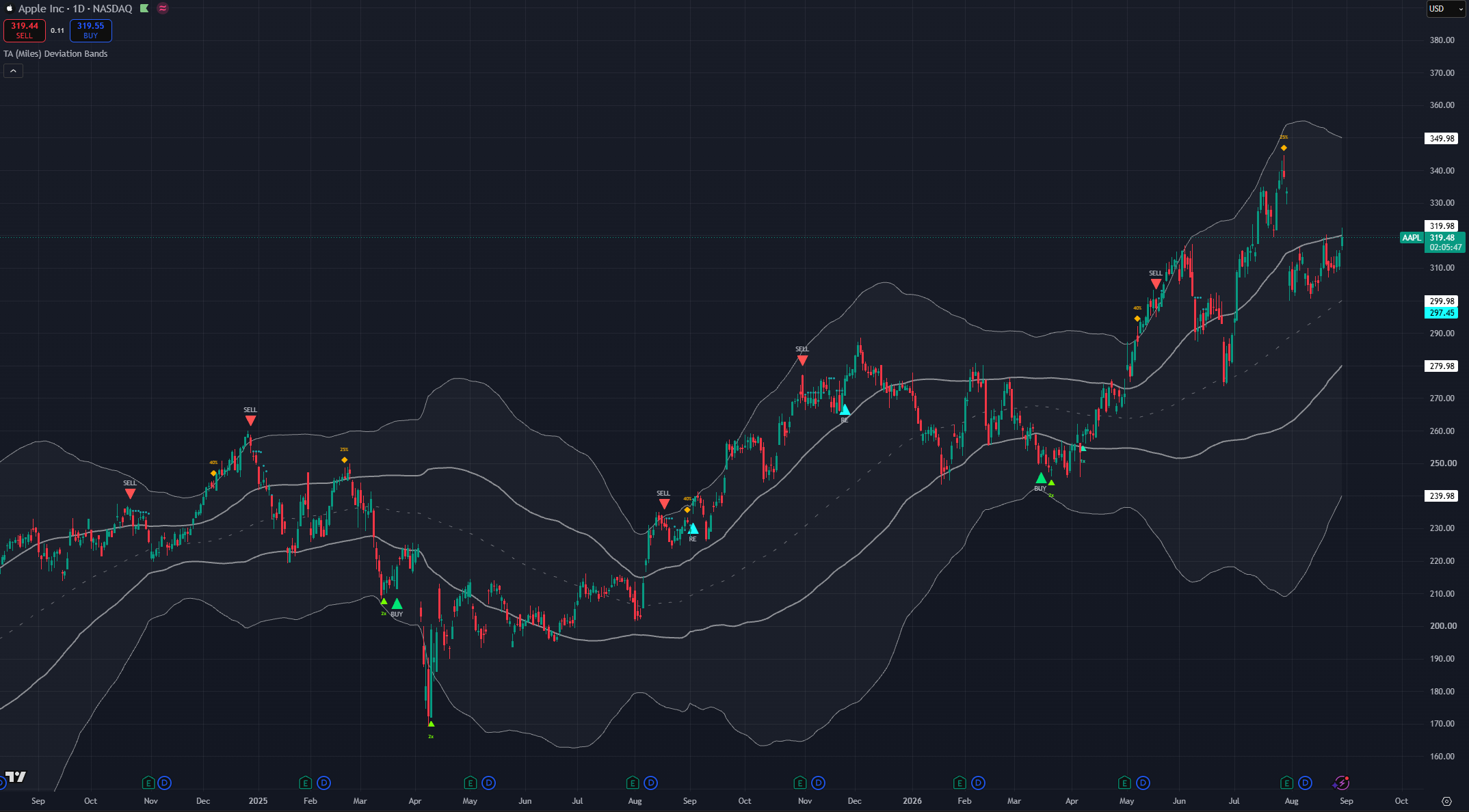
(AAPL 1D chart, default settings with reentry engine ON)
Active swing trading (4H)
For trades measured from days to a few weeks. Keep Buy Sensitivity → Neutral or move to Aggressive if you want the blue dip markers for finer timing.
Depending on your own preference and how active you want to be this is the first timeframe where you may consider mixing and combining different engine modes. The engines have been left separated in configuration on purpose. This allows traders to adjust them with more detail to their own liking. You may consider having Aggressive mode in only one of the sides while the other stays in neutral or conservative. You can fine tune the profiles to fit the asset type.
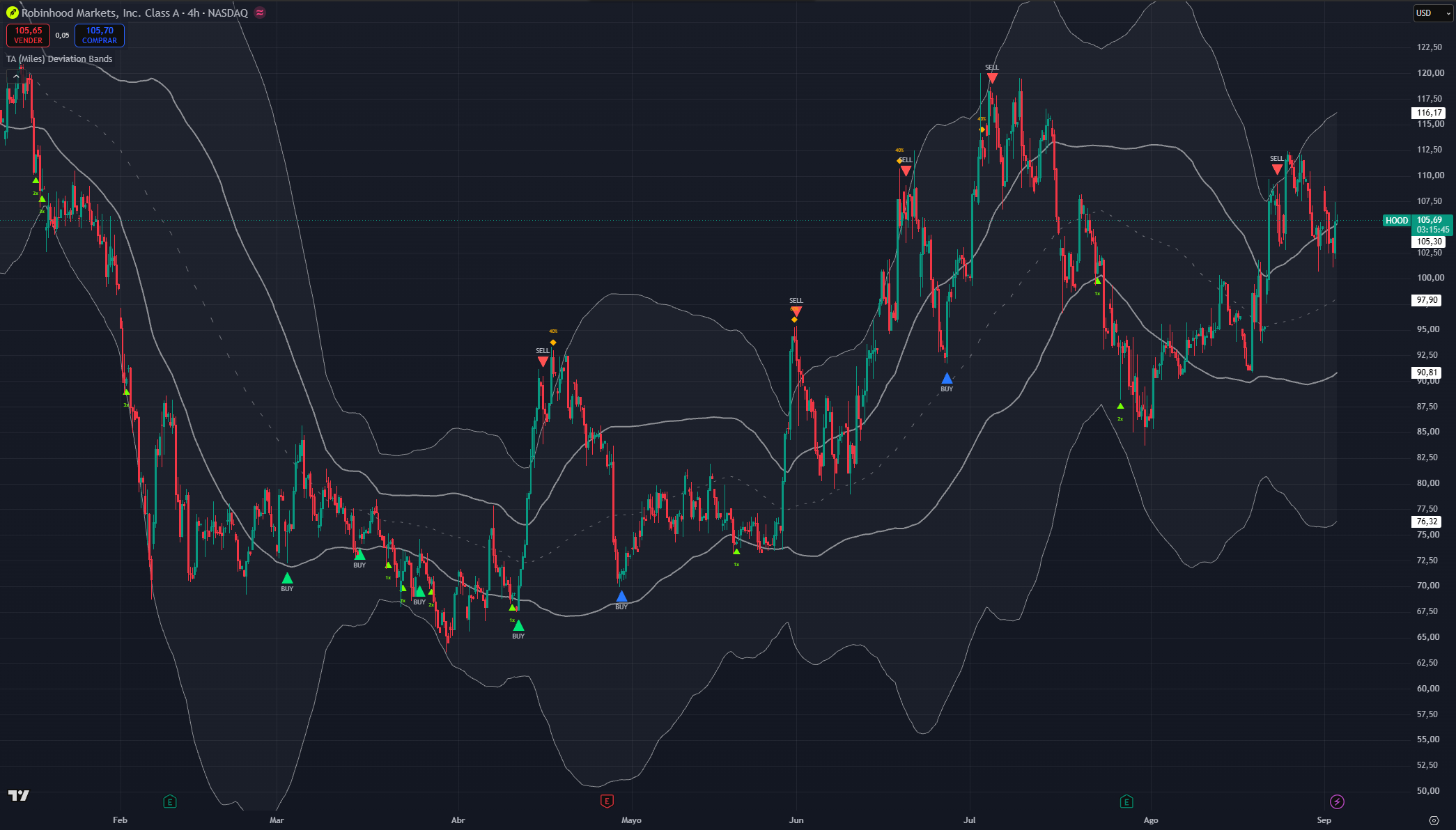
(HOOD 4H chart, Aggressive buy and neutral sell)
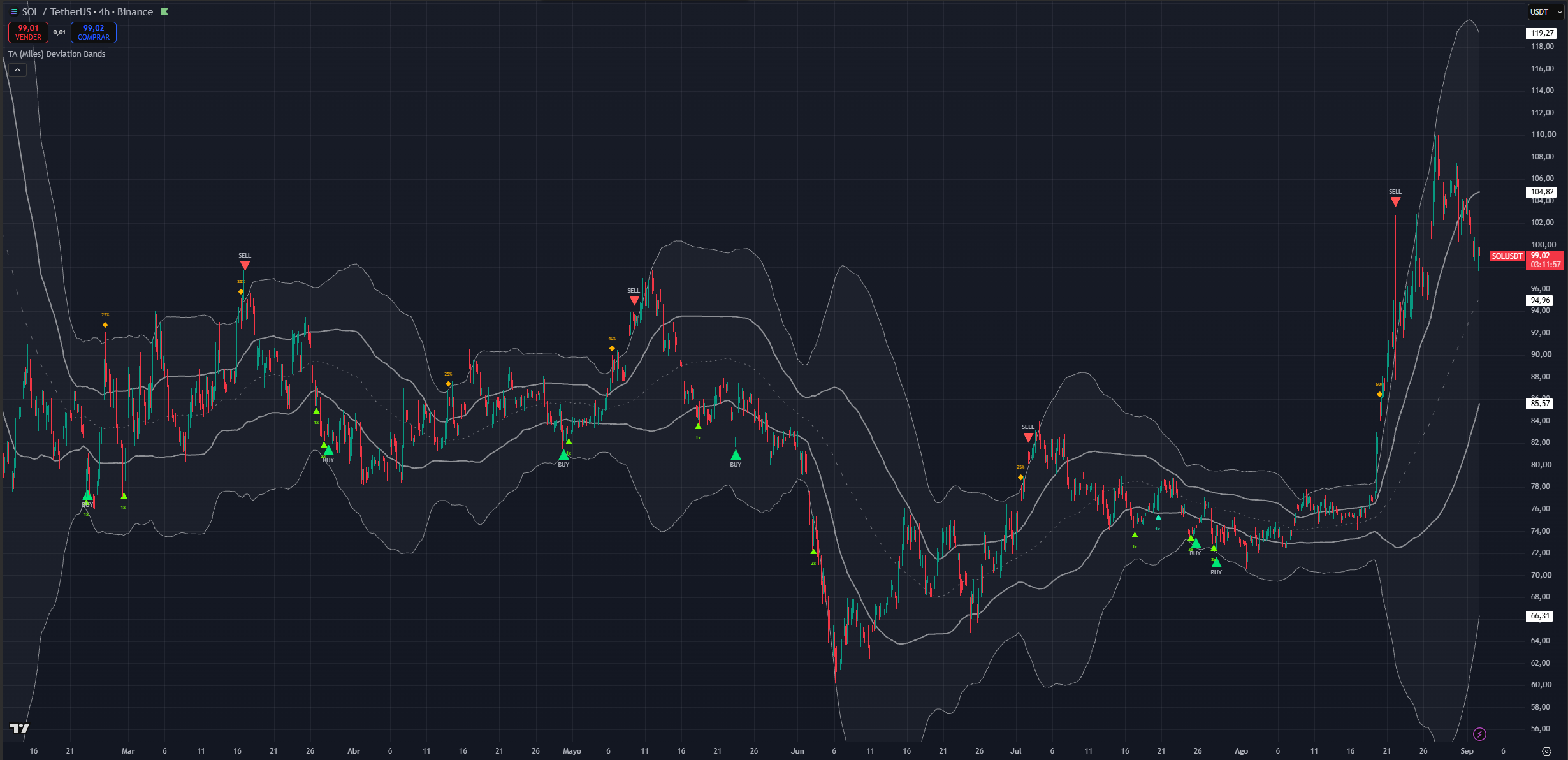
(SOL 4H chart, neutral buy and conservative sell)
Intraday
The indicator runs below 1H without errors, but the staging logic is built around swing-scale rotations, so signals become more frequent and less durable. If you work here, favour working with both modes in aggressive and using the bands as a stronger confluence signal.
Avoid buy signals that are not in the lower band and use the top of the upper band as confluence with the sell signal.
As mentioned these timeframes are not as well suited for the indicator concepts but the concepts can still be applied.
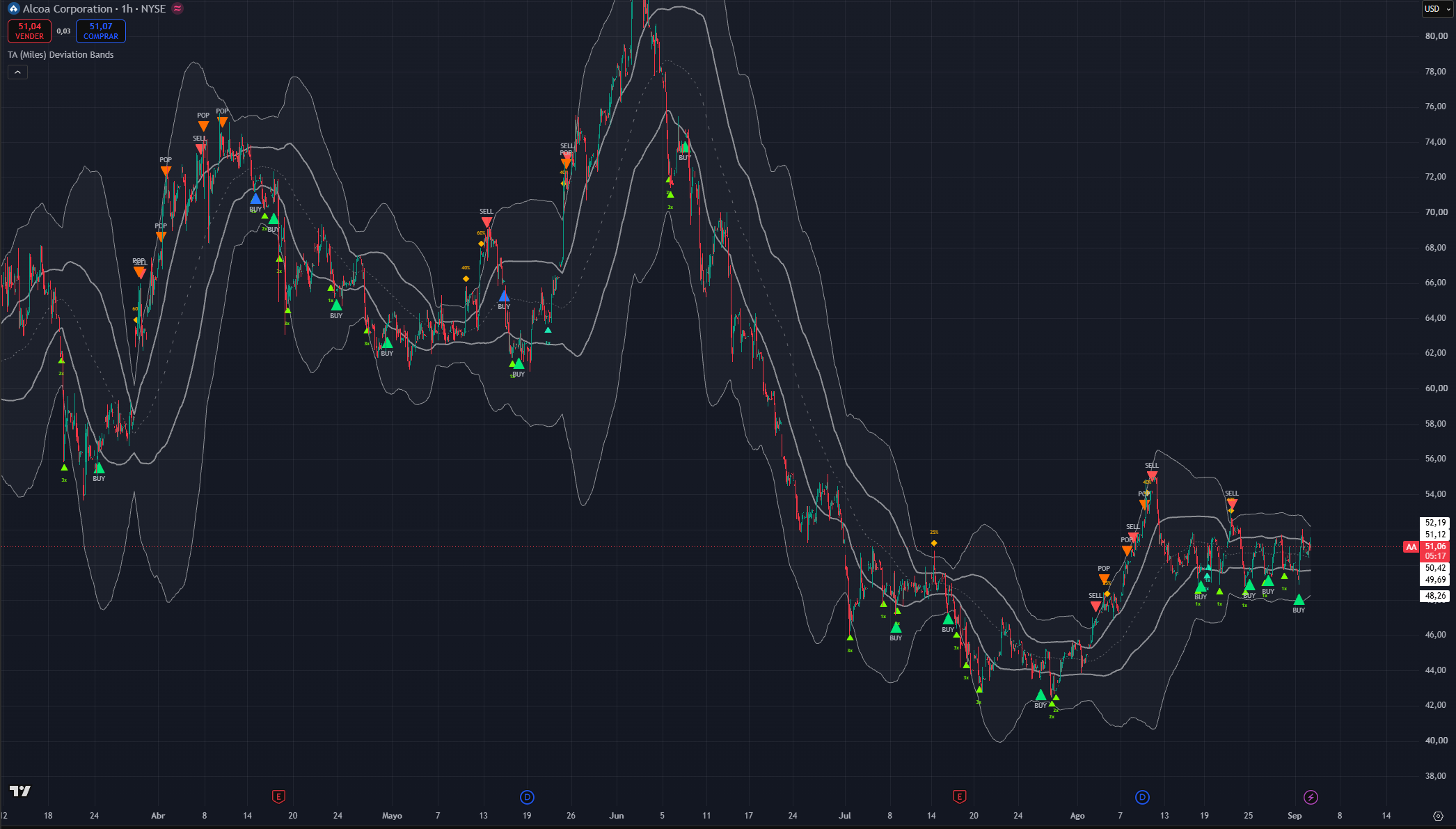
(AA 1h chart, Aggressive buy and aggressive sell)
Setting inputs and how to use them
Every user-facing input, grouped as the settings panel groups them. Visual settings never change when a signal fires only how it looks.
NOTE: since this is the first settings section, companion settings from other sections are mentioned here only at a high level. Each has its own section below.
Signal Sensitivity
Buy Sensitivity
The master dial for buy-side eagerness. Three modes, and each one retunes a coordinated set of factors tier spacing, how much agreement is required, what counts as a turn, how quickly a tier can re-arm, and minimum spacing between markers not a single threshold.
- Conservative: the fewest, highest-quality buys. Deeper tiers, more agreement required, a structural reversal factor demanded, one fewer add per decline, and roughly double the spacing between markers.
- Neutral (default): balanced. Meaningful decline cycles produce a core BUY; adds arrive at a moderate cadence.
- Aggressive: the most buy activity. Shallower tiers qualify, agreement requirements loosen, tiers re-arm faster, one extra add is allowed per decline and this is the only mode that produces the blue dip BUY marker.
Sell Sensitivity
The master dial for the sell side, and the one place where the modes do not behave the way you would guess.
- Conservative: the fewest sells holds winners. The SELL targets abnormal, parabolic cycle extensions specifically, and it additionally requires the rally to have been a genuine swing before it will trim. Expect a once-per-major-swing cadence.
- Neutral (default): balanced, tuned to land on the actual swing top. Trims are deliberately thinned relative to the raw engine so they do not clutter a rally.
- Aggressive: the same red SELL engine as Neutral no extra red sells plus the orange POP engine. Moving to Aggressive adds "sell a rip into resistance" markers. It does not make the take-profit engine looser.
Momentum stretch confluence
On (default): how far momentum has displaced from its mean becomes one more piece of confirmation behind the core BUY, the dip BUY and the SELL and gains importance for the dip BUY and POP in Aggressive mode.
Off: stock band-engine behaviour throughout.
Leave it on unless you want to compare against the original band behaviour.
Momentum stretch threshold
How far momentum must stretch from its mean before it counts toward a signal. Independent of the sensitivity modes.
A higher number demands a more extreme, rarer stretch, so fewer signals appear. A lower number lets milder stretches qualify, so more appear.
Tune based on frequency of signals in aggressive.
Signal Suppression (bars)
A cooldown on repeat partial markers, applied per side. Buy-side spacing never blocks a sell and sell-side spacing never blocks a buy, and the core BUY and full SELL take priority over partials regardless.
Higher values thin out clustered ADD, PB, TRIM, dip and POP markers. Set it to zero to disable spacing entirely.
Raise it if the chart looks busy on a fast timeframe. Leave it alone on Daily and above.
Show forming BUY-side markers / Show forming SELL-side markers
Two independent toggles for the live-bar previews, one per side. When on, dim same-colour previews of that side's markers can appear while the bar is still forming and solidify on close or disappear if the setup fails.
Off means that side's markers appear on bar close only. Display only; the alerts are unaffected.
Suppress SELL during parabolic runs
The parabolic guard. When on, the SELL is held back while price still closes above its fastest trend line and that line is climbing steeply, and releases the moment the line cracks.
On (default) means fewer premature tops in blow-offs and markers that land closer to the real high. Off means the SELL can print on earlier rejection wicks earlier, and more often wrong in exactly the moves where being wrong costs the most.
Detect rounded / rolling tops
Adds the slow-rollover top path. When on, a SELL can also fire when an already-significant rally loses momentum and curls lower a fast trend line tipping over, a run of lower highs, or a close back below the medium moving average, with momentum fading inside a wider window around the peak.
On (default) catches distribution tops that grind rather than spike. Off restricts the SELL to sharp-turn tops only, which will miss most cycle tops in slow, heavy markets.
Multi-Timeframe Confirmation
Enable MTF precision filter
Default Off, pending cross-timeframe walk-forward validation.
When on, the chart timeframe still creates every setup MTF data can never originate a signal. Two completed higher timeframes classify the prevailing regime and can veto or delay a signal; one lower timeframe confirms the turn timing. Concretely:
- Primary buys and the red SELL additionally require a confirmed lower-timeframe turn in their direction.
- A unanimous higher-timeframe bearish regime vetoes buys, with a narrow exception for genuinely capitulative conditions.
- A SELL into a unanimous higher-timeframe bullish regime becomes a bounded watch instead of an immediate marker, and releases only if chart structure actually cracks while price is still near the watched peak.
ADD, PB, TRIM and POP are unaffected.
The timeframe ladder is automatic from your chart timeframe and there is nothing to configure. Expect fewer and later signals when you turn this on that is its entire purpose. If you enable it and signals vanish, check the dashboard's MTF rows to see which gate is holding.
Continuation Re-entry (EXPERIMENTAL)
Enable continuation re-entry (experimental)
Default Off. Turns on the reentry (RE) marker and the dotted aqua flag guide described in the marker reference.
Enable it only if your workflow actually exits on SELL markers and you want a disciplined buy-back. It is conservative by construction and will stay silent through re-entries that worked out, because a V-shaped recovery never forms the consolidation it is looking for.
Also arm after aggressive POP
Default Off, which means only the full red SELL starts a re-entry watch. Turn it on only if your strategy treats POP as a genuine exit rather than a partial fade.
Re-entry watch expiry (bars)
The maximum number of bars the continuation pattern has to form and break upward after the exit. Buy Sensitivity scales this internally Conservative is shorter, Aggressive slightly longer as it does the pattern depth and duration requirements and the minimum spacing from the exit.
Longer gives a slow consolidation more room to complete; shorter keeps the buy-back tight to the exit. Leave it at default unless you are working on an unusually slow timeframe.
Historical Memory (Buy)
Five checkboxes. Together they let the buy side learn this symbol's own decline behaviour instead of applying fixed rules. Everything reads completed history plus the current bar no repaint. All five are on by default.
Enable historical move-magnitude memory
The master switch. Learns how large past declines became on this symbol and timeframe, then ranks the current drop against that history. A drop deeper or longer than most past drops makes buys more eager and earlier.
Off means buys ignore historical context entirely and run on real-time confluence alone. Leave it on it is the main reason the same settings work across a mega-cap and a small-cap.
Use self-referential stretch percentile
Also ranks the current stretch against roughly the last year of this symbol's stretches. A smooth, always-available extremity read, so the system has historical context before enough complete swings have been recorded.
Useful especially on newer listings with short histories. Leave on.
Bottom: condition on historical bounce
Pairs each past decline with the rally that followed it. A forming bottom whose decline class historically bounced well becomes more eager; when recent bounces have been shrinking, a falling-knife regime is assumed and more confirmation is demanded.
This is the setting that keeps the engine cautious in genuine bear markets. Leave on.
Bottom: adaptive oscillator-at-trough
Learns the oscillator level this symbol has historically bottomed at, and counts reaching that characteristic level as bottom evidence. More precise than a fixed oversold line, because some assets simply never reach the textbook level.
This mirrors a rule experienced traders apply by hand: give yourself tolerance on the weekly oscillator rather than insisting on a fixed number. Leave on.
Bottom: prior-trough support clustering
Remembers the prices of past troughs. When the current low sits on a shelf of two or more remembered troughs, that historically-validated support counts as bottom evidence price has bounced here before.
This also feeds a behaviour score: levels that hold score up, levels that break cleanly score down, and only respected levels qualify a buy. Leave on.
Buy Frequency
Max repeatable BUY signals per decline cycle
A hard cap on repeatable buy markers ADD, PB and dip BUY within one decline cycle. The core BUY is exempt, because its once-per-cycle latch already bounds it and it must not be suppressed by an earlier partial.
Lower means fewer scale-in opportunities per drop. Higher means more, at the cost of committing more capital before the decline ends. The counter resets once price recovers toward the midpoint.
If your position sizing cannot absorb four graduated adds in one decline, lower this rather than moving to Conservative.
Band Calculation
Source
The price series the midpoint and bands are built from. Alongside the four single prices, the last four options are common composite prices median, typical, average, and weighted close which smooth intrabar noise.
Different sources shift band placement slightly, which moves where the stretch tiers trigger. Close is the default and the right choice unless you have a specific reason.
MA Length
The lookback for the midpoint. Longer means a smoother midpoint, wider and more stable bands, and fewer stretch signals. Shorter means tighter, faster-reacting bands and more signals.
This is the strongest single lever over how often anything fires. Best left at default the staging logic was tuned around it.
MA Type
Simple or exponential midpoint. Exponential adapts faster, so the same move can reach a tier sooner. Simple is the default and produces the steadier rotation described earlier.
Band Deviations
Four inputs define the asymmetric geometry an upper and a lower distance for each of the two pairs. Larger values push that band further from the midpoint, which means signal territory moves further out and signals become rarer:
- Bullish · Upper Deviation the top of the sell shoulder. Larger means a rally has to extend further before the upper cloud is reached.
- Bullish · Lower Deviation the deep floor, the bottom of the buy shoulder. Larger means a decline has to go further before it reaches deep-cycle territory, which directly delays the core BUY.
- Bearish · Upper Deviation the bottom of the sell shoulder, the inner ceiling. Larger lifts the whole upper zone.
- Bearish · Lower Deviation the top of the buy shoulder, the inner floor. Larger drops the whole lower zone.
The defaults encode the asymmetry deliberately: a deeper floor than ceiling. If you flatten them into a symmetric pair you will get frequent sell activity and starved buys. Change these only if you have measured your asset's own stretch behaviour and know the standard geometry does not fit it.
Band Display
All visual. None of these change when a signal fires.
- Show Midpoint MA the dashed central line.
- Show Zone Fills the cloud shading as a whole.
- Fill Middle Span shade the central span between the inner bands as well, not just the two shoulders. Off fills only the shoulders, which reads cleaner if you also run other overlays.
- Sell Shoulder Fill (upper), Middle Span Fill, Buy Shoulder Fill (lower) each cloud region has its own colour, so you can run a green lower cloud and a red upper cloud if that suits how you read the chart.
- Sell Shoulder Transparency, Middle Span Transparency, Buy Shoulder Transparency opacity for each region. Higher is fainter; the maximum hides that region entirely (or simply untick Show Zone Fills).
Visualization
- Show Entry / Exit Markers the master switch for every marker shape. Off leaves just the bands. Alerts continue to fire.
- Show BUY / SELL / RE / POP text on markers the word next to the shape. Off leaves the coloured triangle alone. The colour still identifies the signal type, so this is a good way to declutter without losing information.
- Show suggested add / trim size the 1x/2x/3x and 25%/40%/60% text on the scaling markers. Off leaves plain shapes.
- Show Score Dashboard the context table. Off by default.
- Show signal legend table the static colour and symbol key. On by default and worth keeping while you learn the marker set.
- Signal legend position corner or edge placement for that legend.
None of these change when a signal fires.
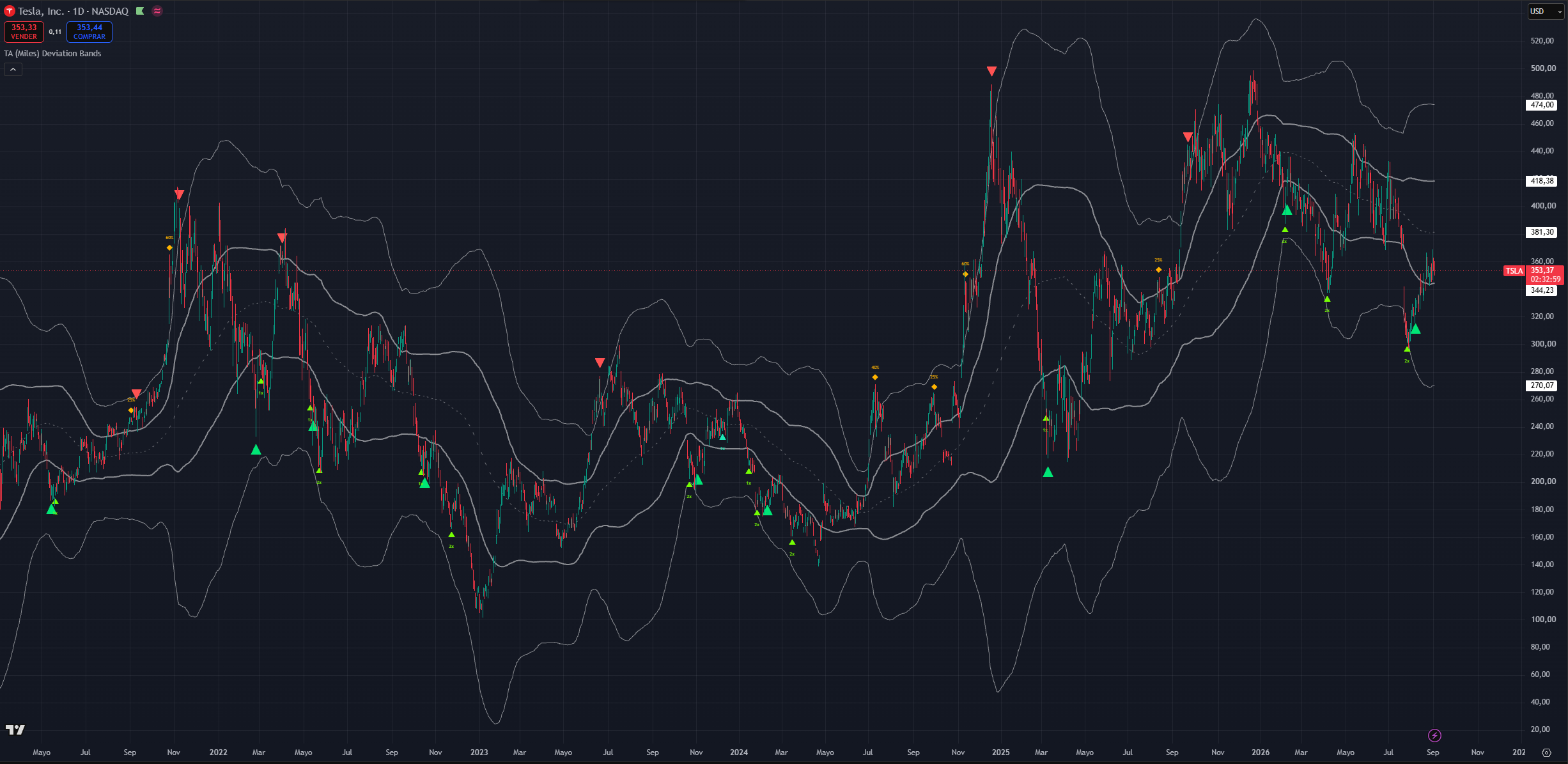
(TSLA 1D chart, default settings with buy/sell marker text off add and trim size on and the bands unfilled)
The dashboard and the legend
Signal legend
A static key: each marker's shape, colour, label and one-line meaning, plus a row explaining that dim markers are live-bar previews and a row noting that the guides reinforce a thesis rather than being absolute. Independent of the dashboard. On by default.
Score dashboard
An optional context table on the last bar, and a learning aid rather than a signal source. It reports:
- A headline conviction score and the current regime squeeze, trending up, trending down, or ranging.
- Reversal conviction for each side, and the net trend bias.
- The contributing groups broken out band position and touch, divergence count, oscillator condition, candle and participation, moving-average and trend structure, band-walk and trend strength.
- The current signal, if any.
- Accumulation and distribution state: current stretch, which tier you are in, and how many adds or trims have been spent out of the allowance for this cycle. This is the most practically useful row it tells you whether you have scaling capacity left.
- The active buy and sell modes.
- MTF status: whether the filter is on, the ladder in use, the higher-timeframe regime reads, the lower-timeframe turn reads, and whether each side is ready, waiting, or vetoed.
Read the MTF rows as status, not as signals. If you have the filter on and markers stopped appearing, these rows tell you which gate is responsible.
Turn the dashboard on while you are learning the indicator, then off.
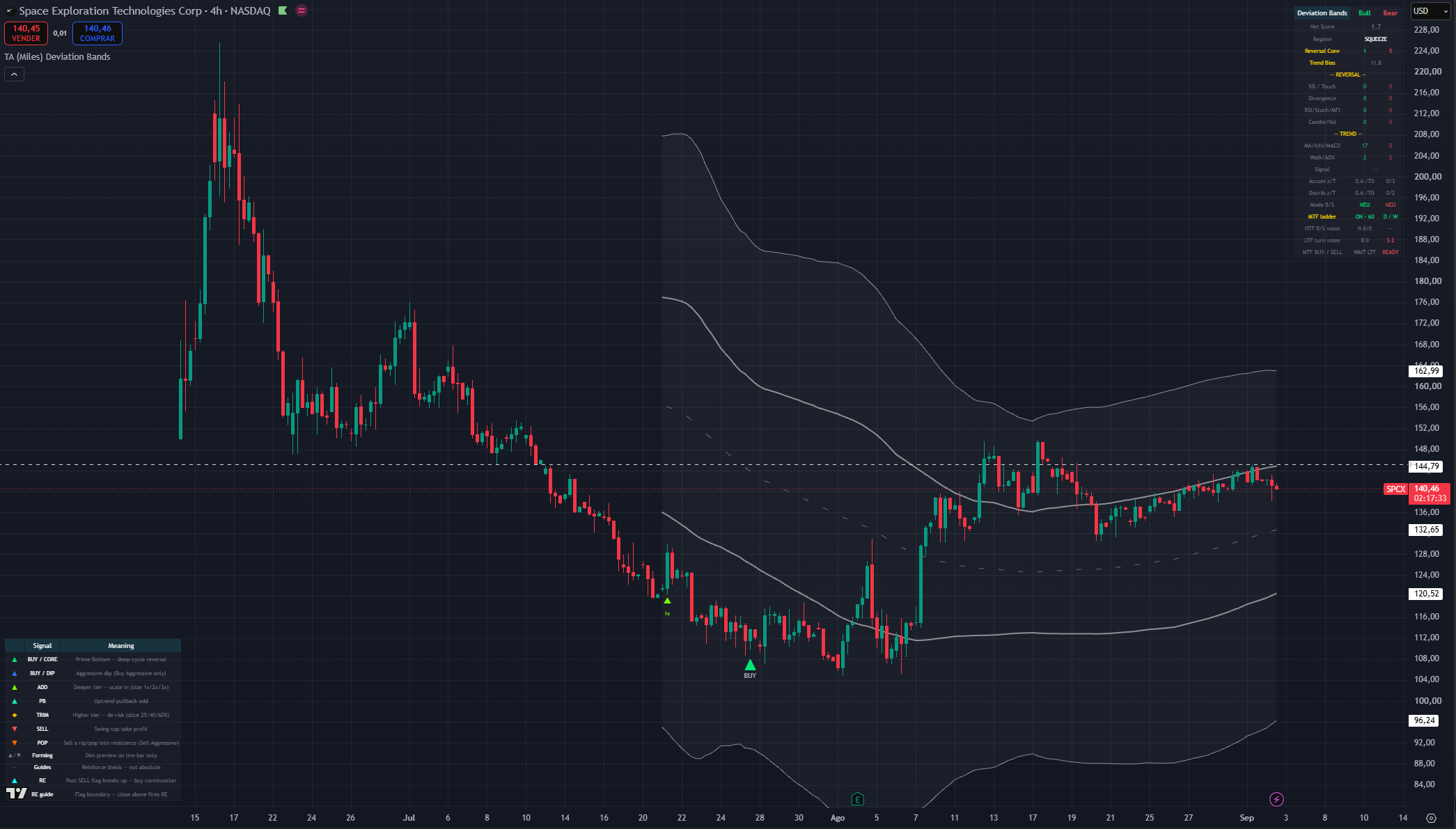
(SPCX 4h chart, default settings with MTF-precision filter and show score dashboard on)
Using it with the rest of the suite
Deviation Bands answers where and when. It does not answer whether this asset deserves your capital. That comes from context you bring:
- Start wide, then narrow. Index, then sector, then the individual name. A strong chart in a weak sector in a weak index is a harder trade than its own chart suggests. Relative strength usually decides which technically-similar setups actually work.
- Higher timeframe regime first. A daily buy signal while the weekly is stretched into its upper band is a higher-risk trade it can bounce, but the weekly has not resolved. The best risk-reward is a weekly working from its lower band toward its upper, with you playing daily and 4H stretches inside it.
- Pair with the momentum suite. Confluence between an oscillator extreme and a band condition is stronger than either alone: an oscillator above its overbought line while price is in the upper cloud and a sell marker prints is a materially better read than any one of the three. Multi-timeframe oscillator tools and the mean-reversion tools in this suite are the natural companions.
- Map horizontal levels yourself. Volume clusters, prior highs and lows, gaps, and on newer listings the offering price and the first public trade. The bands will not know that a fund mandate forces selling below an offering price. Where a band condition and a real level coincide, the read is much stronger.
- Respect the pattern targets you can see. A measured move from a completed chart pattern pointing at the same area as a band extreme is confluence worth weighting.
Assets where the bands behave less well
Options-heavy names respect technical levels less reliably. Price turns slightly before you would expect, or fails to reach a band it "should" have, because positioning rather than price structure is driving the tape. On those names, treat the rotation as a guide rather than gospel and lean more on your horizontal levels.
Crypto and cleaner-volume equities tend to respect the geometry far better. The approach does not transfer well to forex.
Useful Alerts
Every condition below is a separate entry in TradingView's Create Alert → Condition dropdown. Alerts are evaluated regardless of whether the matching marker is displayed, so you can subscribe to a signal while keeping the chart clean.
Entries and scale-ins
- Deviation Bands MF: Core Buy the Prime Bottom deep-cycle reversal
- Deviation Bands MF: Pivot Buy the Aggressive dip buy (Aggressive buy mode only)
- Deviation Bands MF: Accumulate Add a tier-deepening scale-in
- Deviation Bands MF: Re-entry Buy a post-exit continuation pattern broke upward (re-entry enabled only)
De-risking and exits
- Deviation Bands MF: Sell the full swing-top take-profit
- Deviation Bands MF: Trim a tier-scaled partial profit-take
- Deviation Bands MF: Pop sell a rip into resistance (Aggressive sell mode only)
Location and context
- Deviation Bands MF: Squeeze Start entered a squeeze regime; volatility is compressing
- Deviation Bands MF: Squeeze Release the squeeze released; expansion is underway
- Deviation Bands MF: Bullish Upper Cross close crossed above the outer upper band
- Deviation Bands MF: Bullish Lower Cross close crossed below the outer lower band
- Deviation Bands MF: Bearish Upper Cross close crossed above the inner upper band
- Deviation Bands MF: Bearish Lower Cross close crossed below the inner lower band
The four cross alerts are location only they carry none of the signal logic. They are useful for knowing that price has entered or left a shoulder; they are not entries.
Note that the Accumulate Add alert covers both the tier ADD and the trend Pullback, since both are the same underlying accumulation event.
A small set of values is also published to the data window for the companion strategy script. They are wiring, not something to read by hand.
Simple Workflow
- Map your horizontal levels first or use TA (Miles) Adaptive Levels, on a long history. Major support and resistance, volume clusters, gaps, prior highs and lows. The bands are dynamic; these are not.
- Check the higher timeframe. Where is price in the weekly rotation? A weekly working up from its lower band is a tailwind; a weekly stretched into its upper band is a headwind on every lower-timeframe buy.
- Locate price in the rotation on your trading timeframe. Lower cloud, centre span, or upper cloud and which swing of that band visit you are on.
- Ask what the rotation failed to do. Did the last push reach the next band, or stall? That is your strength-versus-weakness read, and it usually matters more than the marker.
- Wait for a marker. Touching a band is not a signal. Reaching the lower cloud without an ADD or BUY means the engine did not see a turn that is information.
- Size by marker type. ADD and PB are graduated scale-ins with a suggested multiplier. BUY is the cycle reversal call. TRIM is a partial slice. SELL is the full take-profit. RE is a disciplined buy-back, not a fresh entry.
- Check your scaling capacity on the dashboard if you are working a long decline how many adds are left in this cycle.
- Confirm against structure and your risk plan before acting. Every trade needs a thesis, an invalidation, and a stop. Once a trade moves in your favour, get it risk-free.
Common Mistakes
- Buying because price touched the lower cloud, with no marker.
- Selling because price touched the upper cloud, with no marker. In an uptrend the upper shoulder is visited constantly.
- Treating an ADD as a full entry. It is one graduated slice of a plan that assumes you do not know where the bottom is.
- Waiting for a blue dip BUY without setting Buy Sensitivity to Aggressive, or for an orange POP without setting Sell Sensitivity to Aggressive. Those markers do not exist in the other modes.
- Expecting Aggressive sell mode to produce more red SELLs. It adds POP markers; the take-profit engine is unchanged.
- Acting on a forming preview before the candle closes. It exists so you can prepare, and it is allowed to vanish.
- Enabling MTF or continuation re-entry and expecting more signals. Both make signals fewer, later, or rarer that is what they are for.
- Enabling every visual at once all three clouds, marker words, size hints, dashboard and legend together bury the price action.
- Flattening the band deviations into a symmetric pair and then wondering why buys stopped printing.
- Treating the bands as gospel on options-heavy names, or expecting the approach to transfer to forex.
- Forgetting the bands recalculate every close. They are the weakest of the three kinds of reference on your chart, and they are only trustworthy for the candle in front of you.
- Assuming the indicator predicts exact tops and bottoms. It measures location and follow-through, and it deliberately gives up the exact low in exchange for not catching knives.
Summary
The clouds show where price sits relative to its own normal behaviour. The rotation between them and, more usefully, the rotation's failures tells you whether the trend is strong or weakening. ADD and PB are graduated scale-ins on the buy side; BUY is the deep-cycle reversal call; TRIM scales out as price extends; SELL is the swing-top take-profit. The dip BUY and POP are opportunistic extras that only exist in Aggressive mode, and RE is an optional disciplined buy-back after an exit. The two sensitivity dials control how selective the engine is, historical memory adapts the buy side to this symbol's own declines, and the optional multi-timeframe filter trades signal count for precision. Use it to locate, stage, and time not to call tops and bottoms.
Deviation Bands is a Trading Apologist TradingView indicator.Request access to the scripts, or browseevery guide.
Educational and analysis purposes only. Not financial advice. See theterms.