
Purpose
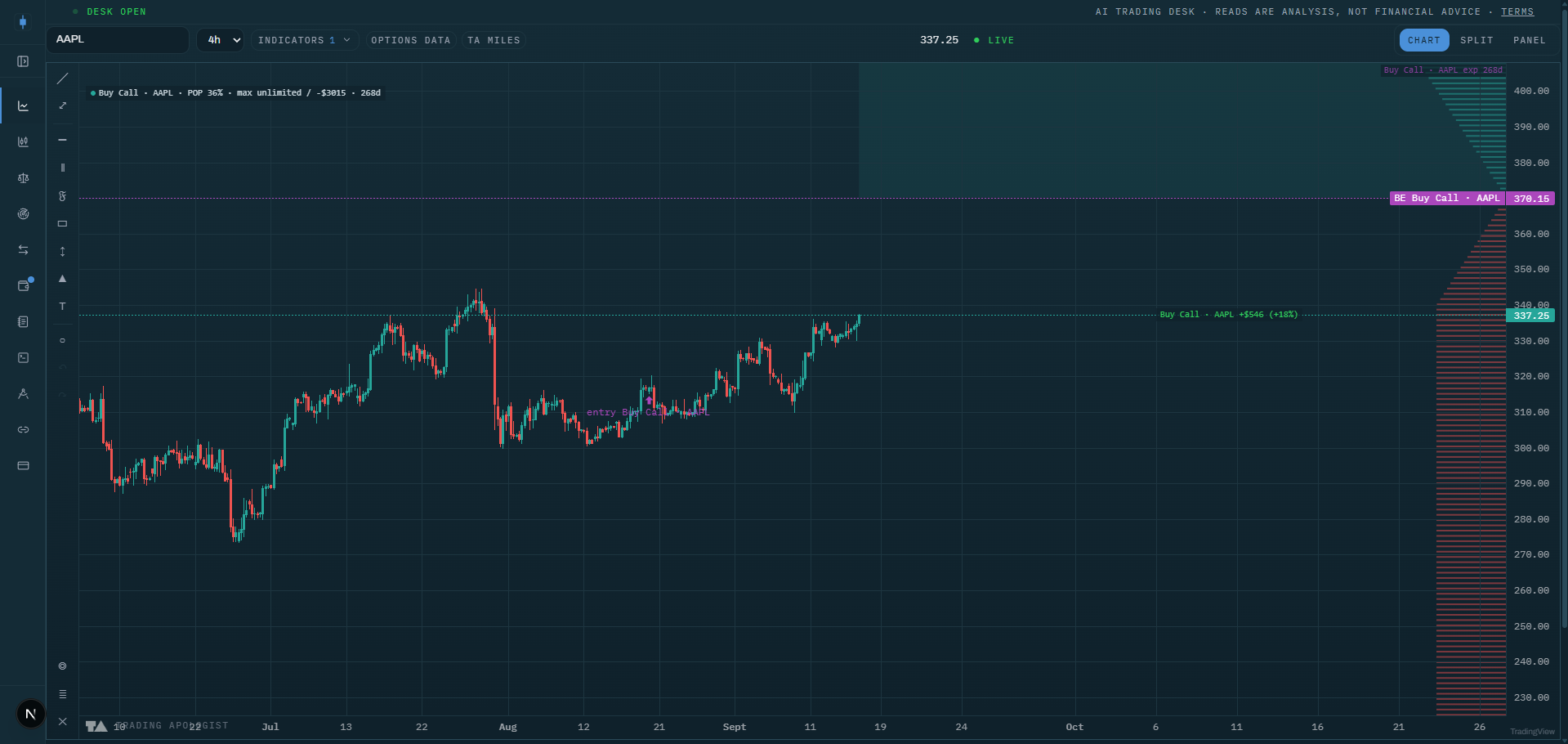
My Positions draws your own saved Position Designer structures directly on the price chart: breakevens, profit zones, expiry, probability of profit, and a live modeled P&L. It is the first personal overlay in the suite; instead of asking "where will price go", it answers "where does my structure win from here", in the same pane as the market indicators.
Once your position's geometry sits on the chart, every market level becomes a position decision: a call wall inside your profit zone is a take-profit magnet, a dark pool level at your breakeven is where the defense will happen.
Best used for:
- Managing open option structures without leaving the chart or re-deriving breakevens by hand.
- Pre-visualizing a trade: sketch a structure in the Designer as a sim and see it against live walls, cones, and levels before committing.
- Judging theta risk at a glance: price hugging a breakeven with the expiry marker approaching means time decides the trade, not direction.
- Comparing your profit zone with the Expected Move Cone: a zone that contains the cone is a high-probability structure; a zone entirely outside it needs a move the market has not priced.
What you see on the chart
For up to the three nearest-expiry saved positions on the charted symbol:
- Breakeven price lines: dashed for entered positions, dotted for sims, so committed money and sketches never look alike.
- Profit zone shading between breakevens, drawn from now to the position's expiry, with the expiry marked. Open-ended zones (like a long call above its breakeven) shade accordingly.
- An entry marker below the bar where the position was opened, labeled with the position's name.
- A payoff-at-expiry profile in the right gutter: the combined P&L curve of the drawn positions against price, green where the structure wins, red where it loses.
- A chip row with the live modeled P&L, probability of profit, and max profit and loss per position.
How to read it
- Breakevens are your real support and resistance. Price living above the upper breakeven of a debit structure with time left means the trade is working. Everything else on the chart is context for defending or pressing that line.
- The profit zone versus the cone is your honest odds check. If the shaded zone sits inside the 1-sigma cone, the market's own distribution favors you, and the POP chip will say the same thing numerically.
- The expiry marker changes the question. Far from expiry, direction dominates. Near the marker, theta dominates: a position hugging its breakeven into expiry is a coin flip you can choose not to hold.
- Use market levels as exits. A GEX wall or dark pool level inside your profit zone is where the market is likely to stall; taking profit into a magnet beats hoping through it.
- Sim positions are for rehearsal. Sketch the alternative structure, see both geometries against the same walls, and keep the one whose profit zone lines up with the levels.
How the engine works
The chart fetches your saved Designer positions for the charted symbol and keeps the three with the nearest expiries. All the math runs in your browser with the desk's options model: each leg is aged to today (days to expiry minus your holding period), then breakevens are root-found on the combined payoff, the profit zones and max profit/loss are computed from the same curve, and probability of profit uses a risk-neutral lognormal model seeded with the chart's live implied volatility when available, else each leg's saved volatility.
The live P&L is a model mark from current spot and time, not your broker's fill-level P&L. The overlay renders on its own layer, separate from your drawings, so it never enters undo history or drawing sync.
Honest limitation: POP and the live mark are modeling aids built on lognormal assumptions and the available implied volatility. They are good for comparing structures and reading geometry, not a substitute for your broker's marks.
Key settings
- Include sim positions: draw sketched, not-entered structures (dotted) alongside entered ones.
- POP and max profit/loss chip: the numeric chip row on or off.
- Payoff profile: the right-gutter P&L curve on or off.
Availability
Works wherever your saved Designer positions exist; shown on the charted symbol only, not on pairs charts. Included from the Plus plan up, together with the Position Designer.
My Positions is an AI Trading Desk indicator. See it on a live chart in the AI Trading Desk, or browseevery guide.
Educational and analysis purposes only. Not financial advice. See theterms.