
Purpose
OI Change marks the strikes on the charted stock where option open interest built up or unwound overnight. Volume tells you what traded today; open interest change tells you what stayed on the books afterward. That makes it the positioning ledger: it shows where new commitments were made and where old ones were taken off.
It is an early-warning layer for the other positioning indicators. A large OI build at a strike is a wall forming, often visible a day before it shows up as gamma in the GEX Profile.
Best used for:
- Catching walls before they exist: a fresh multi-thousand-contract build at a virgin strike is new positioning worth watching.
- Confirming existing walls: an OI build on top of a tall GEX bar upgrades that wall's credibility.
- Spotting pins losing their magnet: an unwind at the current call or put wall means the max-pain gravity trade weakens into expiry.
- Reading intent: put-side builds below spot while price grinds up are hedged longs (healthy); call-side unwinds into strength are overhead supply being taken off.
What you see on the chart
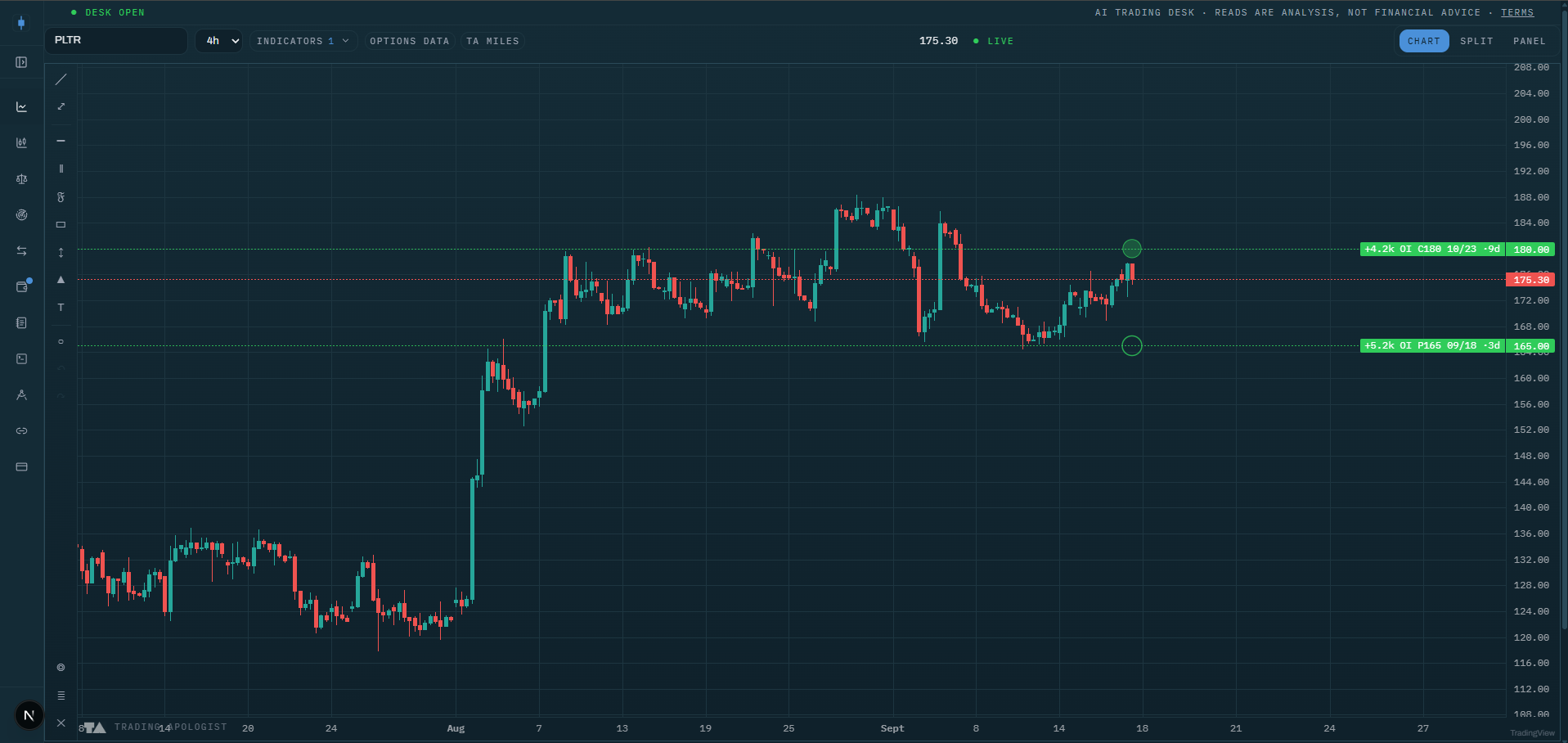
- Dashed horizontal lines at the affected strikes: green for builds (open interest added), red for unwinds (open interest coming off). Labels read like
AAPL 240C 03-21 +12.4k OI, so you get side, strike, expiry, and size in one glance. - Size-scaled bubbles in the right gutter, one per contract: bigger bubble, bigger overnight change. Calls draw filled, puts draw hollow, and the green/red hue still means build versus unwind. In bubbles-only style the lines collapse to axis labels.
- An honest empty state: a small chip tells you when the scan has nothing for this ticker or nothing above your filters, so a blank chart is an answer, not a bug.
The bubble column automatically shifts left of the GEX Profile gutter when both are on, so the two never overlap.
How to read it
- Build at a virgin strike is new information. Someone committed size where nothing stood before. Watch how price behaves on first approach to that strike.
- Build on an existing wall is confirmation. The wall got heavier overnight. Expect a stronger reaction there than the day before.
- Unwind at the wall is the pin dissolving. If the heaviest strike is being closed out into expiry week, do not lean on the max-pain drift; its anchor is leaving.
- Repeated builds on the same contract are a campaign, not a punt. A strike that grows several days running reflects a position being accumulated deliberately, and those levels tend to be defended.
- Combine with the cone. An OI build plus a GEX bar at a strike inside the Expected Move Cone is the highest-conviction pin or target candidate this suite produces. The same combination outside the cone is a next-week story.
How the engine works
Unusual Whales publishes a market-wide ranking of the roughly 200 option contracts with the largest overnight open-interest changes. The desk fetches that global list once on a shared cache (every user and every ticker reads the same scan), filters it to the charted stock, parses each contract into strike, expiry, and side, and keeps up to 12 rows sorted by the size of the change.
Because the source is a market-wide top-movers list, coverage is deliberately sparse: mega-caps usually have rows, small caps often have none. That is what the "market-wide scan" hint in the menu means, and why the empty state exists. All the filter settings work locally in your browser on the fetched rows, so changes repaint instantly.
Honest limitation: OI change tells you that positioning changed, not why. A build can be opening buys, opening sells, or a hedge. Use direction of price into the strike and the GEX side to interpret it, not the OI number alone.
Key settings
- Side:
both,calls, orputs. - Min contracts: floor of 500, 1k, or 5k contracts to hide small changes.
- Show unwinds: include the red, negative rows or show builds only.
- Style:
lines,bubbles, orboth. - Labels:
full,minimal, oroff. - Opacity: 10 to 100 percent.
- Bubble position: how far in from the right edge the bubble column sits.
Availability
US equities only; not available on pairs or crypto charts. Included from the Plus plan up. Data updates once per market day, reflecting the overnight open-interest print.
OI Change is an AI Trading Desk indicator. See it on a live chart in the AI Trading Desk, or browseevery guide.
Educational and analysis purposes only. Not financial advice. See theterms.