
Purpose
VAYO (Volatility Adjusted Yield Options) finds the stretches where option premium is expensive relative to what a stock has actually been delivering, and says which side of the chain that applies to. Selling an option is selling insurance against movement, so the question it answers is whether the market is currently paying more for that insurance than the stock's own behaviour justifies.
Two conditions have to line up before anything is marked. The premium has to be rich for this symbol by its own recent standards, and price has to be stretched on the side you would be selling: oversold for puts, overbought for calls. Either one on its own draws nothing, which is why a chart can show expensive premium for weeks without a single mark.
It reads as a condition rather than a countdown. The pane tells you whether today is a favourable day to sell premium on this symbol, the marks tell you when such a stretch began, and both sides are reported separately because they routinely disagree.
Best used for:
- Deciding whether a cash-secured put is being paid enough for the risk it carries.
- Timing the sale of premium you were going to sell anyway, rather than selling it on the day you happened to look.
- Telling an expensive-looking chain from a genuinely rich one, since high implied volatility often just reflects a stock that has become genuinely more volatile.
- Choosing which side to sell on a given symbol, instead of defaulting to one of them.
- Staying out: long stretches with nothing lit are the indicator's most common answer.
- Comparing conditions across symbols, because every reading is ranked against that symbol's own history rather than an absolute level.
What you see on the chart
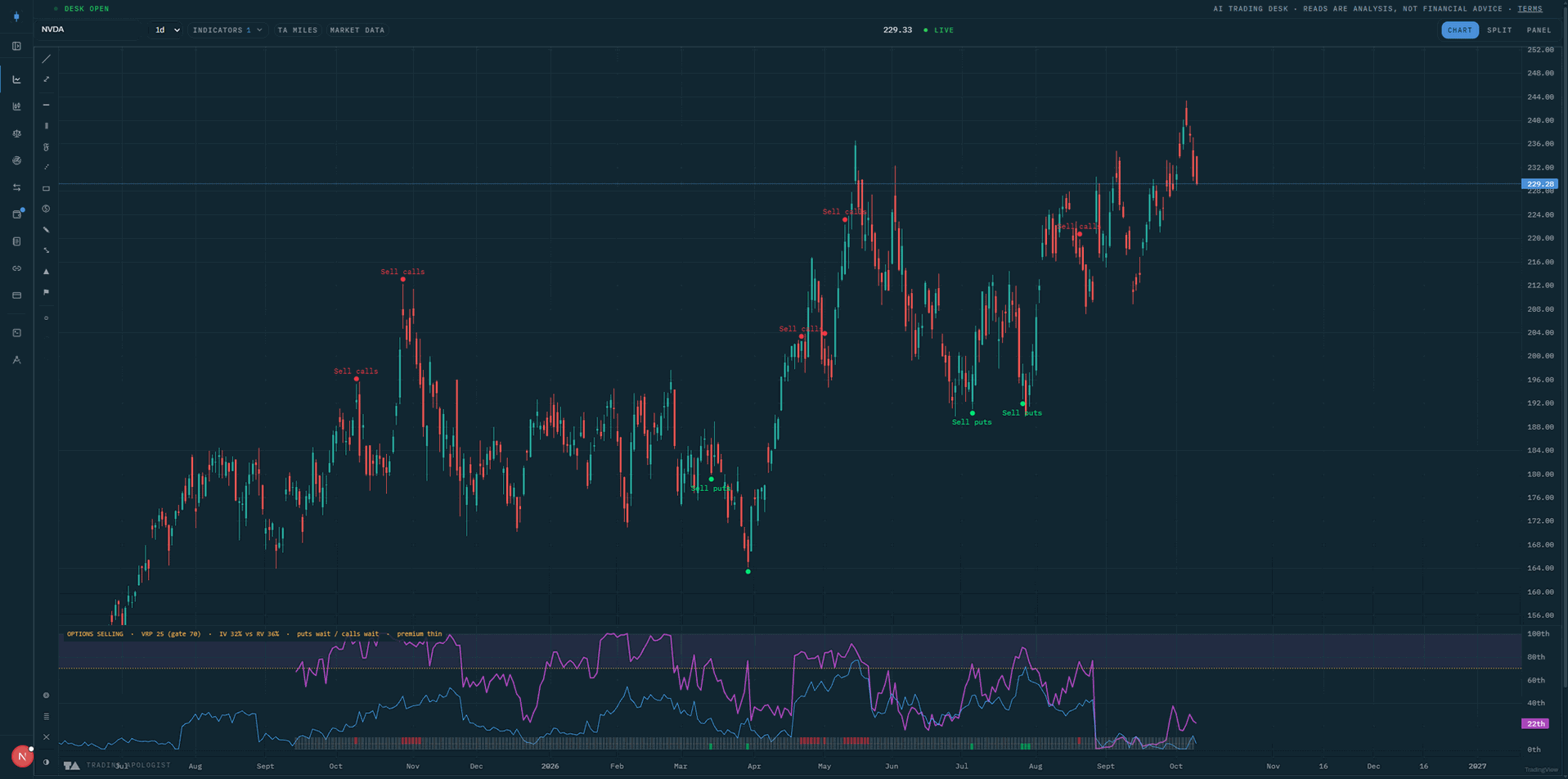
A separate pane below price, scaled as percentiles from 0 to 100 so the axis reads 96th, plus marks on the price pane itself.
In the pane:
- The premium line in purple: how rich the current premium is for this symbol, as a percentile of its own trailing year. High means the market is paying more for movement than it usually does here.
- The implied volatility line in blue: the absolute level of implied volatility as its own percentile. This is the number an options screener would show you, and it is deliberately not the same reading as the purple line.
- A dashed amber gate line with the area above it shaded: the level the premium line has to clear. It carries no axis label because it never moves during a session, and the legend prints it instead.
- Two ribbons stacked along the bottom. The lower one is the put side, lit green when selling puts is favourable and dim grey when it is not. The one directly above it is the call side in red. They are separate strips so the two sides can never be confused for each other.
- Blank space in either ribbon where there is not enough stored volatility history for this symbol yet. Nothing is drawn rather than a dim cell, because "not measured" and "not favourable" are different answers.
On the price pane:
Sell putsin green below the bar, andSell callsin red above it. The side the label sits on is the side the obligation sits on: you are being paid to accept stock below, or to give it up above.- Faded marks with no label on the candle that is still forming. The conditions are being re-checked on every tick, so a mark on an unclosed candle can disappear again before the close. The fading says the reading is not final yet.
- Dots without labels where marks cluster. The dot always draws; the text is dropped when another mark on the same side sits too close for both labels to be readable.
Quick visual key
| What you see | What it means |
|---|---|
| Purple line above the dashed gate | Premium is rich for this symbol right now |
| Purple line below the gate | Premium is thin, and nothing can fire whatever price is doing |
| Blue line high, purple line low | Implied volatility is high in absolute terms, but so is the movement it is pricing |
| Lower ribbon lit green | Selling puts is favourable on this bar |
| Upper ribbon lit red | Selling calls is favourable on this bar |
| Both ribbons dim | Premium or the price condition is missing, see the legend for which |
| Ribbon blank, nothing drawn | No stored volatility history for this symbol yet |
Green dot and Sell puts below a bar |
A favourable put stretch began here |
Red dot and Sell calls above a bar |
A favourable call stretch began here |
| Faded dot, no label, on the last candle | The candle is still forming and this may not survive the close |
| Green dot with no label | A put mark too close to the previous one to label |
How to read it
- The ribbon is the read, not the lines. The two percentile lines tell you how rich premium is; the ribbon tells you whether anything follows from that. A chart can show the purple line well above the gate with both ribbons dim, which means premium is there but price is not where the signal wants it.
- A mark is the start of a stretch, not an entry on one candle. It prints on the bar where conditions became favourable, and the favourable period usually runs on for days after it. Treat it as a prompt to look, with your own structure and sizing deciding the rest.
- The two sides disagree more often than they agree, and that is the normal state. An upside extreme is a call seller's condition and is of no help to a put seller, so most symbols spend their time with at most one ribbon lit.
- Nothing lit is the common answer. On most symbols on most days neither side is favourable. Long dim stretches are the indicator working, not a missing feed.
- A high blue line is not the signal. Implied volatility rises for reasons: an earnings date, a pending announcement, a stock that has genuinely become more volatile. The purple line exists to separate premium that is rich from premium that merely looks large.
- Read the pane before the marks on a symbol you have just opened. If the ribbons are blank, there is no history yet and the absence of marks says nothing at all.
The pane legend
The legend across the top of the pane is always visible and cannot be hidden, because two percentile lines and a coloured strip cannot say on their own why a strip is dim. It reports the last closed bar, never the one still forming.
A full legend reads like this:
VAYO · VRP 81 (gate 70) · IV 27% vs RV 19% · PUTS OK / calls wait · vol daily
Taking the segments in order:
VRP 81 (gate 70): the premium percentile, with the level it has to clear beside it. Here it is clear. A reading ofVRP --means the percentile could not be measured on that bar.IV 27% vs RV 19%: the same comparison in plain numbers. The market is pricing 27% volatility while the stock has been delivering 19%. When those raw figures are unavailable the segment falls back to the implied volatility percentile alone.PUTS OK / calls wait: both sides, always, in that order. A side in capitals is favourable, lowercasewaitmeans the conditions are not met, and--means that side could not be measured.- A reason, when the put side is waiting.
premium thinmeans the purple line is below the gate.needs oversoldmeans premium is rich but price has not reached the oversold condition.needs zone exitis the same situation when you have asked for the stretch to unwind first.not yetappears when the price condition has been switched off entirely. vol daily: the volatility reading is a daily one, which is worth stating on an intraday chart because it steps once a day rather than once a bar.
NOT MEASURED replaces everything after the name when there is no stored volatility history for the symbol. It is a statement about coverage, and claims nothing about conditions.
Selectivity
One dropdown sets how far price has to be stretched before either side can fire. Loose marks as price approaches a stretch, balanced waits for it to reach the first band, and the tighter settings wait for a deeper one.
loose: fires as price approaches the stretch rather than once it arrives. The most marks of the four.balanced: the default. Waits for price to reach the first band of the stretch.selective: additionally requires richer premium before either side counts.very selective: requires the richest premium of the four, and fires the least often.
Across two years of history that runs from roughly four marks a year per symbol down to under one. Which end suits you is a preference about how often you want to be shown something, not a setting with a correct value.
The AMR condition
A second dropdown sets what the price condition actually asks for. It uses the same stretch zones the Adaptive Mean Reversion indicator draws, so if you run both you can see the condition being tested on your own chart.
in the zone: the default. Marks while price is still stretched, as soon as it reaches the zone on the matching side.leaving the zone: waits for the stretch to unwind first, firing as price crosses back out. This is the calmer tape a premium seller is usually after, and it marks later and less often than the default.no AMR condition: drops the price requirement and marks on rich premium alone. This marks far more often than either of the above, and the marks no longer carry any statement about where price sits.
The oversold zone is the condition for puts and the overbought zone is the condition for calls, which is why switching this dropdown changes both sides at once.
Showing the pane and the marks
The pane and the price-pane marks are the same reading presented two ways, and they have their own switches:
Lower pane: the percentile lines and the ribbons.Marks on the chart: theSell putsandSell callslabels on price.
Either can be turned off on its own. Keep the marks and hide the pane if you only want to be shown the moments, or keep the pane and hide the marks if you prefer to read the condition yourself without labels over your candles. Turning off the last of the two switches the indicator off rather than leaving it drawing nothing, and switching it back on restores both.
Both switches are display only, so changing them redraws the chart without refetching and leaves your zoom alone.
Key settings
Two numbers under advanced, both of which recompute the chart:
gate (percentile): 50 to 99, default 70. The premium percentile both sides have to clear. The selectivity dropdown writes this for you, so set it by hand only if you want a value between the rungs.realized vol (days): 5 to 90, default 30. The window the stock's delivered movement is measured over.
Leave the realized window at its default unless you know why you are changing it: it is matched to the tenor of the implied reading, and a different window compares two different horizons rather than measuring a premium.
Availability
US equities only. The volatility reading is daily on every timeframe, so on 4h and below it steps once a day rather than once a bar. Covered calls are not marked. Not available on pairs charts, which have no options chain to be rich against. A symbol needs stored volatility history before the pane reads at all, so a newly tracked ticker shows NOT MEASURED until that history has been collected. There are no alerts for this indicator yet; it reads on the chart. Included from the Plus plan up.
Volatility Adjusted Yield Options (VAYO) is an AI Trading Desk indicator. See it on a live chart in the AI Trading Desk, or browseevery guide.
Educational and analysis purposes only. Not financial advice. See theterms.