
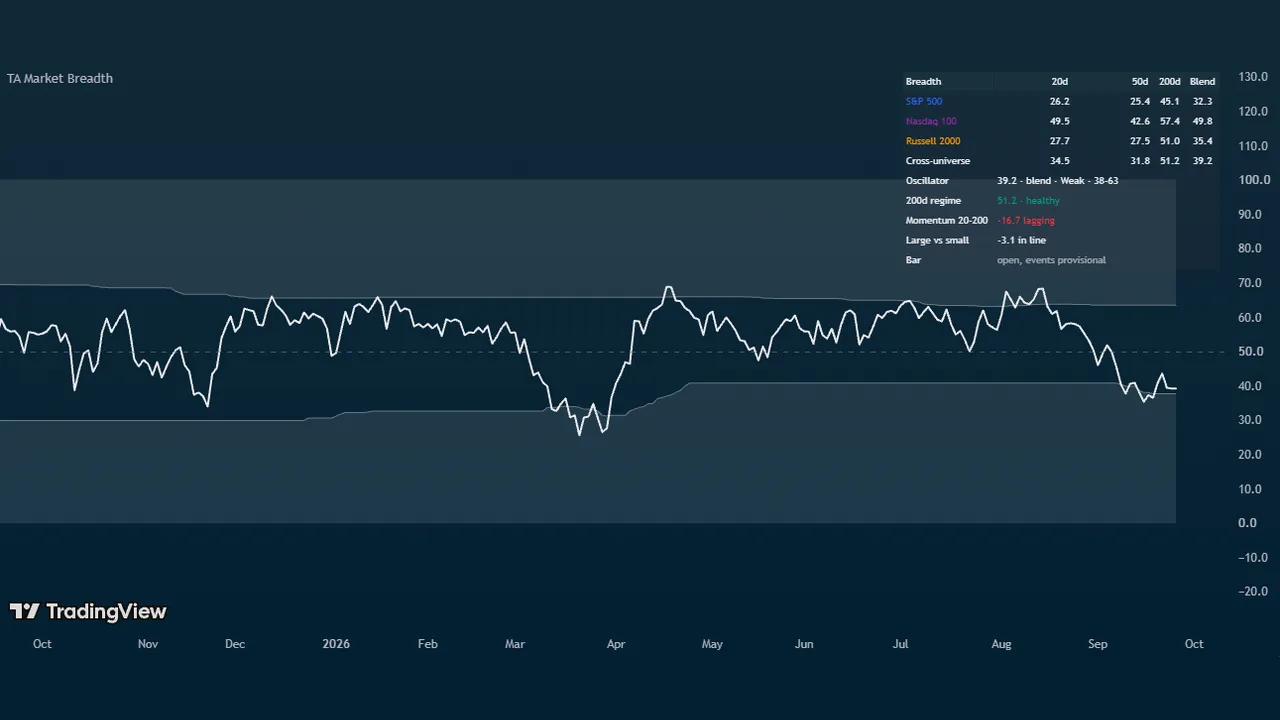
Answers one question in one panel: how many stocks are actually participating, and is that number at an extreme worth acting on. Market Breadth builds a single 0 to 100 oscillator from TradingView's own percent-of-stocks-above-moving-average series, adds the market internals breadth traders actually watch, and ranks sector rotation in the same pane.
Because the underlying data is market-wide, the panel reads the same whatever symbol is on your chart. Put it under SPY, QQQ, IWM, or a single stock and you are always looking at the market's participation, not that symbol's.
What you see on the chart
- The oscillator: the share of stocks participating, on a 0 to 100 scale with a dashed midline at 50. Low readings are washouts and high readings are broad participation, which is strength rather than an automatic top, so the line is one neutral colour by default.
- Shaded extreme zones, set from the composite's own trailing percentile rather than from fixed numbers.
- A breadth readout table carrying every universe at 20, 50, and 200 days, the plotted value with its zone and bands, the 200-day regime, both spreads, and any module you have switched on. Compact is the default; Full spells everything out.
- A sector rotation table (optional), ranking the strongest and weakest funds over the lookback you choose.
What makes it different
This is not one percent-above-average line with a 20 and an 80 level drawn on it.
- A calibrated composite across universes. Choose the moving-average length that drives the line, then average it across the S&P 500, Nasdaq 100, and Russell 2000, with the whole US market, the Nasdaq Composite, the S&P 400, and the S&P 600 available too. Presets read a single universe on its own, or weight a custom mix, and three optional compare lines draw individual universes against the composite.
- Bands that mean the same thing in every regime. The extreme bands sit at the composite's own trailing percentile over a year, so a washout in a quiet market and a washout in a violent one both register. Optional drift limits stop the bands wandering somewhere meaningless over a long trend, and the panel tells you when a limit is binding. Fixed levels are there for anyone who prefers them.
- The two spreads a single breadth line cannot show. Short-term participation minus long-term participation is breadth momentum, and a cross up through zero soon after a washout is the earliest broad recovery signal in the panel. Large-cap breadth minus small-cap breadth is the narrow-leadership detector: the classic late-cycle pattern where the index holds up while most stocks underneath it roll over. Both are readouts and alerts whether or not you draw the lines.
- NYSE internals computed correctly on any timeframe. An optional module reads advancing versus declining issues and derives the ratio-adjusted McClellan oscillator and Zweig Breadth Thrust inside the daily request, so the values are right whether your chart is hourly, daily, or weekly. Two more optional modules cover net new highs with a new-lows washout marker, and Lowry-style 90 percent up-volume and down-volume days.
- Borrowed scales that never flatline. McClellan and net new highs ride the same 0 to 100 pane through a soft curve, where 50 is zero and you set the value that reads 75. A crash-level print keeps moving toward the edge instead of pinning against it, which is exactly when you are looking at it.
- Event timing that does not drop or repaint. Each module returns a running event count from inside the daily request rather than a bars-since window, so two 90 percent down-volume days in consecutive weeks both mark on a weekly chart instead of collapsing into one. Markers wait for the bar to close, and on intraday charts they print once per day rather than flickering through the session.
Sector rotation
An optional table ranks the top three and bottom three performers from a 41-ticker pool of sector and industry funds over one day, one week, one month, or three months, with the S&P 500 and Nasdaq 100 as baselines in the middle. TradingView allows 40 data requests per script, so the pool fills in priority order with whatever the breadth modules leave unused, and the footer always shows how many loaded and how many requests are in use. Theme switches let you keep the industries you care about.
Best timeframes
Daily and weekly. The underlying breadth series print once a day, so on intraday charts the panel shows the day's running value as a step and the readout says so. Divergence flagging is disabled intraday for the same reason.
Key settings
The moving-average length behind the line and the universe mix driving it, adaptive bands or fixed levels, the two spread lines, and a switch for each internals module. The Breadth Readout Table and Sector Rotation Table sections sit at the top of the settings dialog, because they are the two most people reach for first. Two optional colour modes are there if you would rather the line read participation, or read extremes as stretched.
Alerts
19 conditions: extreme-zone entries and exits, midline crosses, breadth momentum turns and the post-washout thrust, narrow and broad leadership, 200-day regime changes, Zweig thrust, 90 percent volume days, new-lows washout, and breadth divergences against the chart's price. Create them with Once per bar close.
An honest caveat
The breadth and internals series cover US equities and are end-of-day data, so treat today's value as provisional until the close. Sector rotation and divergence read live prices. Nothing here predicts: it measures participation, and participation is context for your own trade decisions rather than a signal to take them.
TA Market Breadth is a Trading Apologist TradingView indicator.Request access to the scripts, or browseevery guide.
Educational and analysis purposes only. Not financial advice. See theterms.