
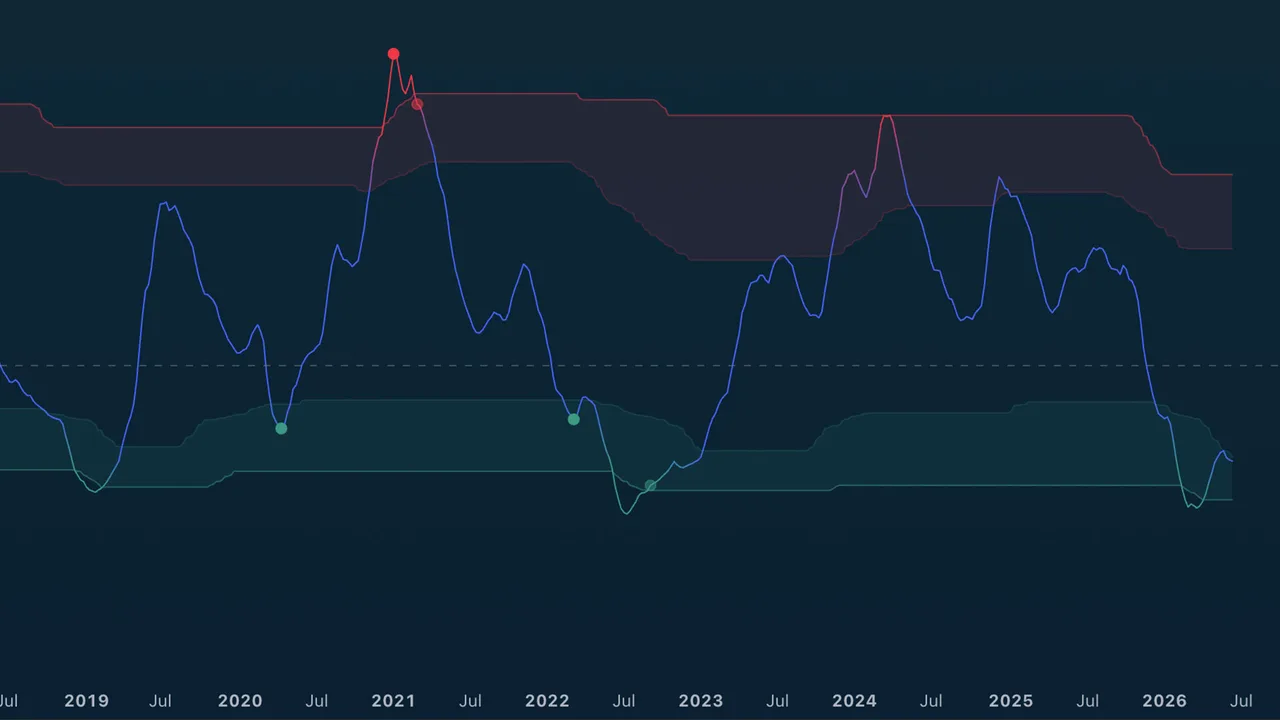
Purpose
TA (Miles) Adaptive Mean Reversion helps you see when price has stretched far from its normal behavior and may be preparing to rotate back toward balance.
Use it for reversal awareness, exhaustion warnings, and timing help after extended moves. It is not designed to chase trends.
Best used for:
- Finding possible exhaustion after sharp moves.
- Watching for buy opportunities after downside stretch.
- Watching for sell or trim opportunities after upside stretch.
- Spotting lower-timeframe pullbacks inside a higher-timeframe stretch (optional MTF markers).
- Avoiding late entries when price is already extended
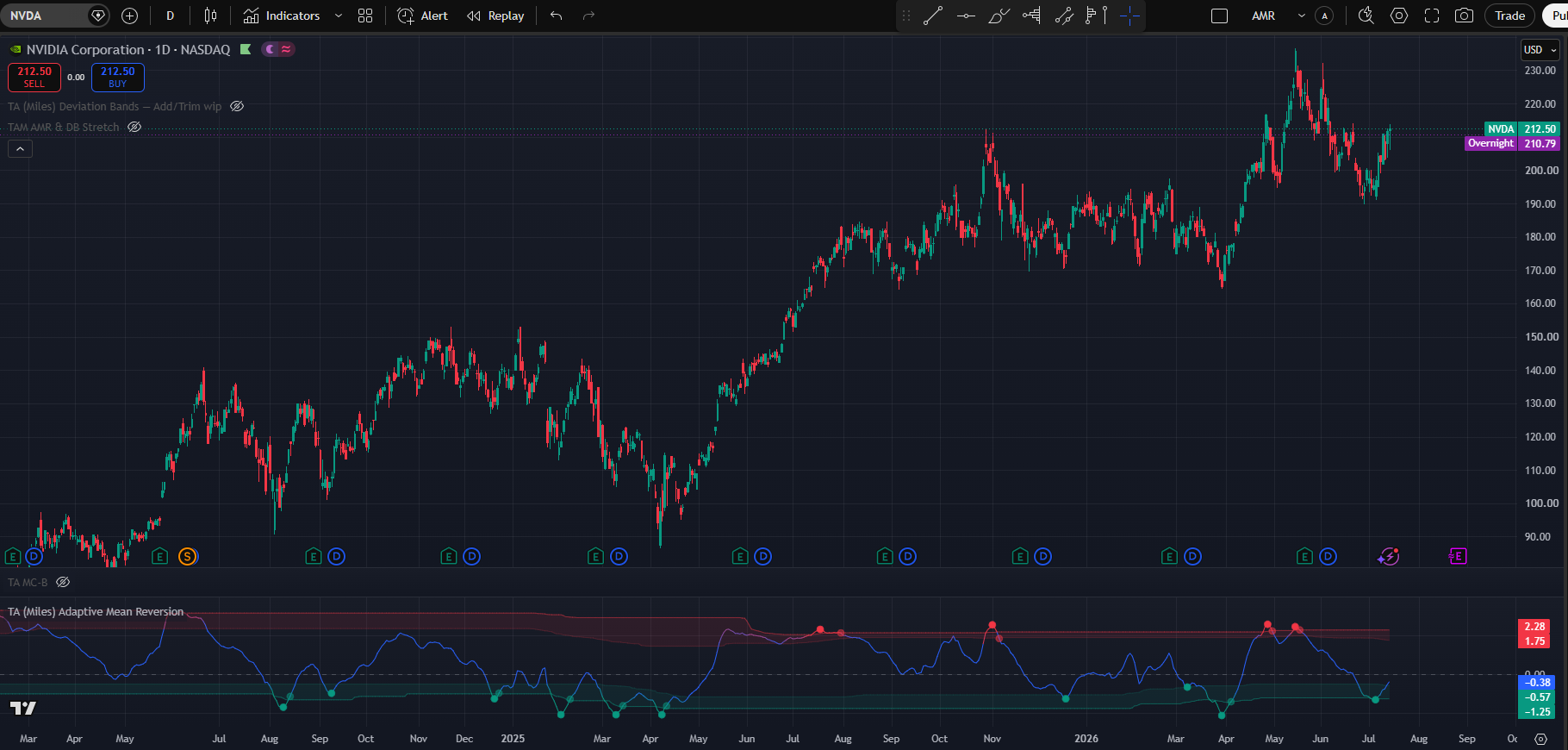
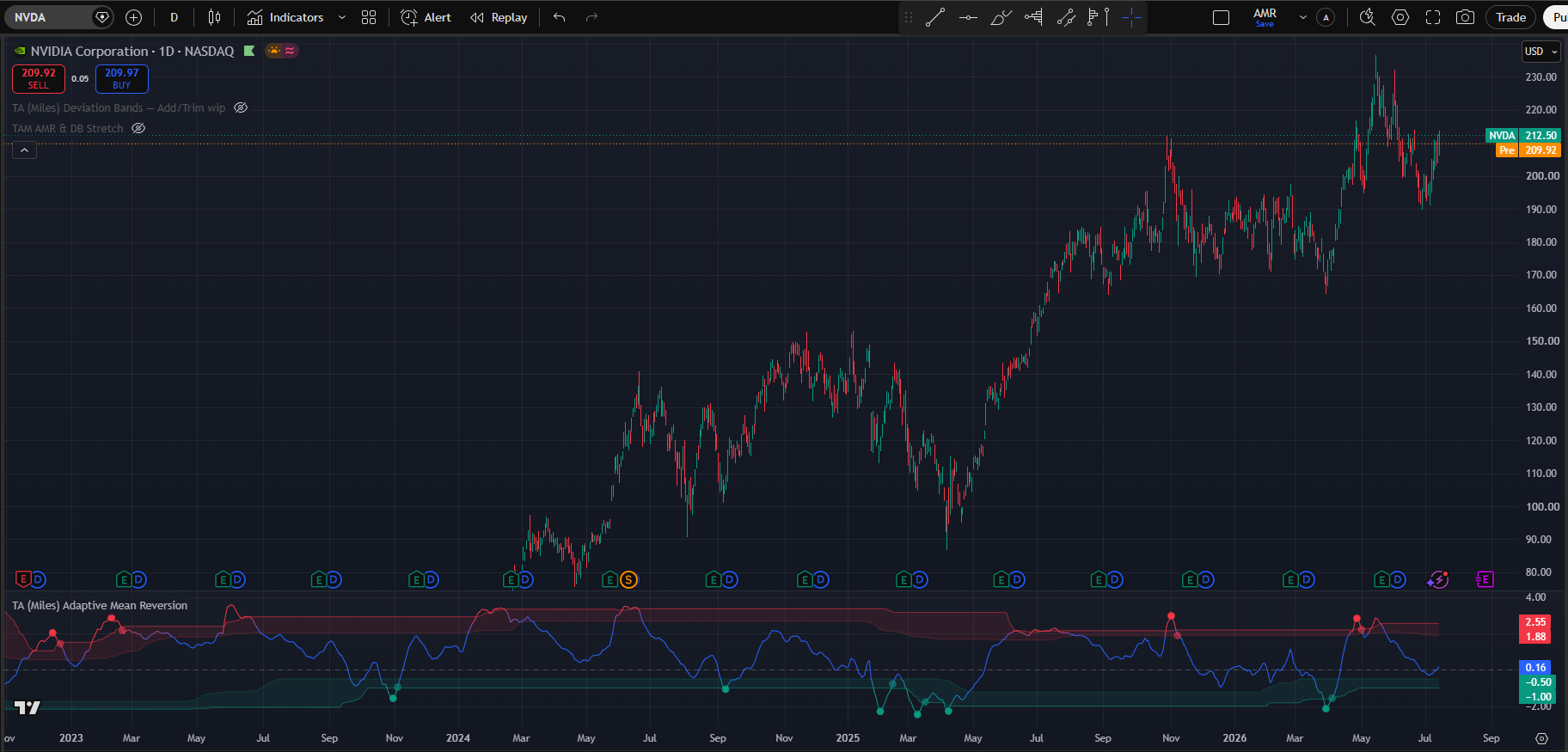
(NVDA 1D chart Default settings)
How to read AMR
Adaptive Mean Reversion displays as an oscillator panel. AMR has three main visual components
What You See
- An AMR line in the lower pane.
- A center line that represents balance.
- Upper and lower stretch zones (adaptive by default: they adjust to each asset).
- Circle markers: main Trigger signals on the chart timeframe.
- Cross (+) markers: optional lower-timeframe reversal cues (when MTF is enabled).
- Optional setup markers (X), confirmations, zone fills, state background tint, and readout table.
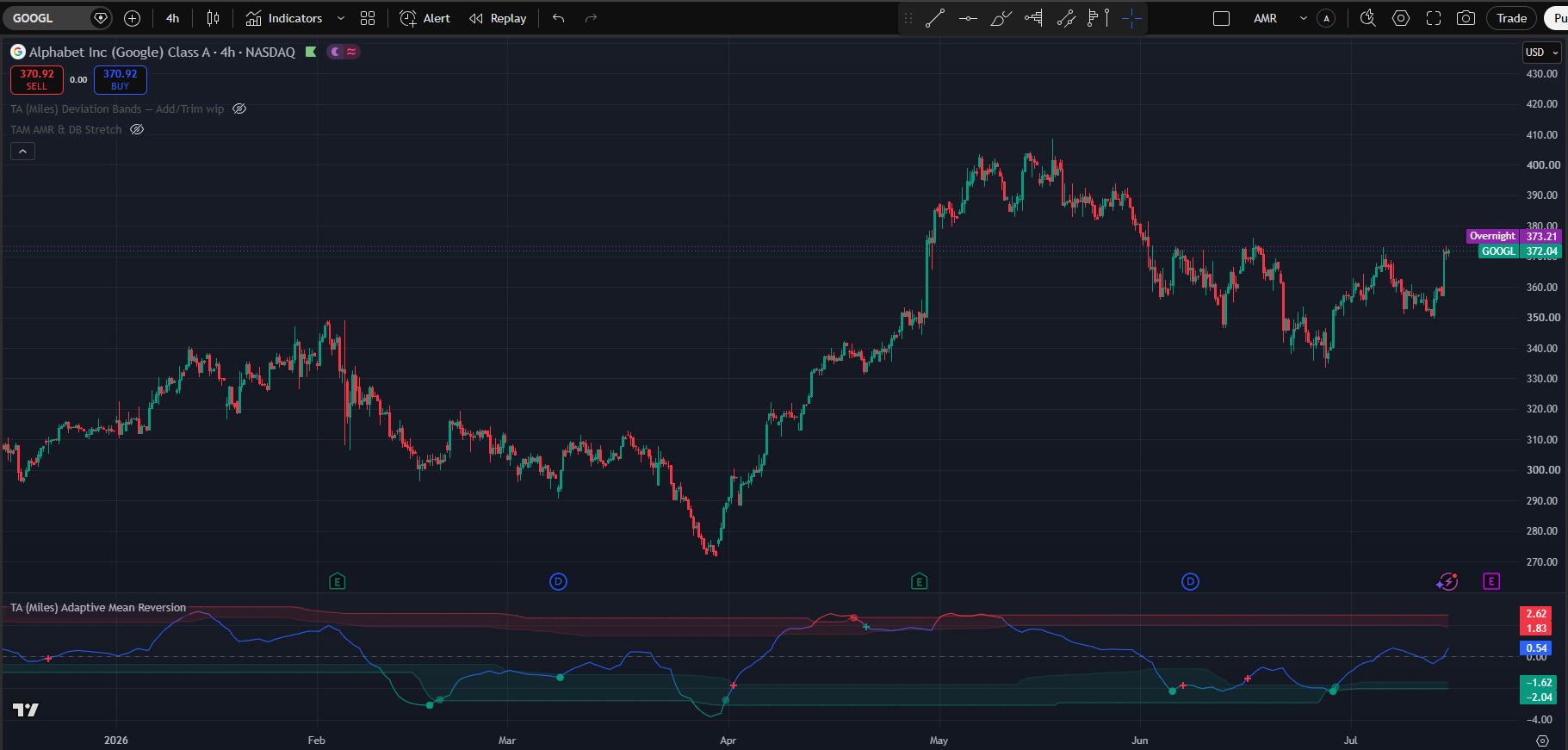
(Default setting with Multi-Timeframe 1h triggers)
The bands
Red Upper Band: Price is or is approaching overbought, stretched conditions. The price has made an out-of-the-ordinary move to the upside. Start looking for exit opportunities and avoid chasing price action.
Middle Band: Price is behaving regularly with no stretched moves either direction and no actionable signals either way.
Green Lower Band: Price is or is approaching oversold, stretched conditions. The price has made an out-of-the-ordinary move to the downside. Start looking for long entries or taking profits from short positions.
Triggers (Circles)
Circles are the main actionable events on your chart timeframe.
The indicator is flagging that a stretched move may be turning. Confirm with price structure and risk management.
Lower-TF Markers (+)
When enabled, a “+” sign may appear on the AMR line that signals that a faster timeframe fired its own trigger. Lower timeframe oversold conditions may indicate a higher low, for example 1h oversold conditions may serve to indicate a higher low in daily time-frame. This will be displayed as a green “+” signal in the AMR line. On the inverse lower time-frame overbought conditions may mark a lower high during a downtrend. This will be indicated as red “+” in the AMR line.
Lower time-frame signals are meant as potential continuation warnings. If the lower TF engine detects a reversal to the downside it will fire the red “+” as a warning that despite being oversold we might still experience more downside.
Disclaimer: a shift in direction will almost certainly require the lower timeframes to throw a “+” sign because lower time-frames always move faster. Because of this the “+” markers are meant to be taken as a warning to double check the current situation rather than a directly actionable signal.
Pictured above we can see all three scenarios. The first red “+” sign indicates the 1h fired a sell signal but that situation was a genuine change of direction. The first green “+” sign indicates a 1h buy signal for continuation that played out as such. Notice the difference between a “V” shaped recovery and the consolidation respectively. Finally the second and third red “+” signs are both marking lower highs during a downtrend signaling continuation.
Confirmation Markers (semi-transparent circles)
Confirmations appear after price has moved away from it’s position to mean revert. This are late signals that act more as confirmations of the move rather than early entries. Notice that they may fire even without a AMR signal and can serve to indicate that the indicator is no longer primed to fire one as the price is already recovering or has recovered.
Setup Markers
If enables the setup markers indicate when the MR signals are starting to agree more and more behind the scenes. They mark the area of interest rather the specific moment in time.

State Machine
The Adaptive Mean Reversion state machine works as a progressive confirmation system that filters false signals by requiring multiple conditions to align before taking action. As conditions align and miss-align AMR can move back and forth in it’s different states.
Watch
Starting with the with the watch stage, the system detects early signs of a potential reversal like price stretching away from average with momentum beginning fade.
Setup
As more conditions trigger, it moves to the Setup stage. This stage usually requieres more factors to be in agreement like price, volume and strech factor. This is where we need to start paying attention. If signals fade away the system would move back to “Watch”
Trigger
This stage fires the actual buy and sell signals as a great mayority of the elements are firing at the same time. The Trigger stage is where the actual signal fires: all three key elements align (the price stretch, a directional turn, and confluence of multiple technical indicators), which is your cue to seriously consider an entry, exit, or position adjustment.
Confirm
Finally, the Confirm stage appears when the stretched price condition begins reversing back toward the mean, providing a more patient and usually delayed, confirmation that the setup was valid.
Essentially, the state machine moves you from passive observation → active planning → aggressive signal → patient confirmation, ensuring that each stage brings stronger evidence before committing capital, reducing whipsaw trades and false breakouts.
Setting inputs and how to use them
This section covers the different setting options and how they affect the behaviour of Adaptive Mean Reversion. Since this is the first section of the settings there will be mentions of other settings. There will only be superficial-level explanation of the other settings; each setting will have its own section where more details will be provided.
NOTE: time and settings are provided as default samples, different assets may benefit from different settings that may go counter to their standard intended usage.
NOTE 2: Since this is the first section of the settings, companion settings for other sections are mentioned only at a high level here. Refer to each dedicated section below for full detail.
Trading Style
The trading style setting affects the time preference AMR will express.
Very Conservative
Best fit for longer term position trading in daily or weekly timeframes. This fits best for cycle-based traders that are looking for good entries in assets they are willing to hold for 1 year and beyond. Due to its low time preference in winning assets it might be good to pair with low line smoothing and adaptive bands activated.
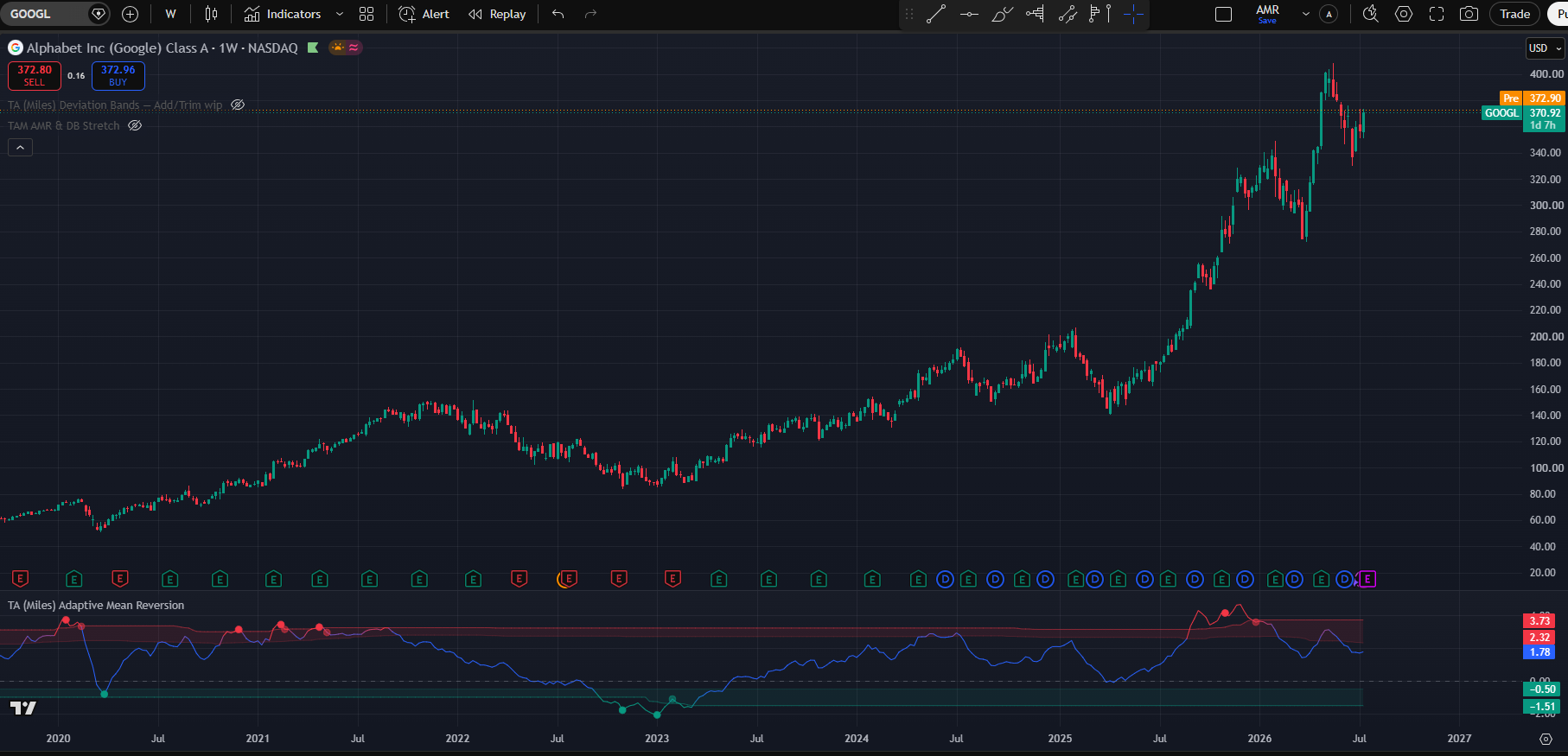
(Google weekly chart with default settings except trading style → very conservative and Line smoothing → low )
Conservative
As the name implies, this one has a slightly higher time-frame preference compared to the previous one. This will be more reactive both in entries and exits and is best used in the daily and weekly when you are looking to build a position for 3 months and up to a year.
(NVDA 1D chart with default settings except trading style → Conservative)
Neutral
This is the standard setting and meant as an all-rounder. As the name indicates it has a neutral time bias without overreacting to short term switches nor having the same patience of the conservative modes. It is meant to be used in the daily timeframe and the 4h timeframe to look for entries that materialize in weeks or a few months.
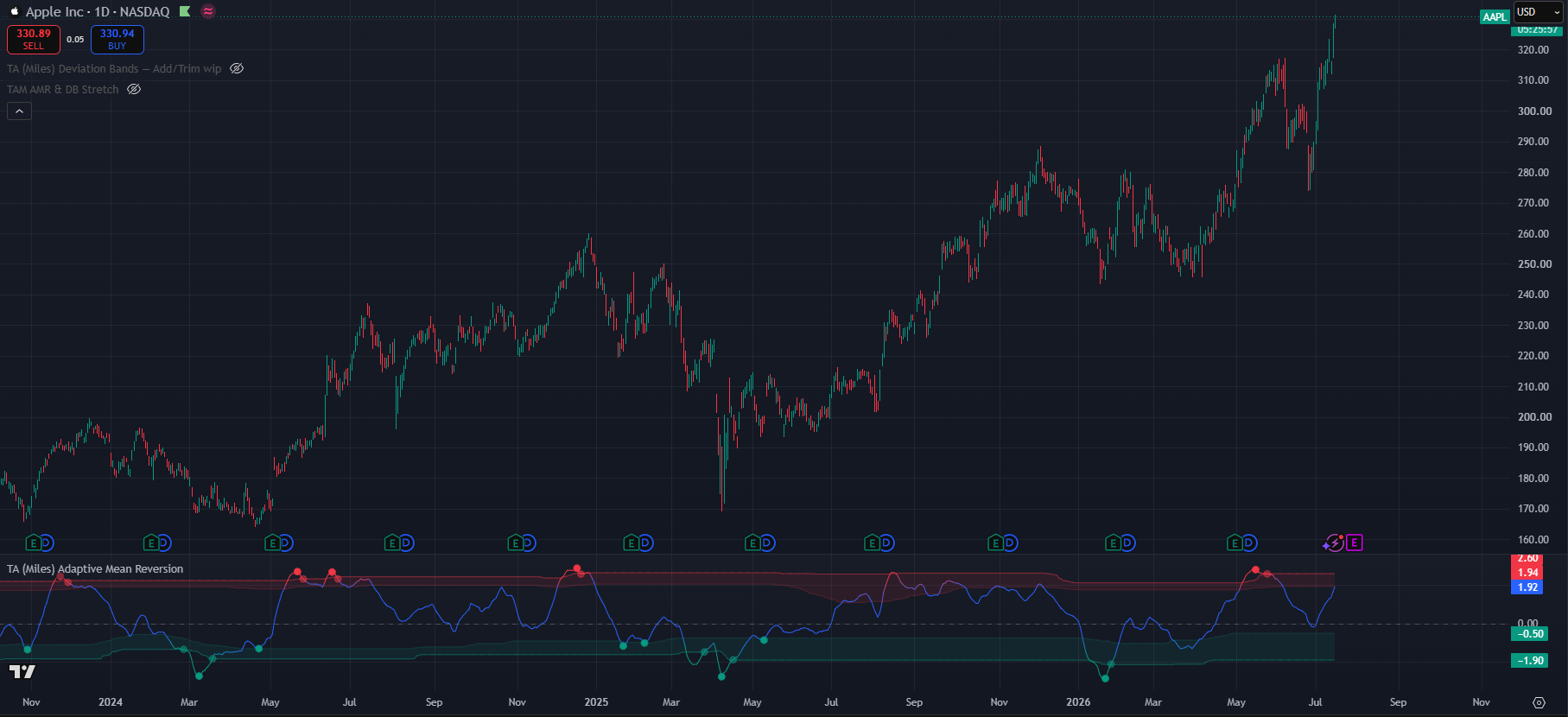
(AAPL 1D chart with default settings)
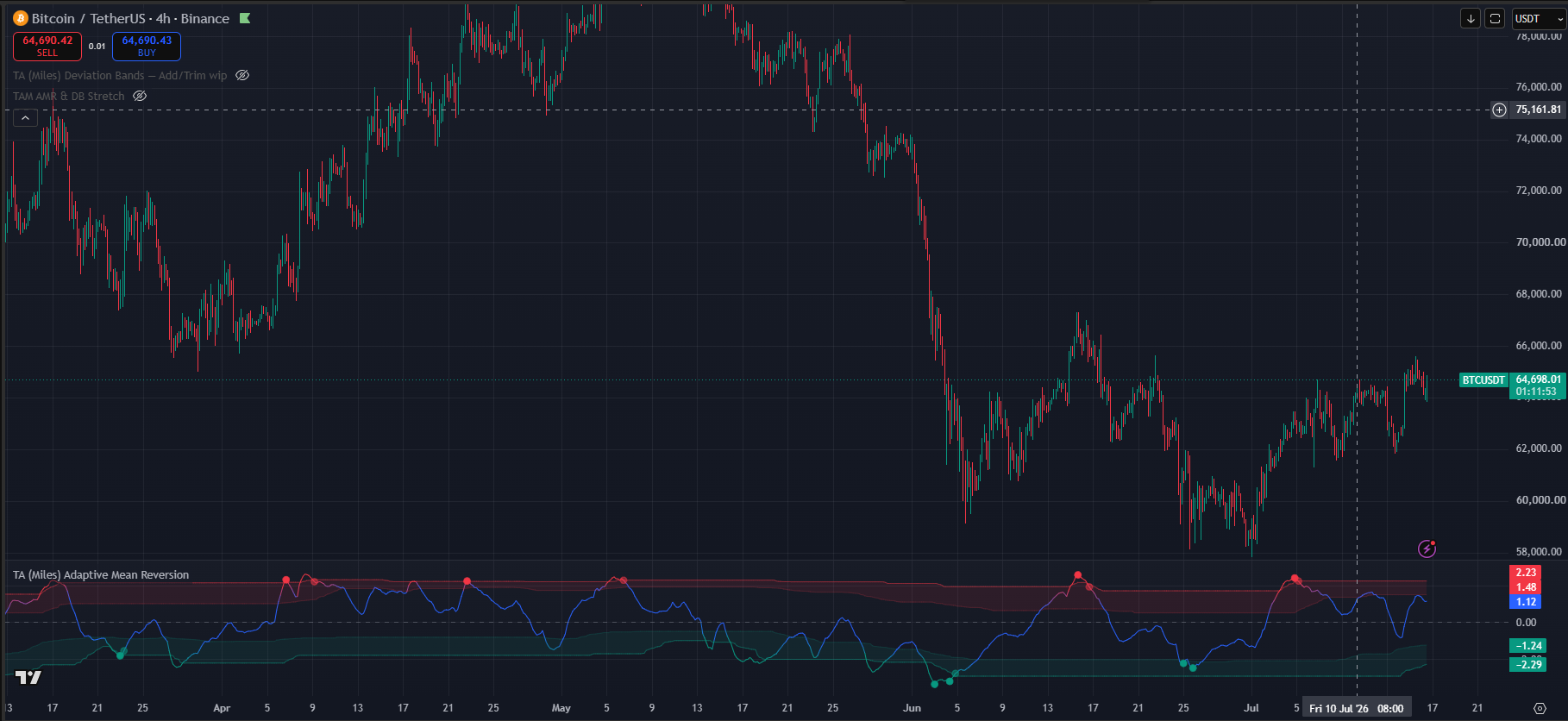
(BTC 1D chart with default settings)
Aggressive
This style has very high time preference and thus works best below the 4h time-frame for trades where you go in and out within 72h. Once we reach these timeframes and styles, this is also where we need to start to look at changing some of the other settings alongside this trading style to allow for a better read of the noisier market conditions of the lower timeframes. To address the extra noise in the lower time-frames I would recommend lowering the line smoothing from high as well as filtering the entry triggers more tightly than “All Qualifying” settings.
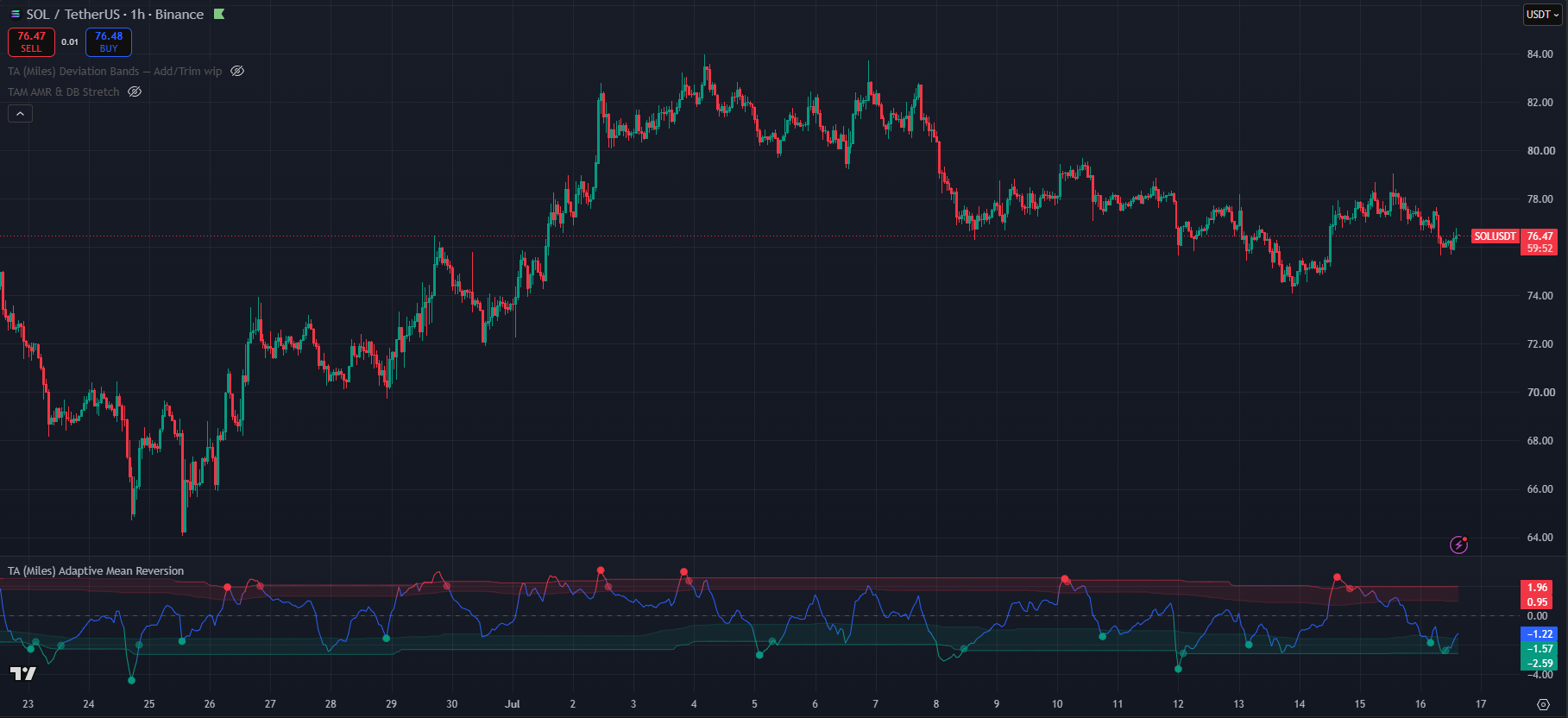
(SOL/USDT Binance 1h chart with trading style → Aggressive, Line Smoothing → low & trigger display → strong only )
Very Aggressive
This trading style has very high time preference and this it works best in the lowest timeframes like the 15m and the 5m time-frames. Best fit for same day scalp trades. Similar the above we need to change some accomying settings to properly accomodate the additional noise that can be found in this minute timeframes. At this point changing the system to work on the outer bands rather than asymetrically is strongly reccomended. additionally low line smoothing and strong signals become more useful. To avoid visual clutter turning off “show zone-exit confirmations” might be a good idea.
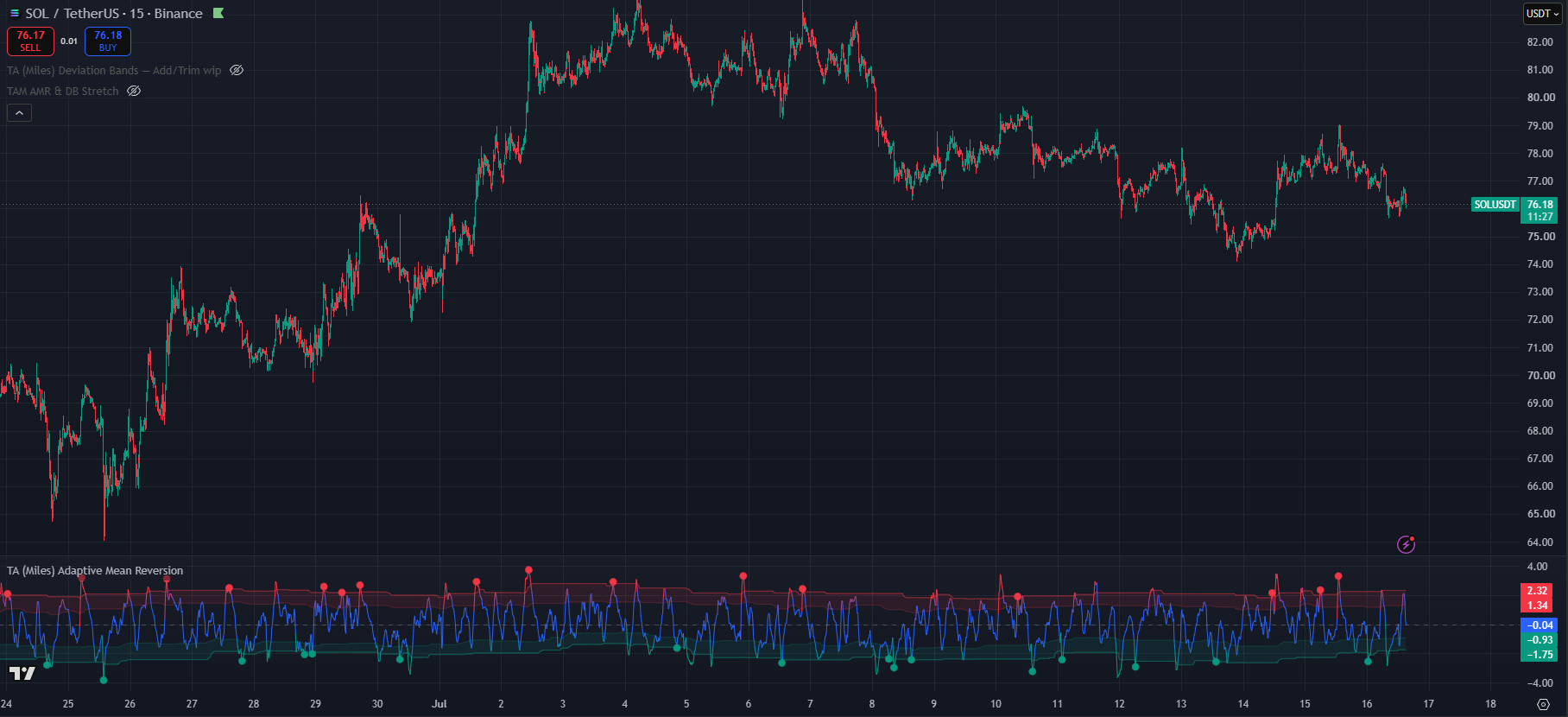
(SOL/USDT Binance 15m chart with trading style → Very Aggressive, Line Smoothing → low & trigger display → strong only, Stretch threshold Outer band, Show zone-exit confirmations OFF)
Line Smoothing
This is a responsiveness setting, the lower the line smoothing the more responsive it becomes. Responsiveness by itself is not an absolute positive, responsiveness comes with noise. While the trading styles are more tied to timeframes the line smoothign settings requieres of multiple factors. Line smoothing will also have an effect on how early a signal fires. In this case this is not about being late to the move but about longer moves in time.
A smoothing function being applied to the AMR line has an effect on the pivot vs rollover detection. Since the line is smooth it will tend to have less sharp turns and more roll, thus firing more signals throw the rollover engine.
While it is true that lower timeframes, especially those below the 4h one, do benefit from more reactiveness and thus lower smoothing, this does not go the other way with the same strength.
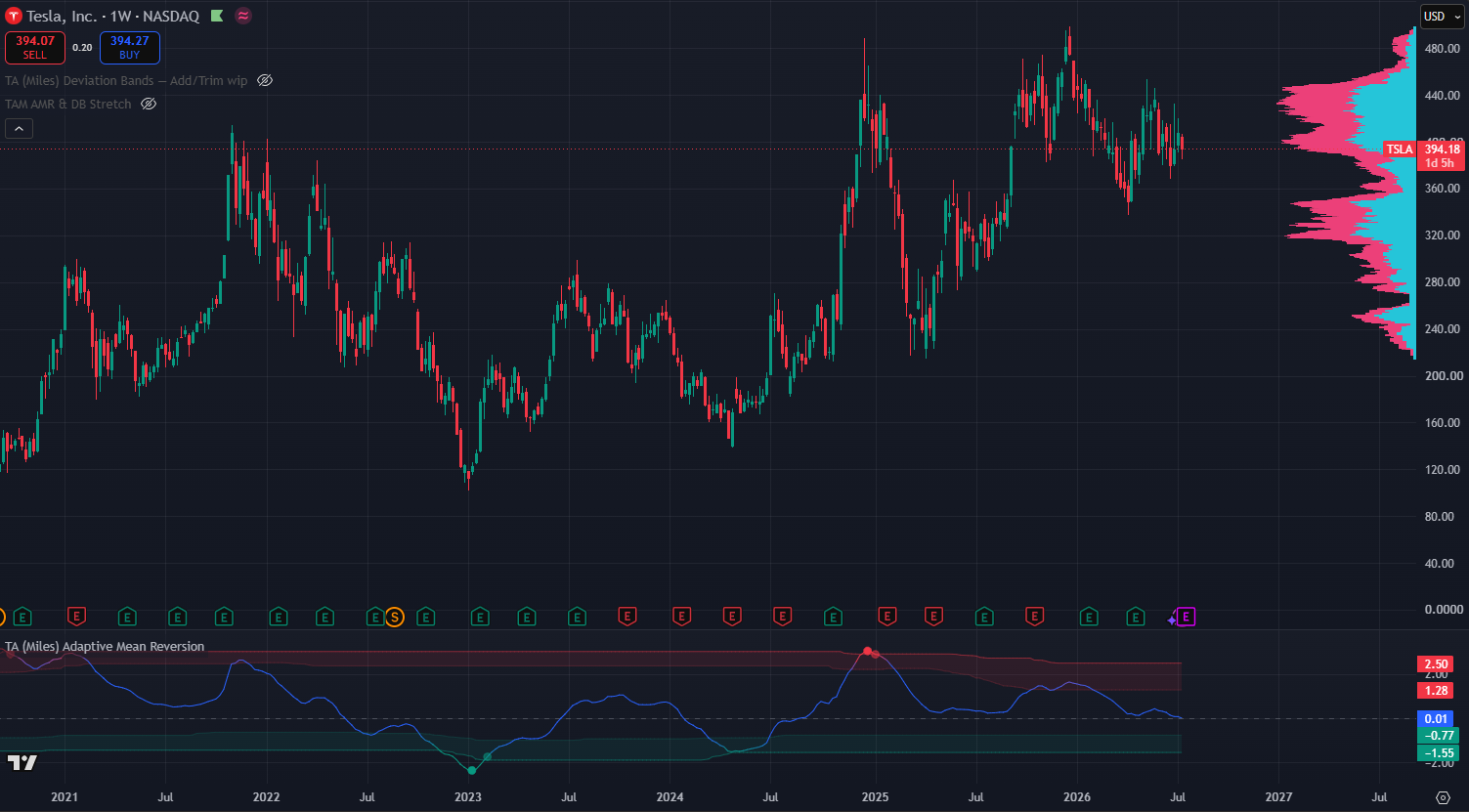
(TSLA Weekly chart default setting except line smoothing → Very High)
Time-frame
As a general guide higher line smoothing is usually paired with the higher time-frames as the lower in timeframe you go the lower your smoothing setting should be. However this is not a linear relation as “High” line smoothing can still be useful in the 4h timeframe at the same time that “Low” smoothing can be paired up with the 4h timeframe.
Volatility
The more volatile and asset is the more it will benefit from higher line smoothing. This will help avoid noise and clustered signals in a potential false bottom. This will also factor in the trading style of each user as “Low” line smoothing may play well with more volatile assets for quick entries and exits like user looking for longer term entries may want higher smoothing for more confident entries.
HTF Trend
When looking at higher time frame assets it is crucial to assertain the overall trend and direction. Assets that have a very clear trend many benefit from lower smoothing. While assets that chop and range a lot will benefit from higher smoothing. In trending assets the high smoothing settings may prevent the AMR line from ever properly reseting either direction thus missing many signals. In ranging or choppy assets the higher smoothing might reduce some the noise.
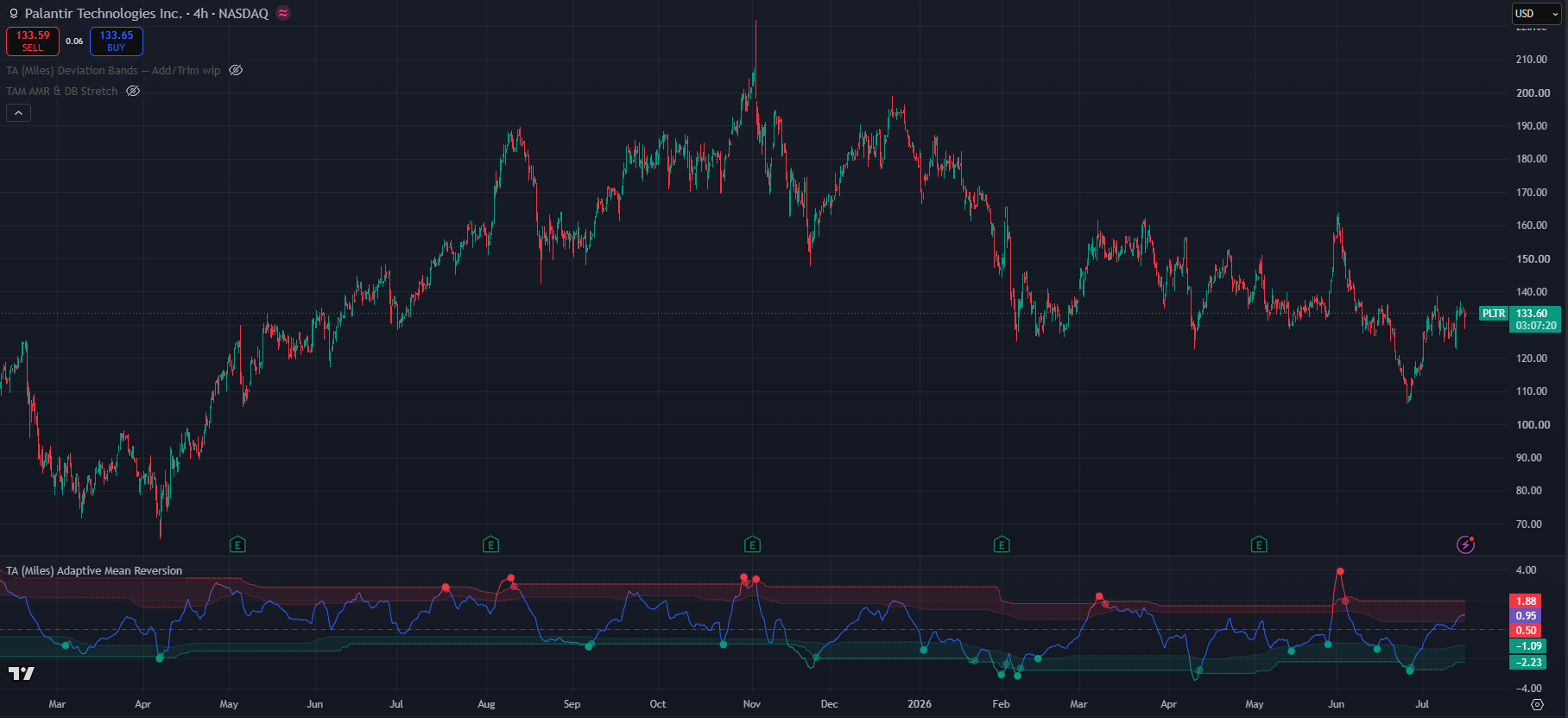
(PLTR 4h chart default setting except line smoothing → Mid)
Adaptive zones
This is a True / False setting. It affects how the bands the price needs to reach to be considered stretched are calculated.
When the setting is off the zones will reflect static 1 & 2 STD stretches in reference to the price. The values for the inner and outer band can also be set by the user.
However when the adaptive zones are turned on the zones automatically tune and learn from the price movement. This automatic adjustment of the bands helps the system remain working and effective even during strong one-side trends and movements by automatically adjusting and changing what overbought and oversold mean according to the asset and the timeframe. Additionally it also helps adjust for price volatility as they will move closer together or move further to the extremes depending on how the asset is behaving.
Stretch Threshold
This settings is also tied to to the bands, however this one is in reference to when the stretch signals starts to count. Since markets tend to be asymetric and move upwards move than they move downwards it is easier correction that do not reach as low in the AMR bands as the movements up reach high. For that reason on the oversold band the stretch starts to count in the first band while for the overbought band it starts to count in the second band. This however can be overwrote to have inner or outer symetry. Inner bands will generate more signals which can work for faster entries and exits however it may generate more noise as well. While the outer band may generate less signals but of higher mean reversion chance.
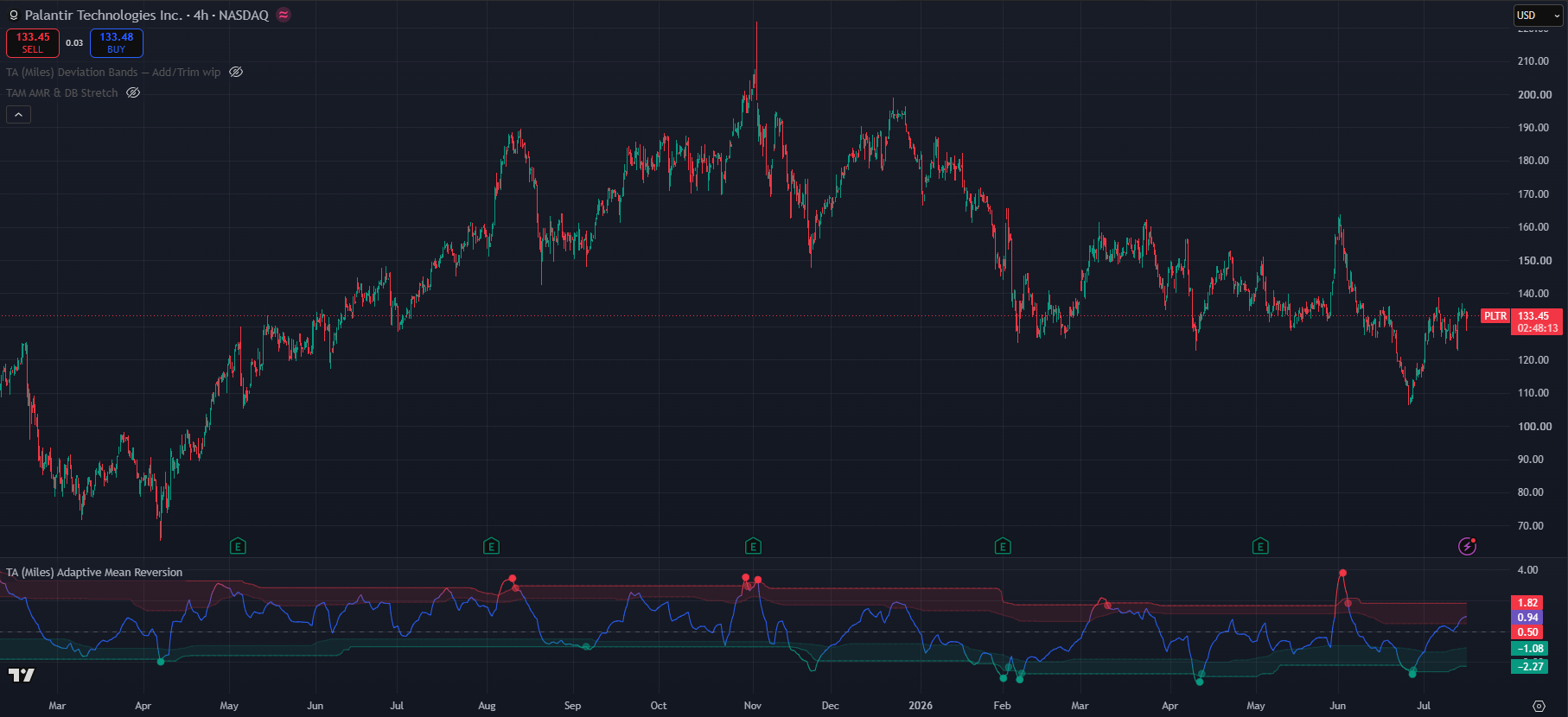
(PLTR 4h chart default setting except line smoothing → Mid, Stretch threshold outer)
Regime filter
Enable regime filter
Master switch for the section
Requiere ATR contraction
It requieres a contraction in the Average True Range as a way to measure that volatility is contracting. It blocks triggers where this condition is not met
Block counter-trend triggers
Vetos seeling on uptrends and buying on downtrends. It prevents you from catching falling knifes or stepping in front of trains.
Trigger display
Trigger display acts as a quality gate for the buy and sell signals. Since the state machine already does a lot of filtering the default settings is “All Qualifying”. However this setting may prove to noisy on extremly volatily assets that have huge price swings in both directions. Thus the other options can helo filter signals and prevent noise. This setting has a direct effect on the underlying state machine.
All qualifying
Shows every trigger that passed the full pipeline
Strong only
Displays only signals that carry a 2+ quality or confluence flags
Pivot Only
Display one where there is a clear pivot and avoid rollovers. This helps avoid potential flags or find V shape recoveries
High Quality
Requieres 2 or more quality flags
With Divergence
Triggers only where there is a divergence between the price and the AMR line
Candle confirmed
only triggers on regection candles
Extreme Stretch
Blocks any trigger that is not outisde the outer bands
Multi-timeframe (Lower TF)
This systems works a duplciate multi-timeframe engine whose main goal is to help identify potential continuation entries or avoid bad entries. While it’s main role is to look at the lower time-frames it has benn left open for manual setting to whichever one the user prefers. The Auto mode will automatically enable the engine two common TFs bellow. An important note is that these are not the trading view tiemframes but the oens commonly used to identified higher lows or lower highs in trends. In case if doubt extend the “Manual Lower TF” to identified which time-frames are taken into account.
This setting warns users about potential continuation either direction. it is possible that an AMR dot is fired and the price never fully corrects to the downside or consilidates at the new level before a continuation. In order to not be left behind this engine will scan the lower TFs and fire green “+” in case your current chart is overbought but the lower TF having fired an oversold AMR signal. This might indicate a continuation to upside. The same logic applies the other way around.
It can also be used to avoid bad entries in the cases where an AMR dot has fired on but on the same candle or close by the lower time-frames fires a “+”. This may act as a warning ofr users to check if they are falling for a lower high or a higher low trap.
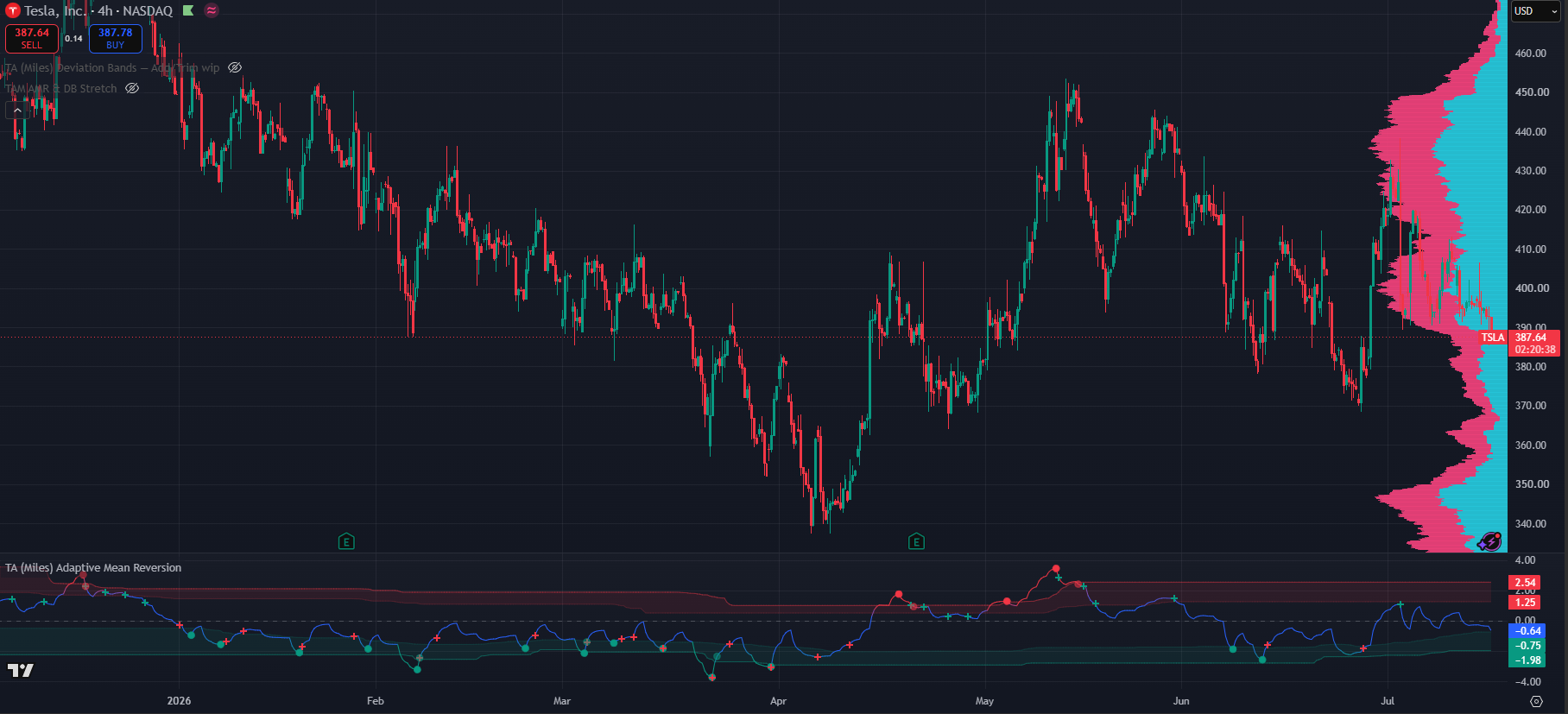
(TSLA 4h chart, default settings except line smoothing → low)
The Lower Timeframe engine inherits the same line smoothing as the regular chart however it does have it’s own setting for signal filtering and noise supresion.
It has additionally a context aware system that maintains the context of your current chart to look for specific signals. This helps keep the noise to a minimum as lower timeframes would fire significantly more signals and present only the relevant ones. It can also be turned off.
Useful Alerts
Every condition below is a separate entry in TradingView's Create Alert → Condition dropdown, listed under TA (Miles) Adaptive Mean Reversion. Alerts are evaluated by the engine itself, so a condition fires whether or not its marker is currently displayed on the chart. That means you can subscribe to a signal while keeping the chart clean, and it also means the Trigger display filter and the marker on/off switches do not silence the alerts.
Each alert message already carries the ticker and the timeframe, so one alert can be reused across a watchlist and you will still know what fired and where.
Every marker in this section is drawn on the AMR line itself, in the indicator pane, not on the price candles. Green is the oversold/bullish colour and red is the overbought/bearish colour by default, and both are user-configurable in the settings, so if you have changed them read "green" and "red" below as "your bullish colour" and "your bearish colour".
Actionable triggers (the solid dots)
- Buy trigger an oversold trigger fired: stretch, a directional turn, and confluence all agreeing. This is the standard actionable long-side event.
- What you see: a small solid green dot on the AMR line, down in or just outside the lower green band. The readout table state flips to ▲ TRIGGER buy.
- Sell trigger the overbought mirror: stretch, turn and confluence agreeing on the short/exit side.
- What you see: a small solid red dot on the AMR line, up in the upper red band. The table state reads ▼ TRIGGER sell.
- Strong buy trigger the same event with two or more extra confirmations at the AMR trough. Fewer of these print. This will correspond 1 to 1 with the green dot if you have the trigger display set to "Strong only". If instead you have "All qualifying", you may get a dot without this alert triggering.
- What you see: the same solid green dot. A strong trigger is not drawn differently from a normal one. If you want to see only the strong ones on the chart, set Trigger display filter → Strong only, and every dot that remains is a strong trigger.
- Strong sell trigger the overbought equivalent, two or more confirmations at the AMR peak.
- What you see: the same solid red dot, with the same Strong only note above.
Progressive state machine (early heads-up)
- OS watch — exhaustion price is stretched to the downside and momentum is starting to fade. The Watch stage: start paying attention, nothing to do yet.
- What you see: no marker at all. Watch is only visible in the readout table, which reads ▲ Watch OS. If you set State background → Watch (strict) you also get a very faint green background tint behind the candles for as long as the condition holds.
- OB watch — exhaustion the overbought mirror of the above.
- What you see: again no marker; the table reads ▼ Watch OB, and in Watch (strict) background mode the faint tint is orange rather than red.
- OS setup — turn likely the Setup stage on the oversold side: price and volume are now agreeing at the extreme, so a turn has become likely. This is the "get your levels and size ready" alert.
- What you see: a small green "x" cross on the AMR line (not a dot, and not the "+" of the lower-timeframe engine), provided Show SETUP markers is on. The table reads ▲ Setup OS, and with State background → Setup only the background tints faint green.
- OB setup — turn likely the overbought equivalent.
- What you see: a small red "x" cross on the AMR line, table state ▼ Setup OB, faint red background tint in Setup only mode.
Watch and Setup are deliberately earlier and looser than the triggers. They exist so you can prepare before the dot prints, and because the state machine can walk backwards, an "x" cross that is never followed by a dot is normal: the conditions stopped agreeing and the state fell back to Watch or Neutral.
Confirmations (late but higher-certainty)
- Buy reversal confirmed AMR crossed back above the outer oversold band; the stretch is actively unwinding upward.
- What you see: a faded, semi-transparent green dot on the AMR line at the point where it exits the outer green band. Same shape as a trigger dot, visibly washed out, and it prints later and higher than the trigger would have.
- Sell reversal confirmed AMR crossed back below the outer overbought band.
- What you see: a faded, semi-transparent red dot where the line leaves the outer red band on its way down.
These are the semi-transparent dots. They appear later than the triggers by design and can fire even when no solid dot printed, which itself is information: the move is already reverting and the engine is no longer primed. They require Show zone-exit confirmations to be on to appear, but the alert fires either way.
Location and context (no signal logic)
- Entered OS approach zone the AMR line crossed down into the oversold band. Price has arrived in the green zone; no turn is implied.
- What you see: no marker. The visual is the line itself: the AMR line drops below the faint inner green band line and, with the gradient line enabled, starts shading from neutral toward green as it goes deeper.
- Entered OB approach zone the AMR line crossed up into the overbought band.
- What you see: no marker; the line rises above the faint inner red band line and begins shading toward red.
- Extreme oversold (σ) the AMR line pushed beyond the −2σ outer band. A genuinely out-of-the-ordinary move, and the zone the Extreme stretch (outer σ) trigger filter cares about.
- What you see: the AMR line crossing below the lower of the two green band lines (the stronger, more solid one) and turning fully saturated green. Once the line is solid green rather than a gradient, you are beyond the outer band.
- Extreme overbought (σ) the same beyond +2σ.
- What you see: the line above the outer red band line and fully saturated red.
- Returned to neutral from oversold the AMR line left the oversold band and re-entered the neutral middle. Useful for knowing a mean-reversion cycle has completed.
- What you see: no marker; the line crosses back up through the inner green band into the middle of the pane and its colour returns to the neutral line colour, with no green left in it.
- Returned to neutral from overbought the same from the upper side.
- What you see: the line crossing back down through the inner red band, colour returning to neutral.
These six are location only. They tell you where the AMR line is, not that anything is turning. If the line reaches a band and no "x" cross, no dot and no state change follows, that is the engine telling you it did not see a turn.
Lower-timeframe continuation warnings
- LTF buy reversal the lower-timeframe engine fired a buy (higher-low cue).
- What you see: a small green "+" cross on the AMR line. The "+" shape is what distinguishes these from the Setup markers, which are "x" crosses, and from triggers, which are filled dots.
- LTF sell reversal the lower-timeframe engine fired a sell (lower-high cue).
- What you see: a small red "+" cross on the AMR line.
As with the markers themselves, treat these as a prompt to re-check the situation rather than a signal to act on. A change of direction will almost always produce one, so on their own they carry little edge; their value is in coinciding with, or contradicting, a dot on your own timeframe. A red "+" appearing on or right next to a green buy dot is the classic warning to check whether you are buying into a lower high.
Quick visual key
| What is on the AMR line | Which alert fired |
|---|---|
| Small solid dot, green or red | Buy / Sell trigger (and Strong, which looks identical) |
| Small faded, semi-transparent dot | Buy / Sell reversal confirmed |
| Small "x" cross | OS / OB setup |
| Small "+" cross | LTF buy / sell reversal |
| Nothing drawn, only the line colour and the table changing | Watch stage, approach zones, σ extremes, returns to neutral |
A practical alert set
For most users three alerts are enough: Buy trigger and Sell trigger to catch the actionable events, plus OS setup — turn likely (or its OB counterpart, depending on which side you trade) so you get the "x" cross warning one stage before the dot prints. Add the two confirmations only if you prefer to trade the unwind rather than the turn.
TA Adaptive Mean Reversion is a Trading Apologist TradingView indicator.Request access to the scripts, or browseevery guide.
Educational and analysis purposes only. Not financial advice. See theterms.