
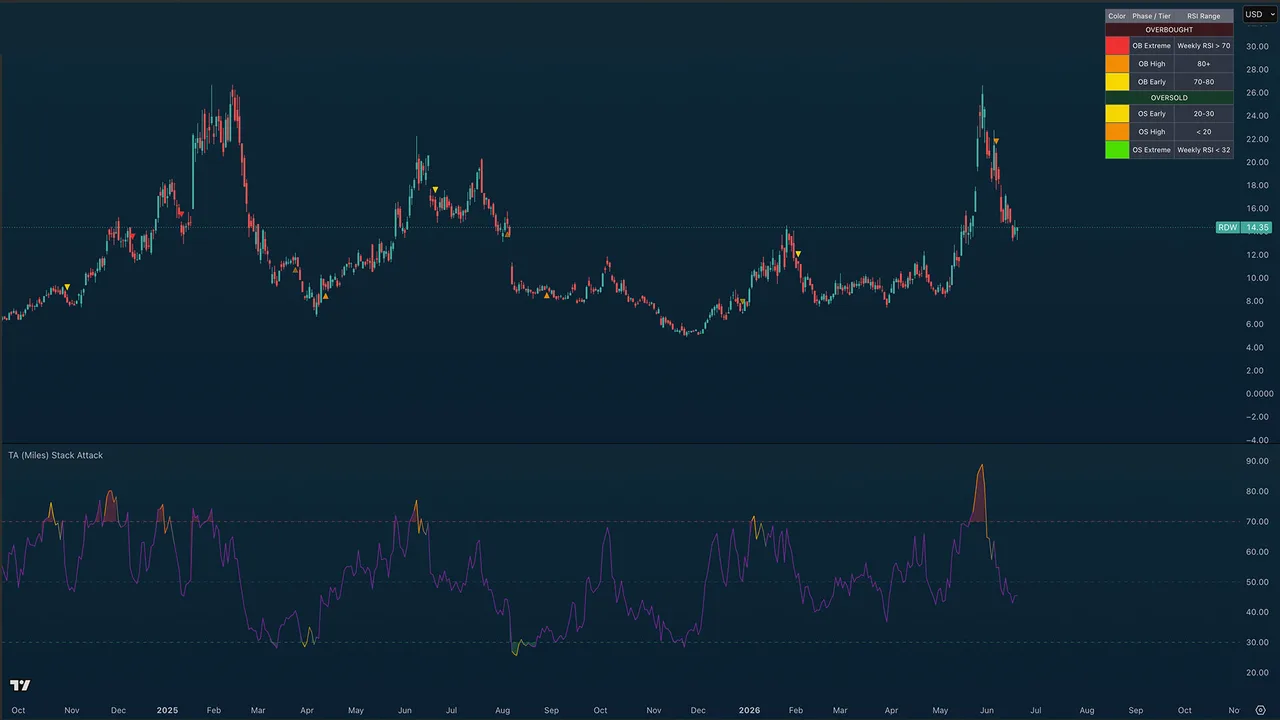
Purpose
TA (Miles) Stack Attack helps you see when several important timeframes are stretched at the same time and then walks that situation through warning and confirmation phases so you know how seriously to take it.
Use it for spotting high-confluence overbought or oversold conditions, separating early warnings from confirmation, and managing exits, trims, and re-entries over several timeframes. It measures stretch and follow-through; it does not predict tops and bottoms.
Best used for:
- Finding high-confluence exhaustion when multiple timeframe, such as the 4H, Daily and weekly RSIs are stretched together, not just the one in your chart.
- Separating "pay attention" (Phase 1) from "the move is weakening" (Phase 2) from "it has turned" (Phase 3).
- Catching the rare Weekly-confirmed extremes the highest-conviction tops and bottoms.
- Watching for long re-entry opportunities after prior sell-side pressure (Stack Memory engine).
- Spotting lower-timeframe pullbacks inside a higher-timeframe stretch (optional 15M / 1H / 4H stack markers).
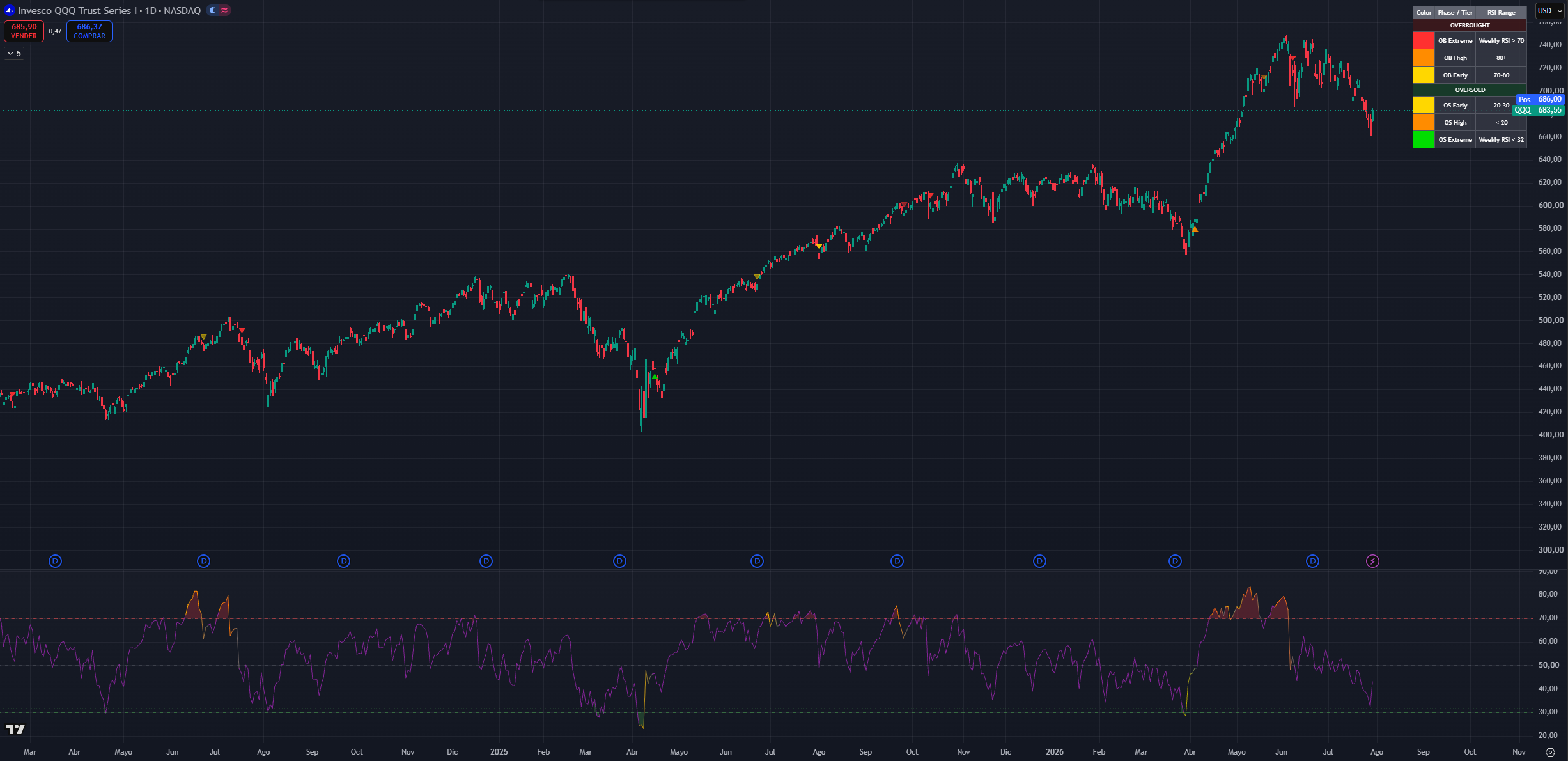
(QQQ 1D chart, default settings)
NOTE: Stack Attack is intended mainly for 4H, Daily, and Weekly charts. On lower timeframes the underlying higher-timeframe RSIs move slowly.
NOTE 2: Time and settings are provided as default samples. Different assets may benefit from different settings that may go counter to their standard intended usage.
How to read Stack Attack
Stack Attack displays as an oscillator panel with its signal markers drawn directly on the price chart. It has two main surfaces: the RSI pane below and the phase markers above.
What You See
- A standard chart-timeframe RSI line in the lower pane, with overbought (70), oversold (30), midline (50), and outer extreme (80/20) reference levels.
- The line is colored in reference to the stack OS/OB agreeing with each other.
- Zone fills when the RSI is inside the overbought or oversold zone.
- An optional composite multi-timeframe RSI line (off by default).
- Circle markers Phase 1 stack ignitions on the price chart (off by default).
- Translucent triangles Phase 2 warnings on the price chart.
- Solid triangles Phase 3 confirmations on the price chart.
- Vertical conviction lines the rare Weekly-extreme ignitions.
- green cross (+) markers dip re-entry longs from the Stack Memory engine.
- Optional white fixed-timeframe stack triangles (15M / 1H / 4H tiers), divergence lines, background tint, and a color reference table (legend).
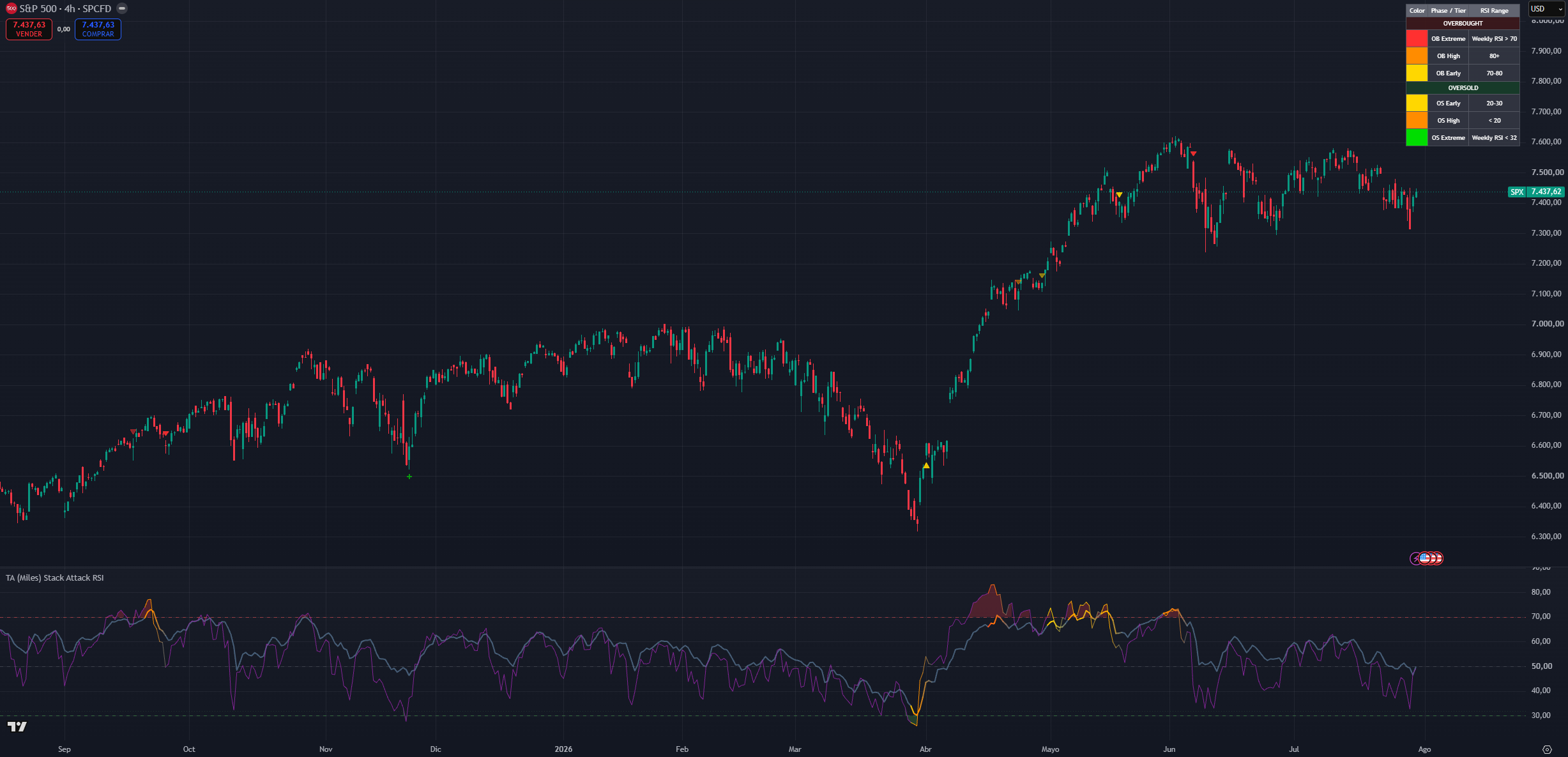
(SPX 4H chart, default settings and Composite RSI on)
The stack
At its core, Stack Attack watches the RSI of a fixed ladder and with different weights of timeframes 1H, 4H, Daily, with the Weekly on top no matter what chart you are on.
Red / overbought stack: the rungs are above 70 together. The asset is stretched everywhere at once, not just on your chart. Start looking for exit or trim opportunities and avoid chasing price action.
Middle / no stack: the timeframes disagree or sit mid-range. Price is behaving regularly and there is nothing actionable either way.
Green / oversold stack: the rungs are below 30 together. The downside move is stretched across the ladder. Start looking for long entries or for taking profit on short positions.
By default a stack needs 2 of the three lower rungs (1H / 4H / Daily) in agreement. The Weekly is not required when it also confirms, the signal upgrades to the Extreme tier.
Color severity
Every marker carries a severity color. Same idea on both sides the stronger the color, the deeper the confluence:
Overbought side: Yellow (Early RSI just crossed 70) → Orange (High RSI deep above 80) → Red (Extreme the Weekly RSI also confirms, max conviction).
Oversold side: Yellow (Early RSI just crossed 30) → Orange (High RSI deep below 20) → Bright Green (Extreme Weekly confluence).
Stronger colors mean the condition deserves more attention: red says long-side risk is at its highest, bright green says recovery or re-entry conditions are at their strongest.
Phase 2 and Phase 3 markers inherit the color of the Phase 1 ignition that armed the cycle a red Phase 3 traces back to a Weekly-extreme overbought ignition.
The same color severity applies to the RSI line. This can be used instead of the markers in the chart if the goal of keeping the chart cleaner while maintaining the stack awareness
Phase 1 Ignition (Circles)
Circles mark the moment the stack ignites: the required timeframes align overbought or oversold on the same bar. This is the earliest warning the market is stretched enough to pay attention, but this is not confirmation.
Phase 1 re-fires when an already-active stack escalates into the High tier (RSI pushing deeper into the 80/20 extremes), so an escalating circle sequence means the condition is intensifying, not repeating.
Phase 1 circles are off by default to keep the chart clean and to reduce the temptation to act too early.
Phase 2 Warning (Translucent Triangles)
After a Phase 1 ignition fires against the prevailing trend, the system arms a watch. The first opposing swing pivot after that ignition prints a translucent triangle: the stretched move may be starting to weaken.
Phase 2 inherits the color of the Phase 1 that armed it, so a red Phase 2 traces back to a Weekly-extreme ignition. It is stronger than Phase 1 but still earlier and less reliable than confirmation.
Consequence: this is the planning layer. Decide what you would do if the move confirms, but do not treat it as a standalone entry or exit.
Phase 3 Confirmation (Solid Triangles)
Phase 3 fires when the trend engine flips against the original stack direction. The reversal Phase 1 hinted at now has real follow-through.
Phase 3 arrives later than Phases 1 and 2, but it is the marker new users should trust first. It also closes the cycle the watch disarms until the next ignition.
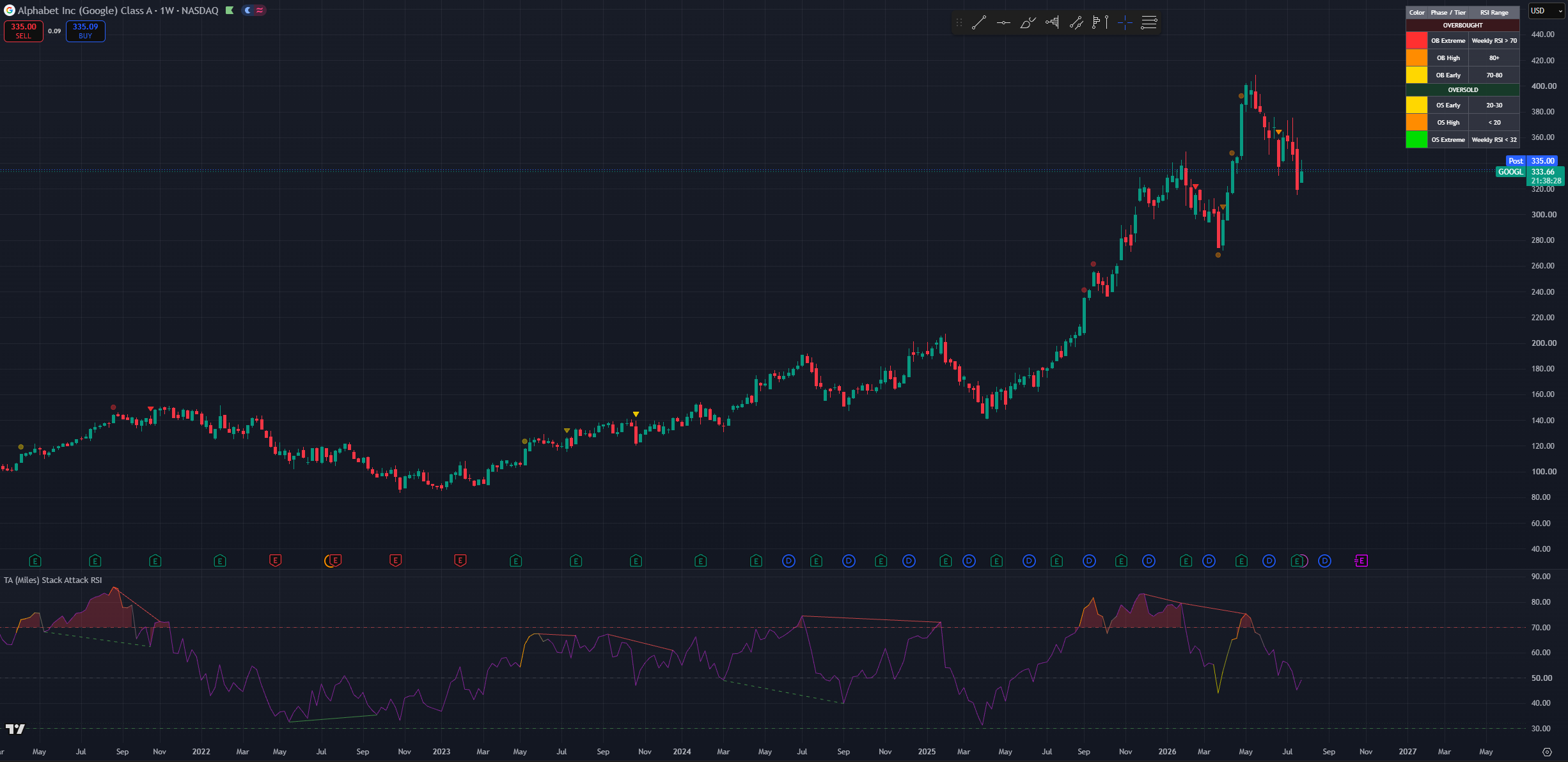
(Higher-timeframe chart showing a red vertical conviction line at a Weekly-extreme overbought ignition near a major top)
Weekly-Extreme Conviction Lines
When an ignition fires with Weekly confluence the Extreme tier a subtle vertical line is drawn on the price chart (red for overbought, green for oversold). These are deliberately rare: they mark the handful of moments per year when everything from the 1H to the Weekly is stretched in the same direction. Weekly re-fires are throttled so the line marks events, not noise.
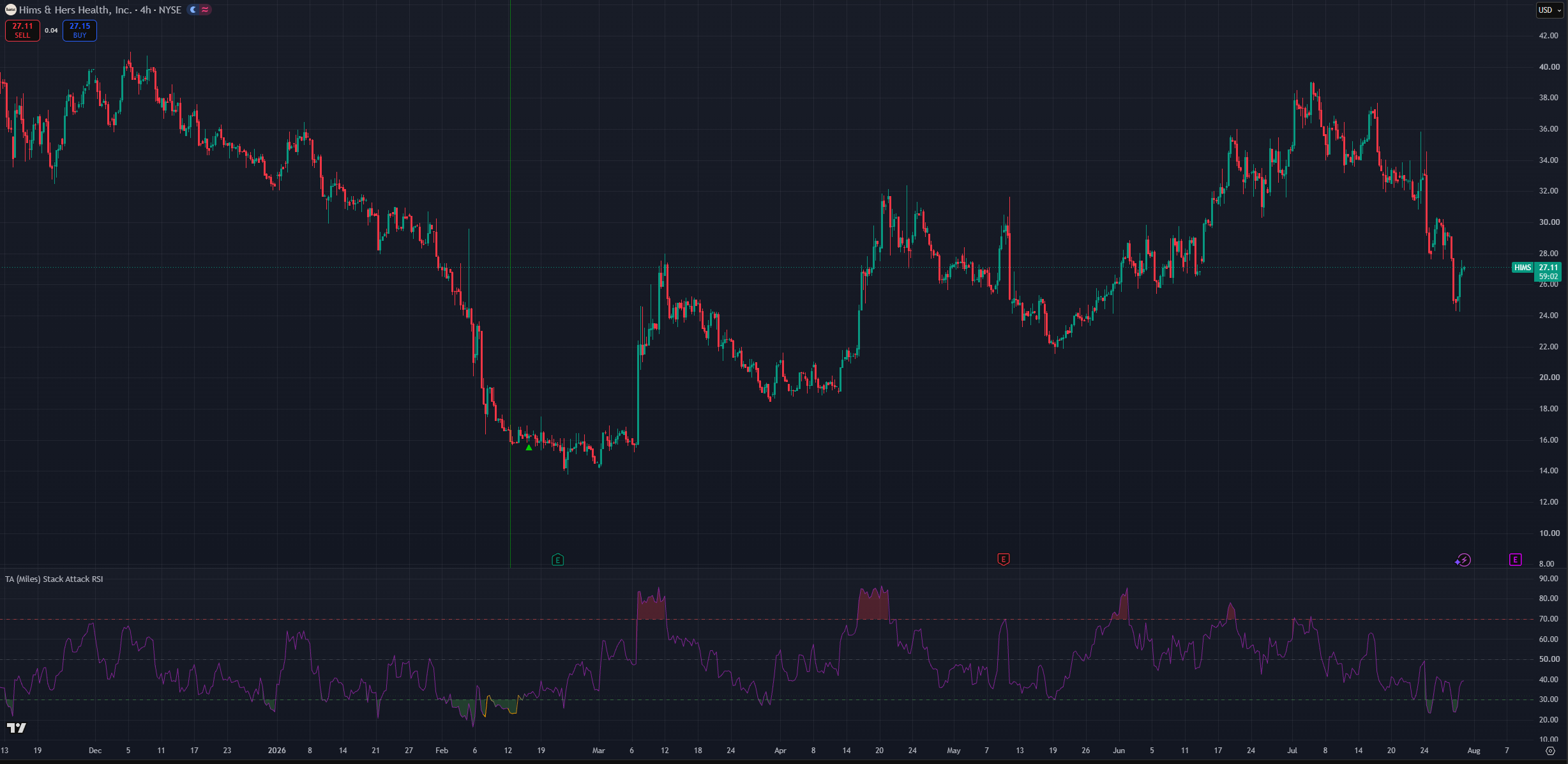
(HIMS 4H chart, default settings)
Stack Memory (dip re-entry)
This is the advanced engine, and it addresses one specific scenario: you sold or trimmed on sell-side pressure (an overbought Phase 1/2/3), price never fully corrected, and you want a disciplined way back in without chasing.
After any sell-side event the engine arms a re-entry cycle and starts auditing price behavior:
- Cooldown: for a fixed window after the sell it will not fire at all this is what prevents buying right back into the top.
- Qualification: during the cooldown it counts how many bars were ranging (bounded range, no waterfall legs, no active overbought stack). Only if the great majority (≥ 80%) were ranging does the cycle qualify a market still trending down never qualifies. If the audit fails but the market later settles into a clean consolidation streak, the cycle can recover and qualify late.
- Tilt: once live, the longer the consolidation holds, the more the internal re-entry RSI shifts its weight from the higher timeframes toward the lower ones (Max tilt period controls how long full tilt takes). Early in a consolidation it demands deep HTF-weighted oversold readings; months in, a shallower LTF dip is enough. This is the "patience" of the engine.
- Trigger: a green "+" fires when the re-entry RSI (or the chart RSI) curls back up through its oversold level. Dump legs, fresh bear phases, and active overbought stacks all block the trigger. Fires are capped per cycle.
Any regular buy-side event (an oversold Phase 1/2/3) disarms the cycle the normal phase system has taken over.
Disclaimer: the Stack Memory engine is deliberately conservative its job is to keep you out of falling knives, which means it will also be late or silent on V-shaped recoveries. Treat every "+" as a prompt to check the higher-timeframe trend, not as a standalone buy signal.
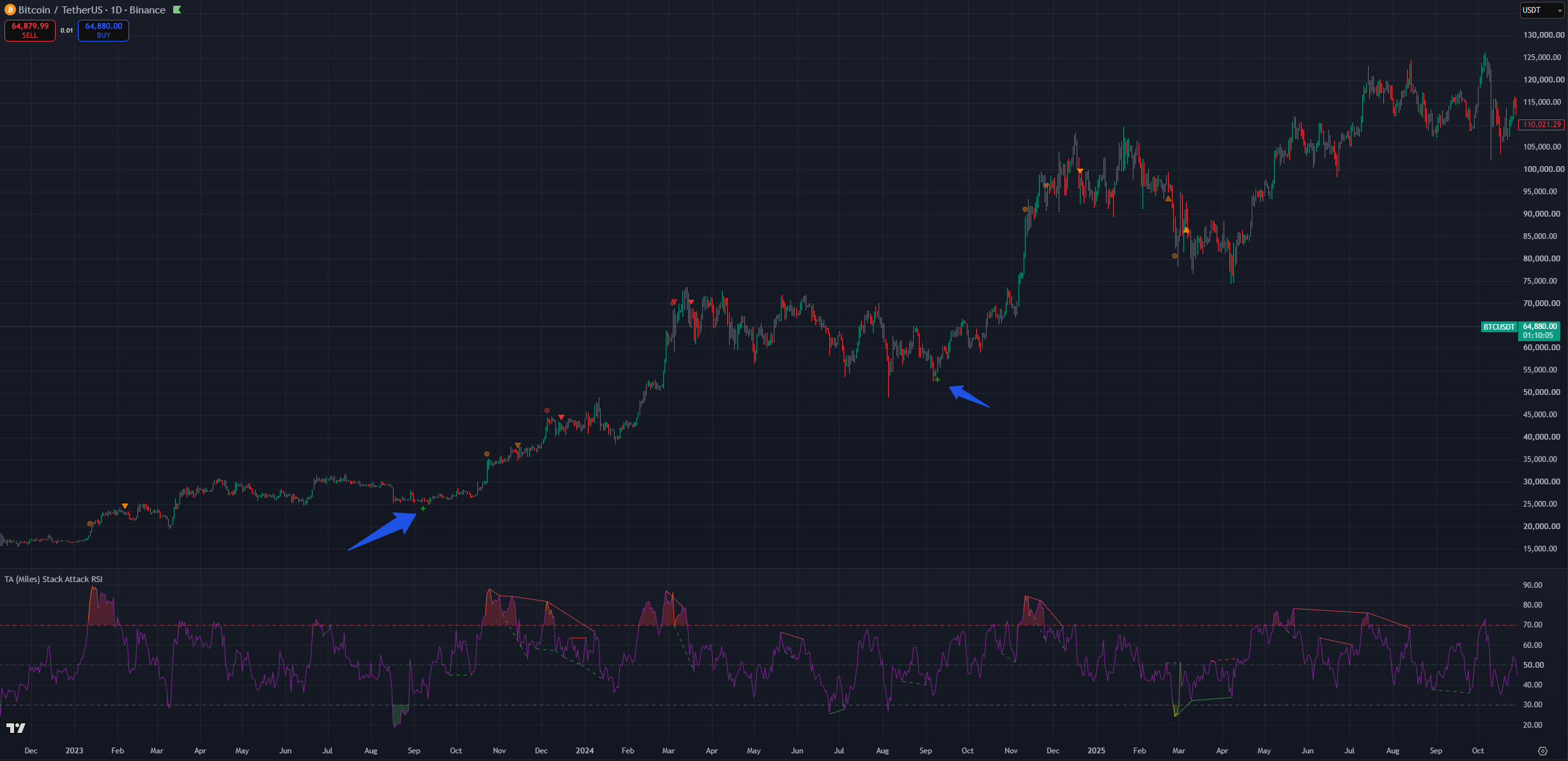
(BTC 1D chart, Default settings with with divergences on)
15M / 1H / 4H Stack Markers (white triangles)
Six optional fixed-timeframe markers (all off by default) for users who want granular context. They read fixed timeframes regardless of your chart, so they work on any chart and any TradingView plan.
When enabled, a white triangle may appear on the price chart that signals a shallower multi-timeframe RSI alignment. Lower-timeframe oversold conditions may indicate a higher low for example, 1H+4H oversold together may mark a daily higher low in an uptrend. This appears as a white up-triangle below the bar.
On the inverse, lower-timeframe overbought conditions may mark a lower high during a downtrend shown as a white down-triangle above the bar.
These markers are meant as potential continuation or trap warnings. If your chart shows an oversold stack but a nearby 1H OB marker fires, that may act as a warning that despite being oversold you might still experience more downside through a lower high.
Disclaimer: a shift in direction will almost certainly require lower timeframes to move first because lower timeframes always move faster. Because of this the white stack markers are meant to be taken as a warning to double-check the current situation rather than a directly actionable signal.
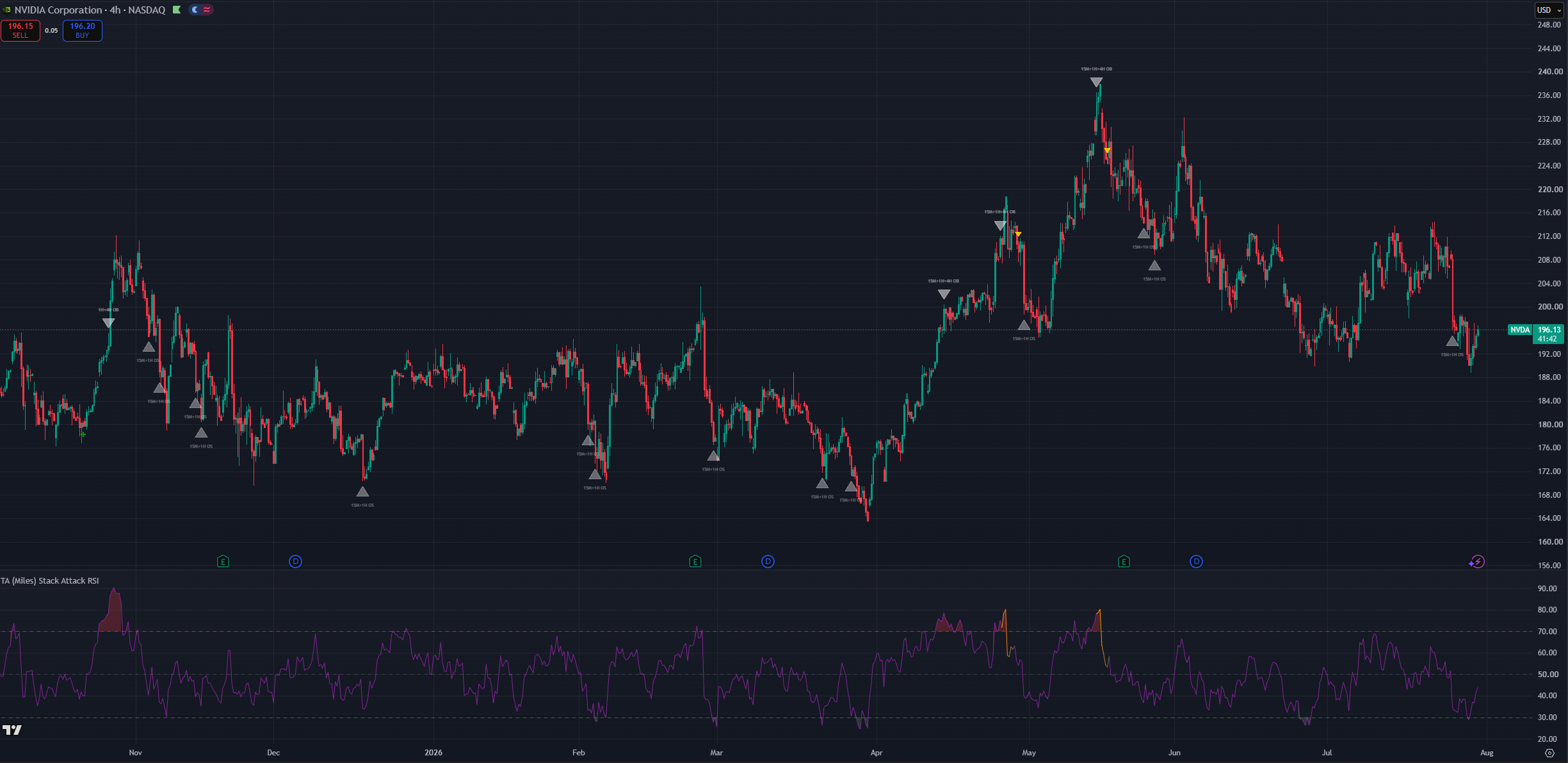
(NVDA 4H chart, default setting with lower timeframe markers)
Divergence Lines
Optional thin lines in the RSI pane connecting divergent RSI pivots.
The solid lines will conne two peaks or valleys indicating the confirmation fo a bullish or a bearish divergence.
Bullish Divergence: Price makes a lower low while the RSI makes a higher low, indicating weakening downward momentum and a potential upward price reversal. Bearish Divergence: Price makes a higher high while the RSI makes a lower high, indicating weakening upward momentum and a potential downward price reversal.
dashed for hidden ones (trend continuation), green bullish, red bearish. Off by default; the alerts fire even while the lines are hidden.
Only extreme-zone divergences are drawn: bearish needs the current RSI pivot at least 60, bullish at most 40. This keeps the lines meaningful rather than cluttering the pane with mid-range noise.
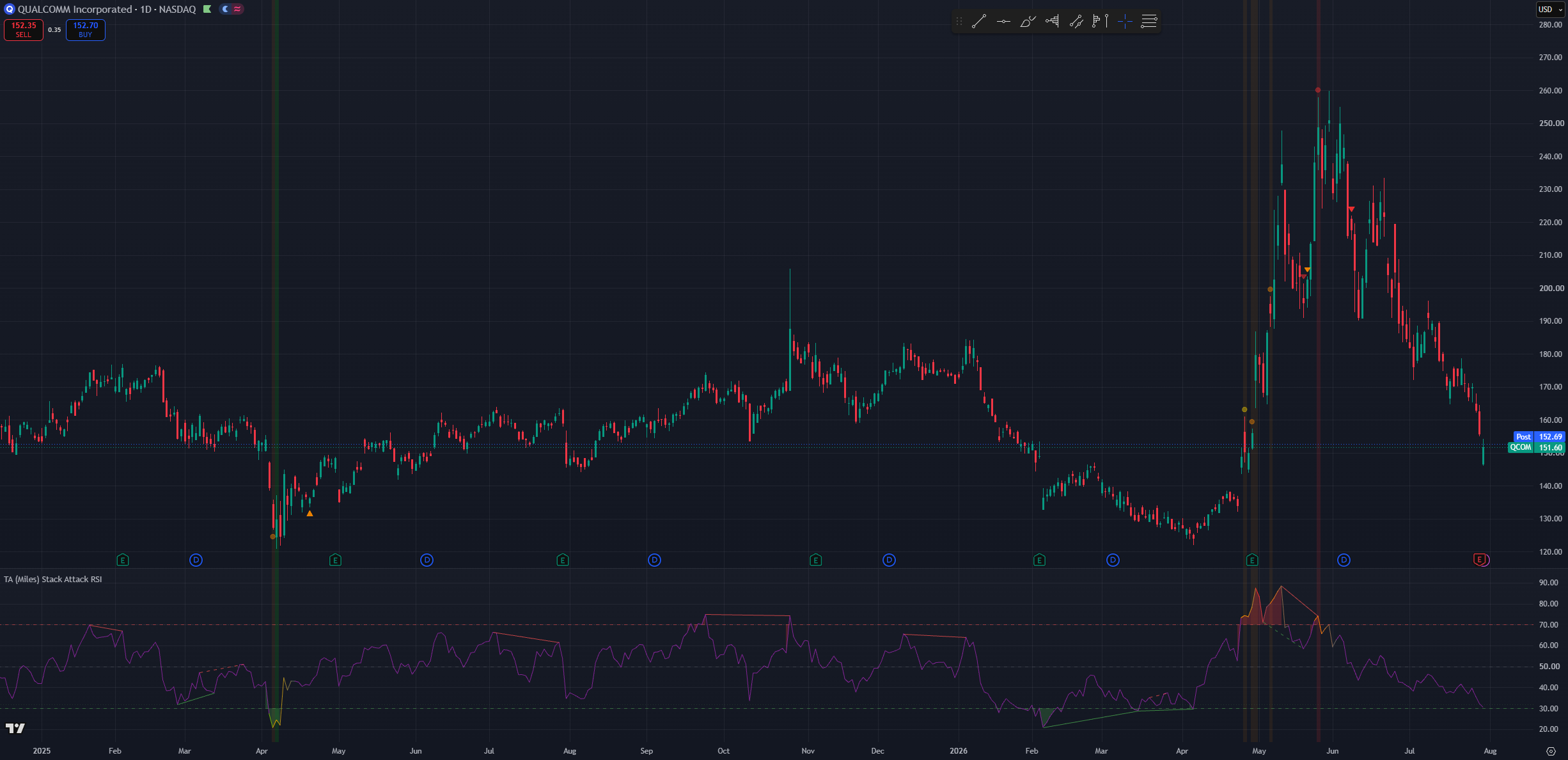
(QCOM 1D chart, Default settings with stack background tint and divergences on)
The Three-Phase Cycle
Stack Attack works as a progressive confirmation system that filters false signals by requiring more evidence at each step before you commit capital. As conditions align and mis-align, the system moves through its phases.
Stack forming
Individual timeframes cross into overbought or oversold territory. Nothing prints yet you can watch this build on the pane (RSI entering its zone fill) or with the optional background tint.
As a quence: passive observation. The ladder is building agreement but has not yet met the minimum threshold for ignition.
Phase 1 Ignition
The required number of timeframes align on the same bar. This is passive observation turning into active attention: the condition is real, but stretched markets can stay stretched.
Next steps: start paying attention, but do not act on this alone unless you are an experienced user who deliberately enables Phase 1 circles.
Phase 2 Warning
The first opposing swing pivot after the ignition. Structure is starting to bend against the stretched move.
Next steps: active planning decide what you would do if it confirms. Still not a standalone trigger.
Phase 3 Confirmation
The trend engine flips against the stack direction. The reversal is underway.
Next steps: the patient, delayed evidence that the setup was valid easier to trust, later to arrive. This is the marker the workflow is built around.
Stack broken
At any point, if the timeframes fall out of agreement, the stack breaks. The composite line (if shown) fades back to neutral over five bars and a Stack Broken alert fires the visual cue that the signal has expired without resolving.
Essentially the phases move you from passive observation → active planning → confirmation, ensuring each stage brings stronger evidence, reducing whipsaw trades and acting-too-early mistakes. Unlike a single-timeframe RSI, a Stack Attack signal already carries multi-timeframe agreement before Phase 1 even prints.
Setting inputs and how to use them
This section covers the different setting options and how they affect the behaviour of Stack Attack. Since this is the first section of the settings there will be mentions of other settings. There will only be superficial-level explanation of the other settings; each setting will have its own section where more details will be provided.
NOTE: time and settings are provided as default samples. Different assets may benefit from different settings that may go counter to their standard intended usage.
NOTE 2: Since this is the first section of the settings, companion settings for other sections are mentioned only at a high level here. Refer to each dedicated section below for full detail.
Chart Timeframe Profiles
Stack Attack does not have a single "Trading Style". Instead, the chart timeframe you work on and a handful of companion settings define how the indicator expresses itself. The profiles below map common workflows to recommended settings.
Position / cycle investor
Best fit for longer-term position trading on Weekly charts. This fits cycle-based traders looking for good entries in assets they are willing to hold for a year and beyond. Due to its high timeframe preference, pair with Min timeframes required for stack signal → 3 so every ignition requires full 1H+4H+Daily agreement. Keep Phase 1 circles off; enable the composite line with Composite weighting → Higher timeframes. Phase 2 and Phase 3 stay on confirmation matters more than speed at this horizon.
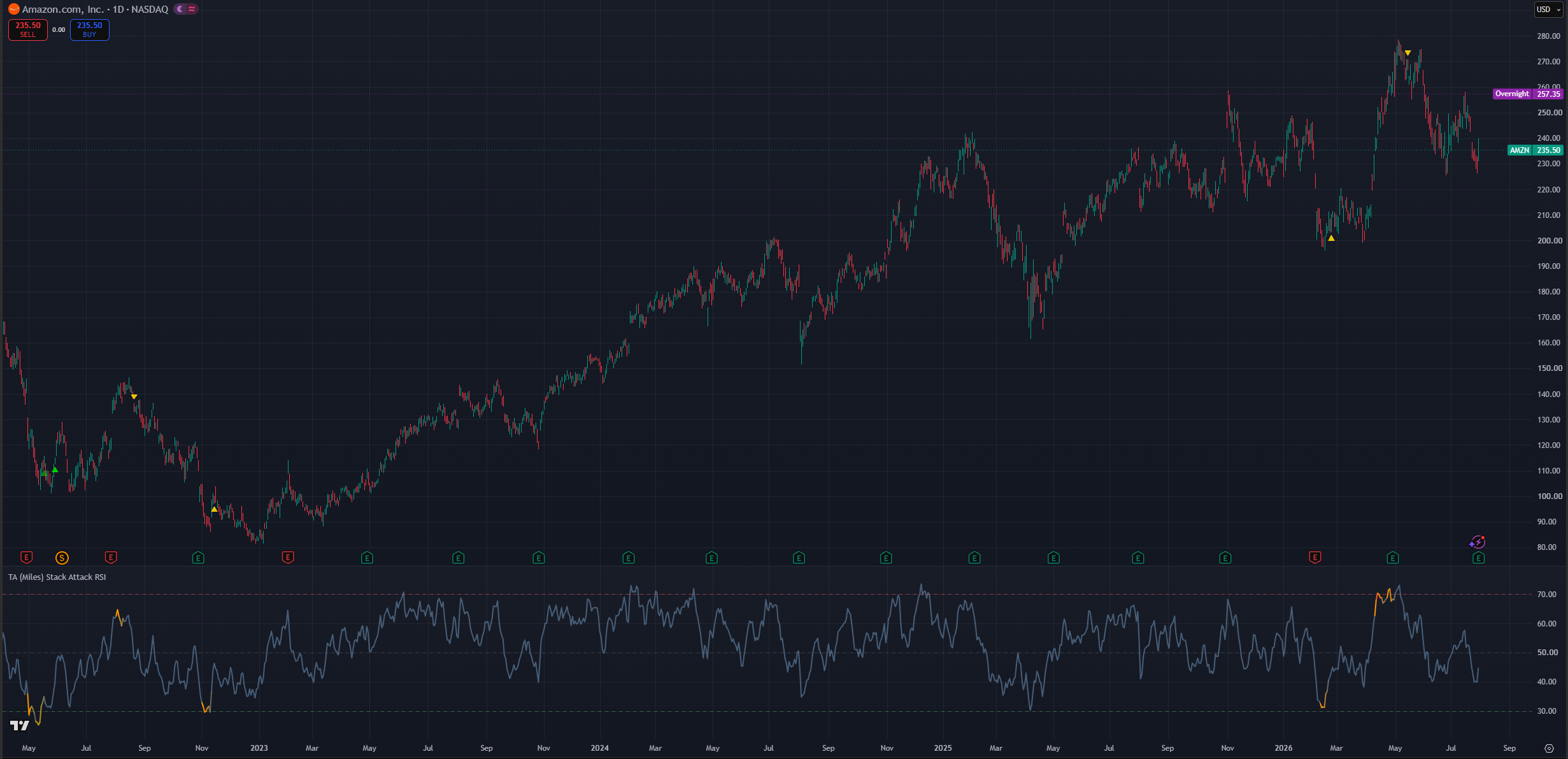
(AMZN 1D chart 3 confirmations, composite RSI)
Daily swing (default)
This is the standard setting and meant as an all-rounder. It has a neutral time bias without overreacting to short-term switches nor demanding the patience of the position profile. It is meant for Daily charts to look for entries that materialize in weeks or a few months. Leave defaults in place; Phase 2 and Phase 3 on and divergences on.
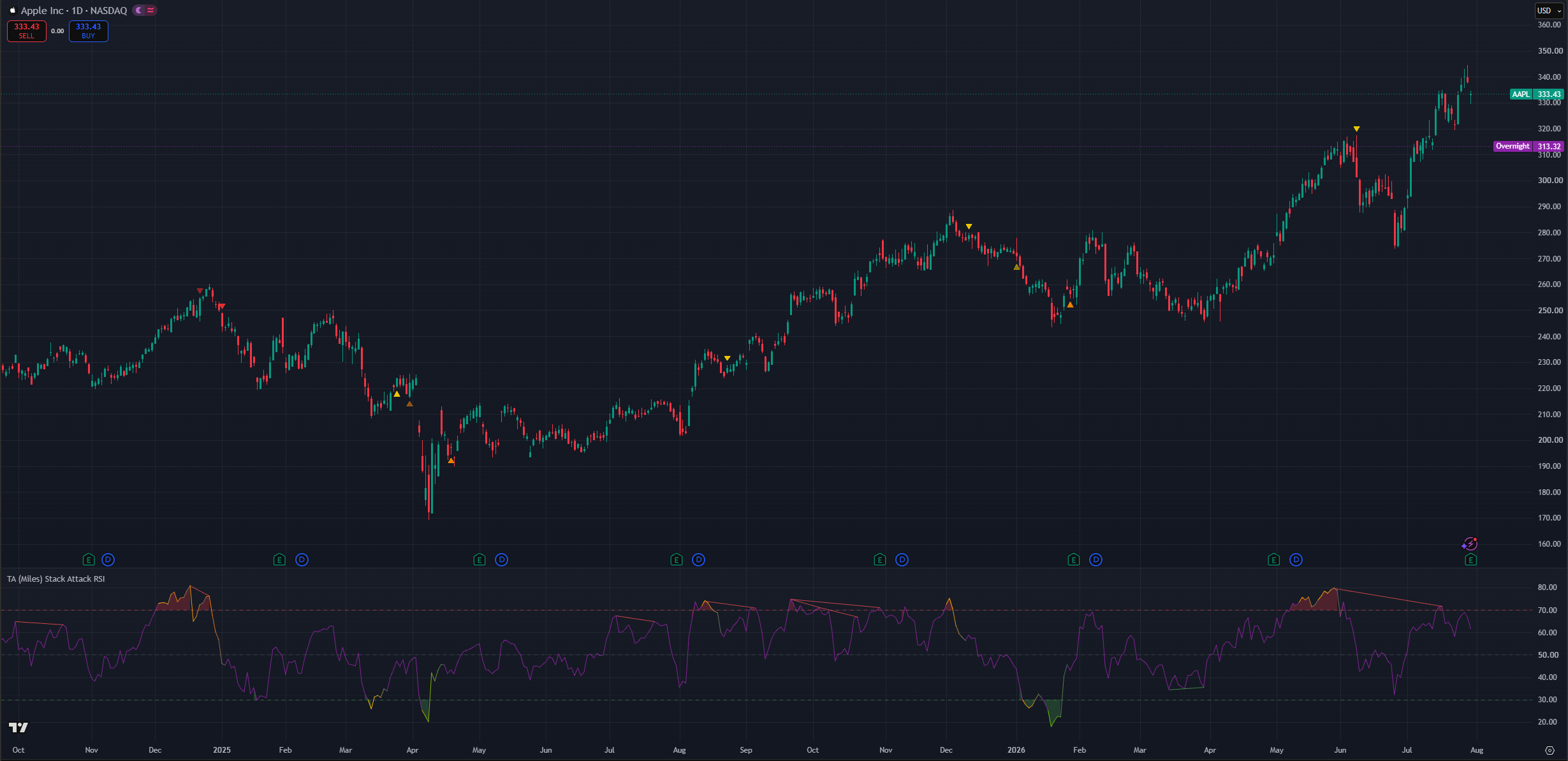
(AAPL 1D chart, default settings and divergences on)
Active swing (4H)
This profile has a slightly higher reactivity preference and works well on the 4H timeframe for trades where you go in and out within a few weeks. Keep Min timeframes → 2. Consider turning Background tint when stacked → On so alignment is visible at a glance, and optionally enable 15m & 1H OS / 15m & 1H OB stack markers for daily higher-low / lower-high context inside the larger move.
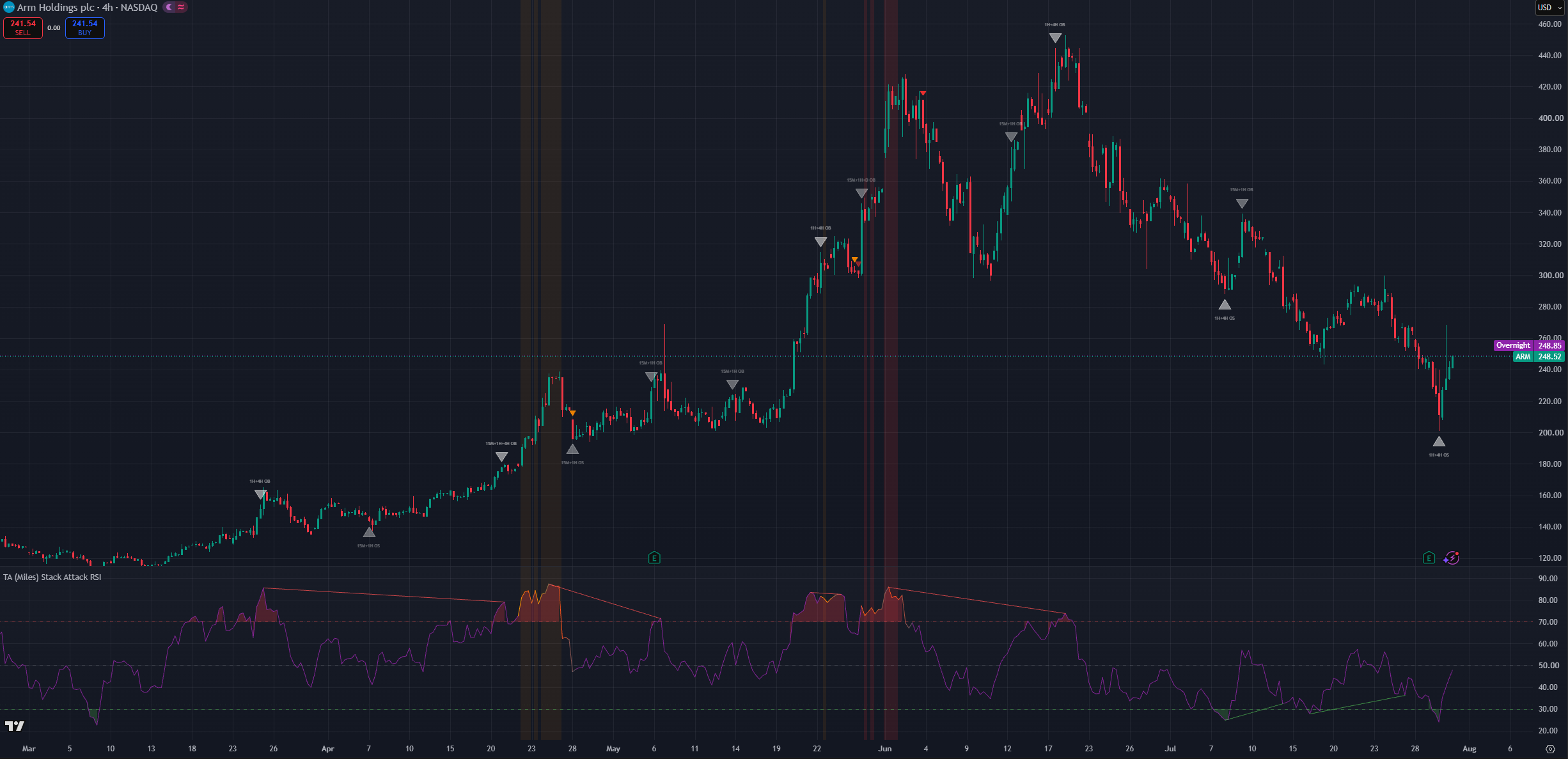
(ARM 4H chart dabove settings)
TV Premium intraday (sub-hour scanning)
This profile requires a TradingView Premium plan. Enable Enable sub-hour scanning (TradingView Premium) → On to swap the ladder to 15S / 30S / 1m / 5m on sub-hour charts. Phase 1 circles should stay off to reduce clutter. Consider Show dip re-entry markers → Off on fast charts the Stack Memory engine is tuned for daily/weekly consolidation patience. Severity color (Orange/Red vs Yellow) becomes your quality gate since there is no separate "Strong only" filter.
NOTE: You can still use Stack Attack in the lower time-frames without errors as long as you dissable “Sub-hour scanning”.
RSI Length
This is a responsiveness setting. The lower the RSI length, the more responsive every RSI in the system becomes chart RSI, ladder RSIs, composite, and Stack Memory re-entry RSI all share the same period.
Responsiveness by itself is not an absolute positive; responsiveness comes with noise. While chart timeframe profiles are more tied to how often signals appear, RSI length requires weighing multiple factors. RSI length also affects how early a stack can ignite this is not about being late to the move but about how quickly RSI resets after extended runs.
Best to leave as the default value.
Min timeframes required for stack signal
This setting is tied to the stack ladder and controls when a stack ignition can count how many of the 1H / 4H / Daily rungs must agree before Phase 1 can fire.
Since markets can reach overbought on one timeframe while another lags, the default of 2 allows meaningful confluence even when one rung has limited history or sits mid-range. Setting 3 demands full agreement fewer signals, stronger confluence, often later arrivals.
This is more of a lower timframe fine-tuning parameter as in higher-timframes by defualt will encompas multiple lower time-frame RSI considitons thus having little effect on higher time-frame candles but helping filter out some noise in lower time-frames.
Enable sub-hour scanning (TradingView Premium)
Master switch for running the full stack system below the 1H chart.
Below 1H the standard 1H / 4H / Daily / Weekly ladder pauses you will see a notice label instead of stack ignitions. TradingView Premium accounts can opt in to a seconds-based ladder (15S / 30S / 1m / 5m) that lets the stack run on 1-minute charts.
Leave this Off unless you have Premium. That is what prevents the seconds-request runtime error (RE10063) on lower plans. Turn it On only when you deliberately want intraday stack reads and understand the noise trade-off.
Composite weighting & Include Weekly in composite RSI
These two settings only shape the optional composite RSI line. Phase 1 / 2 / 3 stack signals are unaffected.
Composite weighting
Controls how the composite RSI weights the ladder rungs:
- Higher timeframes (default): the slow end weighs most (Weekly heaviest in standard mode; 5m heaviest in Premium sub-hour mode). Best for investor and swing reads.
- Blended: all four rungs equal.
- Lower timeframes: the fast end weighs most favors the trading timeframe. Better for more reactive and earlier signals. As has been mentioned previously reactiveness is not inherenctly positive, it allows for earlier entries and exits at the cost of more false positives.
- Current chart: leans about half the weight on your chart's own RSI with a light multi-timeframe taper, so the composite tracks the timeframe you are actually viewing.
Use the composite as a ladder-wide stretch gauge next to the standard RSI: when your chart RSI is pinned but the composite is mid-range, the stretch is local to your timeframe; when both are pinned, that is stack territory. Its color mirrors live stack severity. Context, never a trigger.
Include Weekly in composite RSI
When On (default), the slowest rung participates in the blend. When Off, that rung drops out and the remaining weights re-normalize useful on assets in long secular trends where a pinned Weekly RSI would skew the composite for months. In Premium sub-hour mode the dropped rung is the 5-minute rather than the Weekly.
Display
Stack Attack v8 uses separate display toggles rather than a single "Display Mode" dropdown. Combine them for the view you want.
Individual toggles
- Show phase arrows on price: master switch for Phase 1/2/3 markers and dip "+" signals on the price chart. Off keeps just the pane lines.
- Show standard RSI line: the familiar chart-timeframe RSI (on by default). It tints to the stack severity color while a stack is live a subtle status readout even with individual phase toggles off.
- Show composite RSI line: the weighted multi-timeframe blend (off by default).
- Fade composite line on stack break: when an active stack breaks, gradually fade the composite back to neutral over five bars the "signal expired" cue.
- Background tint when stacked: tints the price chart and indicator pane while the stack is active (subtle red for OB, green for OS, brighter with Weekly confluence). Off by default for a cleaner chart; turn on for at-a-glance alignment awareness.
- Show color reference table (legend): explains every marker color on the price chart. On by default and helpful while learning; independent of timeframe it shows even when the stack is paused below 1H.
- Reference table position: moves the legend to any corner or edge of the price chart.
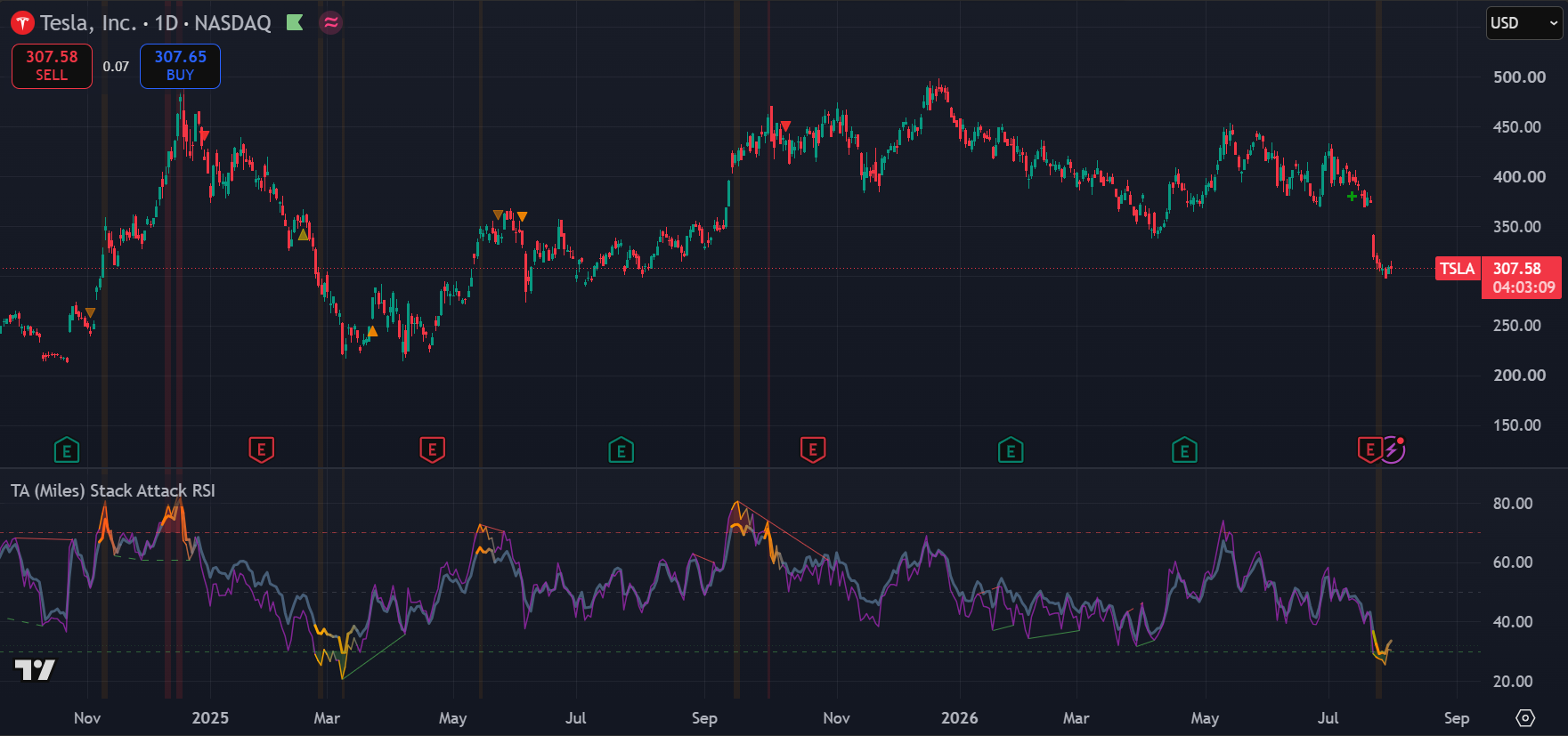
(TSLA 1D chart, Default settings, background tint, composite RSI and divergences ON)
Stack Memory settings (dip re-entry)
The user-facing knobs:
- Enable dip re-entry (on): master switch. Off = Phases 1–3 only.
- Dip signal cooldown (bars) (12): minimum bars between "+" crosses. Higher = fewer repeated attempts.
- Max tilt period (bars) (90): how patient the engine is before giving full weight to the lower timeframes 90 bars on a daily chart is roughly three months of consolidation. Most users should leave this alone.
- Show dip re-entry markers (on): display toggle for the "+" crosses. The alert fires either way.
Colors
Stack Attack exposes color inputs for severity tiers, divergence lines, composite neutral, and each 15M / 1H / 4H stack marker. Defaults follow the yellow → orange → red / bright-green scheme described above.
Customize when you need higher contrast on your chart theme or when printing screenshots for a dark vs light background. Changing severity colors does not change when signals fire only how they appear.
RSI Pane colors (line, zone fills, reference levels) live in the separate RSI Pane group and do not affect price-chart markers.
Useful Alerts
Every condition below is a separate entry in TradingView's Create Alert → Condition dropdown. Alerts are evaluated every bar even when the matching line or marker is hidden, so you can subscribe to a signal without cluttering the chart.
Divergences (RSI vs price)
- Divergence Regular Bullish (price lower low + RSI higher low → possible reversal up)
- Divergence Regular Bearish (price higher high + RSI lower high → possible reversal down)
- Divergence Hidden Bullish (price higher low + RSI lower low → uptrend continuation)
- Divergence Hidden Bearish (price lower high + RSI higher high → downtrend continuation)
- Divergence Any Bullish / Any Bearish (regular or hidden, one alert to catch either)
Phase 1 stack ignition
- Phase 1 OB Ignition / Phase 1 OS Ignition
- Phase 1 OB Escalation (High tier) / Phase 1 OS Escalation (High tier) re-fires when an active stack pushes deeper
- Phase 1 Weekly OB (Extreme) / Phase 1 Weekly OS (Extreme) the rare, highest-conviction reads
Phase 2 / 3 warning + confirmation
- Phase 2 Bear Warning / Phase 2 Bull Warning
- Phase 3 Bear Confirmation / Phase 3 Bull Confirmation
Stack break
- OB Stack Broken / OS Stack Broken an active stack lost timeframe agreement
15M / 1H / 4H markers (fixed timeframe, works on any plan)
- 15M Oversold / 15M Overbought
- 1H Oversold / 1H Overbought
- 4H Oversold / 4H Overbought
Dip re-entry
- Dip Re-entry Long
Use Phase 1 and divergence alerts for early warnings. Use Phase 3 alerts when you prefer confirmation. Stack Broken alerts tell you the setup expired without resolving.
Simple Workflow
- Open a 4H, Daily, or Weekly chart Stack Attack's ladder is built for these horizons.
- Watch the standard RSI in the bottom pane for familiar context; note zone fills and reference levels.
- When phase markers appear on price, check color severity yellow demands attention, orange/red or bright green demands more.
- Treat Phase 1 (if enabled) as early attention only not confirmation.
- Treat Phase 2 as warning and planning structure may be bending.
- Treat Phase 3 as confirmation the trend engine flipped; the cycle closes.
- Optionally cross-check 15M / 1H / 4H stack markers or dip "+" markers for continuation vs trap context.
- Always check the larger trend, structure, and your risk plan before acting.
Common Mistakes
- Treating Phase 1 as confirmation.
- Expecting frequent stack ignitions on low timeframes without Premium sub-hour scanning.
- Ignoring color severity and reacting equally to yellow and red markers.
- Acting on dip re-entry "+" markers against the higher-timeframe trend.
- Enabling every visual option at once Phase 1 circles, all stack markers, divergence lines, background tint, and composite together overwhelm the chart.
- Turning on Enable sub-hour scanning without a TradingView Premium plan the stack pauses below 1H for a reason.
- Assuming Stack Attack predicts exact tops and bottoms it measures stretch and follow-through across timeframes.
TA Stack Attack RSI is a Trading Apologist TradingView indicator.Request access to the scripts, or browseevery guide.
Educational and analysis purposes only. Not financial advice. See theterms.