
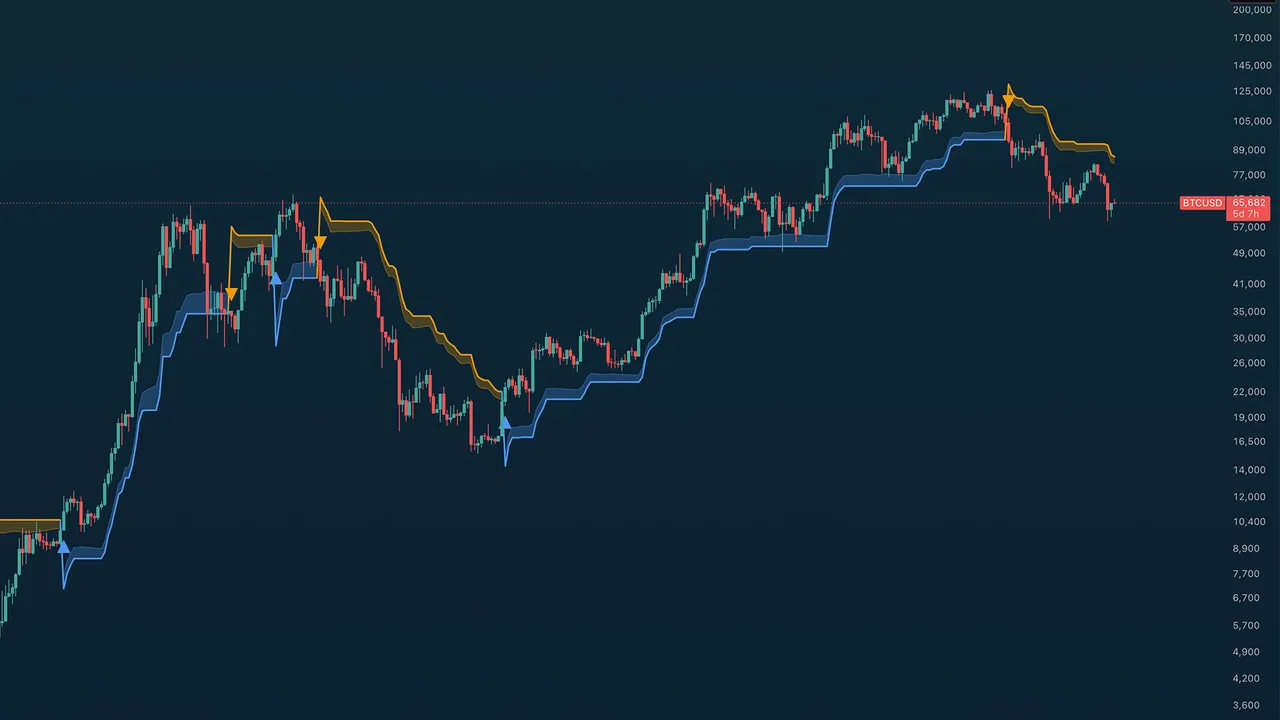
Bull or bear regime at a glance: a volatility-adaptive ribbon that doubles as your dynamic stop. There are no arrow markers to interpret: the color flip is the signal.
What you see on the chart
A filled ribbon band with a center trend line. Blue means bull: the ribbon rides below price as dynamic support. Orange means bear: it hangs above price as dynamic resistance. The center line is the active SuperTrend stop level.
How to read it
The ribbon is a SuperTrend engine: an ATR-scaled stop that trails price and flips when it's crossed. The main dial is the Trend Bias Preset, and it's asymmetric on purpose:
- Neutral (3.0 / 3.0): balanced flips both ways.
- Bullish Bias (4.0 bull / 2.5 bear): gives uptrends room to breathe through normal corrections, but exits fast when a downtrend starts. For markets that grind up and crash down.
- Bearish Bias (2.5 / 4.0): the mirror: quick to confirm downtrends, skeptical of bounces. Filters failed rallies in a bear market.
Ribbon touches are pullback-to-trend events; trend-line touches are your stop being tested. Both are alertable, which turns the ribbon into a complete trail-stop workflow.
Key settings
Trend bias preset, source and smoothing (HL2, EMA-2 by default), ATR period (10), ribbon width (0.5× ATR), and optional bar coloring / background tint.
Alerts
6 alerts: bullish and bearish flips, ribbon touches on both sides, and trend-line touches on both sides.
TA Trend Ribbon is a Trading Apologist TradingView indicator.Request access to the scripts, or browseevery guide.
Educational and analysis purposes only. Not financial advice. See theterms.